

GMT Bug Now Fixed for Google Calendar Users in iOS 8 - MacRumors
Skip to Content

GMT Bug Now Fixed for Google Calendar Users in iOS 8

After widespread complaints over the past five months, the so-called "GMT bug" affecting iOS 8 calendar users appears to have been at least partially fixed. Without installing a software update, several users on the Apple Support Communities, Google Calendar Help Forum, Twitter and MacRumors forums are reporting that calendar events are now syncing in the proper time zone on iOS 8.1.3 and earlier versions. Given that users were not required to take action, it is speculated that Google may have quietly fixed the issue on their backend.
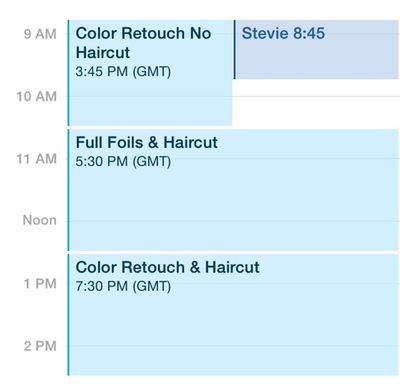
gmt-bug
A significant number of users have been voicing their complaints about the GMT bug since iOS 8 was released in September. In short, the bug causes calendar items to be synced in the GMT time zone regardless of location. One particular topic posted within the Apple Support Communities about the issue has received over 300,000 views and close to 800 replies, although Apple has yet to officially address the bug in iOS 8.1.3 or previous software updates. For that reason, some calendar users syncing with Microsoft Exchange or other services may still experience syncing issues until a wider fix becomes available.

Apple appears to be aware of the GMT calendar bug after listing it in iOS 8.2 beta 5's release notes and, as corroborated by multiple reports, should include a proper fix for the issue in the public release of iOS 8.2. Many users are upset that a fix has taken this long, considering that multiple software updates have been released since the bug was uncovered, but the good news is that the bug finally appears to be nearly resolved.

Follow along in our GMT bug thread on the forums for the latest information.

Tags: GMT, iOS 8

Popular Stories

iOS 26

iOS 26.4 Adds Two New Features to CarPlay

Tuesday March 24, 2026 1:55 pm PDT by
iOS 26.4 was released today, and it includes a couple of new features for CarPlay: an Ambient Music widget and support for voice-based chatbot apps. To update your iPhone 11 or newer to iOS 26.4, open the Settings app and tap on General → Software Update. CarPlay will automatically offer the new features so long as the iPhone connected to your vehicle is running iOS 26.4 or later....

Apple Business hero

Apple Unveils 'Apple Business' All-in-One Platform

Tuesday March 24, 2026 8:53 am PDT by
Apple today announced Apple Business, a new all-in-one platform that unifies device management, productivity tools, and customer outreach features. The service is designed to be a consolidated replacement for several of Apple's existing business-focused offerings, including Apple Business Essentials, Apple Business Manager, and Apple Business Connect. It provides organizations with a single...
AirPods Pro Firmware Feature

Apple Releases New Firmware for AirPods Pro 3, AirPods Pro 2 and AirPods 4

Tuesday March 24, 2026 12:31 pm PDT by
Apple today released new firmware for the AirPods Pro 2, AirPods Pro 3, and the AirPods 4. The firmware has a version number of 8B39, up from 8B34 on the AirPods Pro 3, 8B28 on the AirPods Pro 2, and 8B21 on the AirPods 4. There is no word on what's included in the firmware, but Apple has a support document with limited notes. Most updates are limited to bug fixes and performance...

Top Rated Comments

BryanElliott Avatar
145 months ago
Someone spends a whole lot of time trying to decide on a haircut.
Score: 8 Votes (Like | Disagree)
145 months ago
Just turned my google calendar off and on and it fixed it. Worked for the couple other people I know who had this issue. They were already excited when I told them that it might get fixed in 8.2 in a month or two. It was a pretty annoying bug for people with multiple calendar events a day and having to be careful when editing or making new events.
Score: 2 Votes (Like | Disagree)
145 months ago
Interesting. I work in 3 timezones with everything in my google calendar synced to my ipad, iphone and macbook pro... and never knew there was an issue like this. It's always "just worked" for me...

Just goes to show you that for wvery person that has an issue on their iphone there are tons (millions) that never see that problem. Sometimes it's hard to remember that on these forums...
Score: 2 Votes (Like | Disagree)
145 months ago
Interesting. I work in 3 timezones with everything in my google calendar synced to my ipad, iphone and macbook pro... and never knew there was an issue like this. It's always "just worked" for me...

Just goes to show you that for wvery person that has an issue on their iphone there are tons (millions) that never see that problem. Sometimes it's hard to remember that on these forums...
That is amazing logic. It works for me therefore it must work for millions.
Score: 1 Votes (Like | Disagree)
145 months ago
I use iCloud calendars so haven't had a single problem. Got tired of all the bugs and incompatibilities in Google's software. Plus they use proprietary crap for email and calendars rather than a true implementation of open standards like IMAP, CALDAV, and CARDAV which iCloud uses.

The fact that you have to pay for push calendars, contacts, and email when iCloud gives it to you for free was the last straw. And I have much better battery life now that Google's half baked software is off my phone.
Score: 1 Votes (Like | Disagree)
145 months ago
Seen this for months, no fix except the 'all day event' toggle and still not fixed for me now. Wonder if it needs to roll out to all servers or something?

I sync my Google Calendar over CalDAV, and I haven't "received" this "bug fix" yet either

Mine wasn't immediate either. I had to turn off and remove calendar syncing in settings and then re-enable it, and it is working fine now. So glad they fixed this!
Score: 1 Votes (Like | Disagree)








































