Apple Upgrading Existing iCloud Subscribers to More Affordable Plans
Just a day after unveiling new pricing for iCloud, Apple has begun emailing existing iCloud subscribers to notify them that the company is upgrading their accounts to the new price points and will be refunding them the difference. However, users will be allowed to keep the same storage sizes.
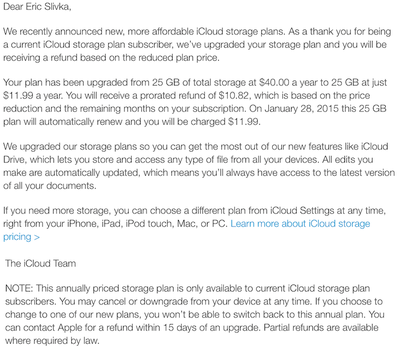
For example, a user subscribed to the 25 GB plan, which is no longer an option under the new iCloud pricing, will have their price reduced from $40 a year to $11.99 a year. The discounted price is in line with the new $0.99 a month price for 20 GB, although established iCloud customers do get an extra 5 GB. However, once a user changes their plan away from "legacy plans" like the 25 GB, they cannot return to them.
Apple says the new price points are in effect due to iCloud Drive, which lets users store and access data from any of their devices. The launch of both iOS 8 and OS X Yosemite will see the launch of iCloud Drive this fall.
Popular Stories
Apple is launching five new products on Friday, November 6, following pre-orders that opened last week, including its first touchscreen MacBook Pro models.
The following new products will be available from today:
iPad mini with OLED display and A20 Pro chip
iMac with M6 chip
14-inch MacBook Pro with M6 chip
14-inch MacBook Pro with OLED touchscreen
16-inch MacBook Pro with OLED...
Apple today announced that its Festival Place store in Basingstoke, England will be permanently closing on Saturday, November 21.
Apple Festival Place
Apple had already announced that the store would be closing in November, but it had not provided the public with a specific date until now.
Apple's store inside the Festival Place shopping center opened in 2011, so it had a 15-year run....
YouTuber Marques Brownlee has switched back to the iPhone 18 Pro after spending more than two weeks with the iPhone Duo. On the latest episode of the "Waveform" podcast, Brownlee said he missed the Pro's cameras and Face ID. He added that he would miss opening the iPhone Duo, using it in portrait, and reading on the larger screen.
Despite strong initial demand for Apple's first foldable...