

Automatic Gains Redesigned App, New Data on Fuel Level - MacRumors
Skip to Content

Automatic Gains Redesigned App, New Data on Fuel Level

by

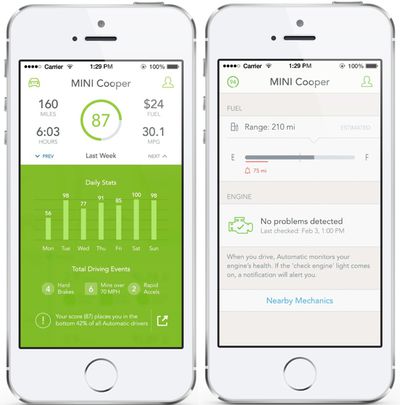
Automatic today announced a major update for its Automatic app and connected driving platform, introducing a significant app overhaul with a revamped UI designed to be "lighter, faster, and more modern."

Along with a new look, the Automatic app now provides data on fuel level and gives low fuel warnings. In supported cars, fuel level will be displayed directly in the iPhone app, along with an estimate of the miles left in the tank based on driving habits. Users are able to set an alert to be warned when they're low on gas.
automatic
Automatic's new fuel data is only available to approximately half of cars using the Automatic system, as many cars do not report their fuel level through the diagnostic port. Automatic recommends checking whether a car supports fuel data on its website.

With the new app update, consumers will also be able to change the speed at which Automatic delivers alerts for driving too fast. Previously set at 70 MPH, users will now be able to choose a custom speed, which is useful for states with higher or lower speed limits. Along with customizable speed thresholds, Automatic is also improving how customers are warned when driving too fast, cutting down on the number of warning chirps.

Now, consumers will only hear the chirp once when you cross the threshold. The chirp won't repeat for the rest of the trip unless a person dips below the threshold and crosses it again.

The Automatic Link, which plugs into a car's data port, can be purchased from the Automatic website for $99.95. The Automatic app can be downloaded from the App Store for free. [Direct Link]


Top Rated Comments

156 months ago
I don't see how a fuel gauge warning indicator is needed. I can simply look at my dashboard and see my low-fuel indicator light appear. I don't have to distract myself by looking at my iPhone.

Sometimes people just create features to create them without thinking.
Score: 3 Votes (Like | Disagree)
156 months ago
I can say for sure a 98 Firebird doesn't.

Well, it's not like GM's ever cut corners to save a few dollars per car or anything ;)
Score: 1 Votes (Like | Disagree)
BJB Productions Avatar
156 months ago
Wish they would've put some effort into actually improving the app by integrating more statistics. They do so little with all the information the link could be collecting.
Score: 1 Votes (Like | Disagree)
Parasprite Avatar
156 months ago
Why doesn't this thing display engine codes? I would buy it if it could display engine codes. It would be absolutely awesome as an odb-2 reader...

Probably because, unfortunately for you, your car is in working condition. :D
Score: 1 Votes (Like | Disagree)

Popular Stories

Aston Martin CarPlay Ultra Screen

Apple Says CarPlay Ultra is Coming to These Vehicle Brands

Thursday May 21, 2026 11:53 am PDT by
Last year, Apple launched CarPlay Ultra, the long-awaited next-generation version of its CarPlay software system for vehicles. Nearly a year later, CarPlay Ultra is still limited to Aston Martin's latest luxury vehicles, but that should change fairly soon. In May 2025, Apple said many other vehicle brands planned to offer CarPlay Ultra, including Hyundai, Kia, and Genesis. CarPlay Ultra...
iOS 27 on iPhone 17 1

iOS 27 Beta Available Tomorrow With These 12 New Features

Sunday June 7, 2026 8:39 am PDT by
Apple is set to unveil iOS 27 during its WWDC 2026 keynote this Monday, and there are many rumored features and changes for iPhones. The first developer beta of iOS 27 will likely be available immediately following the keynote, and a public beta typically follows in July. Following beta testing, the software update should be released to all users with a compatible iPhone in September....
ios 26 iphone 16 pro lock screen notifications feature 1

iOS 27 Notifications Will Slide in From Left Side of Your iPhone's Screen

Friday June 5, 2026 7:24 am PDT by
Bloomberg's Mark Gurman today revealed another iOS 27 change: notifications will slide in from the left side of the screen instead of from the top. In addition, accessing Notification Center on iOS 27 will require swiping down on the top-left corner of the screen. If you swipe down on the Dynamic Island area, a new "Search or Ask" interface tied to the revamped Siri will appear, instead of...










































