

Skip to Content

iOS 7.1 Beta 4 Tidbits: New Slide to Unlock/Power Off Animation, Dialer Updates

Earlier today, Apple released the fourth beta of iOS 7.1 to developers, which included both bug fixes and a few new changes to the operating system. While iOS 7.1 beta 3 introduced several visual changes, iOS 7.1 beta 4 focused more heavily on behind-the-scenes improvements. There were, however, a few tweaks to further streamline the look of iOS 7, which are detailed below.

Slide to Unlock/Power Off: Most notably, the Slide to Unlock bar at the bottom of the phone is now more prominent, with a brighter, slower animation. The same brighter animation can be seen in the Slide to Power off bar when turning off the phone.

Revamped Slide to Unlock/Slide to Power off animation (Courtesy of @Elias96)

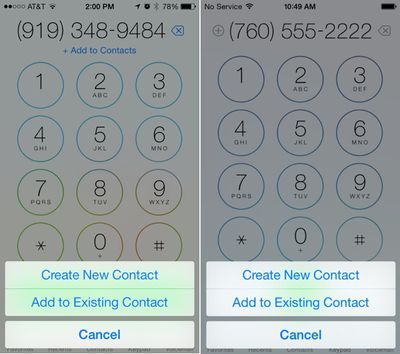
Contacts in Dialer: The option to add a contact when entering a phone number has been altered slightly and is now executed by tapping the + sign next to the phone number. Previously, there was a line that said "Add to Contacts."
contacts

Old version on left, iOS 7.1 beta 4 on right. (Image courtesy of iDownloadBlog)

Messages Scrolling: When scrolling through the Messages app in beta 4, it seems there is slightly more "bounce." This is in line with previous changes to Control Center, which introduced a bounce animation.

Siri: In the U.K., there is a new Siri voice on the iPad.

To check out previous changes introduced in iOS 7.1, make sure to take a look at our previous tidbits post on iOS 7.1 beta 3, which detailed a number of visual changes to the operating system.

It is unclear when Apple plans to release iOS 7.1 to the general public, but a report from December suggested it could see a lengthy beta testing period with a March launch. It is likely that Apple will continue making subtle changes to look and feel of iOS 7 in coming betas, which could result in a refined and polished version of the operating system when it is finally made available to the public.


Related Forum: iOS 7

Popular Stories

MacBook Neo Feature Pastel 1

First MacBook Neo Benchmarks Are In: Here's How It Compares to the M1 MacBook Air

Thursday March 5, 2026 4:07 pm PST by
Benchmarks for the new MacBook Neo surfaced today, and unsurprisingly, CPU performance is almost identical to the iPhone 16 Pro. The MacBook Neo uses the same 6-core A18 Pro chip that was first introduced in the iPhone 16 Pro, but it has one fewer GPU core. The MacBook Neo earned a single-core score of 3461 and a multi-core score of 8668, along with a Metal score of 31286. Here's how the...
MacBook Neo Feature Pastel 1

Apple Announces $599 'MacBook Neo' With A18 Pro Chip

Wednesday March 4, 2026 6:15 am PST by
Apple today announced the "MacBook Neo," an all-new kind of low-cost Mac featuring the A18 Pro chip for $599. The MacBook Neo is the first Mac to be powered by an iPhone chip; the A18 Pro debuted in 2024's iPhone 16 Pro models. Apple says it is up to 50% faster for everyday tasks than the bestselling PC with the latest shipping Intel Core Ultra 5, up to 3x faster for on-device AI workloads,...
Multicolored Low Cost A18 Pro MacBook Feature

Apple Accidentally Leaks 'MacBook Neo'

Tuesday March 3, 2026 7:00 am PST by
Apple appears to have prematurely revealed the name of its rumored lower-cost MacBook model, which is expected to be announced this Wednesday. A regulatory document for a "MacBook Neo" (Model A3404) has appeared on Apple's website. Unfortunately, there are no further details or images available yet. While the PDF file does not contain the "MacBook Neo" name, it briefly appeared in a link...

Top Rated Comments

158 months ago
How nice to see Jony Ive using his access to 500 million i-Devices as an opportunity to teach himself UI design !!!!!
Score: 39 Votes (Like | Disagree)
158 months ago
i wanna see this next:
//www.youtube.com/watch?v=dZyoCA6fHAk
Score: 23 Votes (Like | Disagree)
Rogifan Avatar
158 months ago
How nice to see Jony Ive using his access to 500 million i-Devices as an opportunity to teach himself UI design !!!!!

I know. If only we could have this back. This is proper UI design.

Score: 20 Votes (Like | Disagree)
byke Avatar
158 months ago
Still prefer IOS 6
Score: 19 Votes (Like | Disagree)
AngerDanger Avatar
158 months ago
The complaining in this thread makes me want to vomit.

Hmm, that doesn't seem normal. Perhaps you're in the early stages of pregnancy. :p
Score: 17 Votes (Like | Disagree)
Krazy Bill Avatar
158 months ago
Some of you people sure do put a lot of stock in stupid, silly-assed animations Just give me some solid app performance. I can close my eyes and ignore the hideous side of iOS if I have to.
Score: 15 Votes (Like | Disagree)









































