

How to Run OS X Mavericks in a Parallels Virtual Machine - MacRumors
Skip to Content

How to Run OS X Mavericks in a Parallels Virtual Machine

by

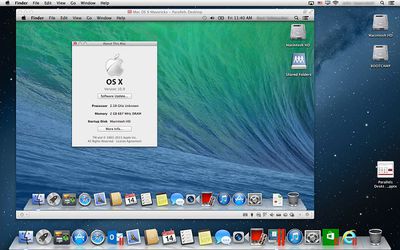
Parallels has posted instructions on how to install the developer release of OS X Mavericks into its virtualization software. Installing the beta in a virtual machine allows developers to test their software in a secure environment on production machines, without endangering their day-to-day work.
Osxmavericks

As you may have heard, Apple has released to its Developer Community a preview of the next version of OS X: OS X Mavericks. What is the easiest way to use a new operating system, especially a early preview of an operating system currently still under development? In a virtual machine in Parallels Desktop, of course. So, the Engineering team at Parallels has released Knowledge Base articles about installing OS X Mavericks in Parallels Desktop 8 and about installing Parallels Desktop 8 on a Mac that is running OS X Mavericks:

The company notes that users cannot install Mavericks into a clean virtual machine, but they can upgrade an already existing OS X virtual machine to Mavericks with only a few minor changes.


Top Rated Comments

roadbloc Avatar
167 months ago
Yo dawg. I heard you liked OS X....
Score: 24 Votes (Like | Disagree)
167 months ago
Makes no sense. Why would I have a virtual machine of a Mac, on a Mac?

It allows you to run beta OSes such as Mavericks without the risk of messing up your main OS.
Second, some older software cannot run on the latest OSes, so you run the software in older versions in the virtual machine.

There might be other reasons, which I don't know of.
Score: 6 Votes (Like | Disagree)
167 months ago
Makes no sense. Why would I have a virtual machine of a Mac, on a Mac?

Two good reasons. I've done this for both reasons.

Software testing. I want to be sure my software runs well on different versions of the OS

Failure containment. If the new Beta OS blows up I don't want it to corrupt my "real" disks. the version running inside the VM can only destroy the VM image and those can be restored in minutes
Score: 3 Votes (Like | Disagree)
arkmannj Avatar
167 months ago
Personally I'm a VMWare guy, has anyone tried installing Mavs. in Fusion?
Score: 1 Votes (Like | Disagree)
AbdullahTammour Avatar
167 months ago
VirtualBox

is there a way to install Mavericks using VirtualBox?
Score: 1 Votes (Like | Disagree)

Popular Stories

iOS 26

iOS 26.4 Adds Two New Features to CarPlay

Tuesday March 24, 2026 1:55 pm PDT by
iOS 26.4 was released today, and it includes a couple of new features for CarPlay: an Ambient Music widget and support for voice-based chatbot apps. To update your iPhone 11 or newer to iOS 26.4, open the Settings app and tap on General → Software Update. CarPlay will automatically offer the new features so long as the iPhone connected to your vehicle is running iOS 26.4 or later....
AirPods Pro Firmware Feature

Apple Releases New Firmware for AirPods Pro 3, AirPods Pro 2 and AirPods 4

Tuesday March 24, 2026 12:31 pm PDT by
Apple today released new firmware for the AirPods Pro 2, AirPods Pro 3, and the AirPods 4. The firmware has a version number of 8B39, up from 8B34 on the AirPods Pro 3, 8B28 on the AirPods Pro 2, and 8B21 on the AirPods 4. There is no word on what's included in the firmware, but Apple has a support document with limited notes. Most updates are limited to bug fixes and performance...
apple tv 4k new orange

tvOS 26.4 Adds These New Features to Your Apple TV

Wednesday March 25, 2026 3:33 pm PDT by
Apple this week released tvOS 26.4, and the software update includes a handful of new features and changes for the Apple TV. tvOS 26.4 is compatible with all Apple TV 4K and Apple TV HD models released since 2015. To update your Apple TV, open the Settings app on the device, navigate to System → Software Updates, and select Update Software. Below, we have recapped what is new in tvOS...















