

Evernote today updated Skitch for OS X and iOS to version 2.5, adding a PDF annotation feature that is aimed at Evernote Premium users.

With PDF annotation, files can be modified with shapes, arrows, and text. Important passages can be highlighted and instructions can be added, which makes Skitch an even better collaboration tool. PDFs are sent with a summary of all annotations.


The new version supports Stamps, which are designed to offer fast feedback. For example, Stamps can be placed to indicate whether something is liked, disliked, or unclear in a document. Skitch has also added a plain text notation mode and a Tool Tip to explain the new features.
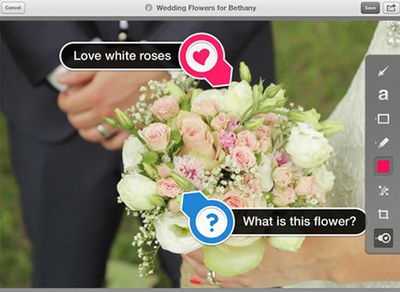
stamps
While all Evernote users will receive 30 days of access to PDF annotations, continuing to use the service will require a premium membership. Skitch is free to use, but a premium membership costs $5.00 per month or $45.00 per year.

Skitch for Mac [Direct Link]

Skitch for iOS [Direct Link]

Top Rated Comments

167 months ago
Or use Preview which is free, comes with OS X and does about the same thing as Glui and Skitch do. The only thing it doesn't do is upload the image. For that there are other tools which are free as well. The biggest power of Skitch was that it combined these into 1 little useful tool. That was destroyed the moment Evernote bought Skitch.
Score: 2 Votes (Like | Disagree)
Sayer Avatar
167 months ago
This app has been moved into an online, professional visual colaboration tool (soft proofs, sending images of design work to clients, etc). The "premium" service offers larger file size uploads, more "business" oriented options like faster processing for OCR and passcodes to keep people out of sensitive stuff.

If you don't think you need this, then don't use it. Not every product ever made or featured on MacRumors has to be useful to every single possible Mac/iPad user worldwide past and present.
Score: 1 Votes (Like | Disagree)
talmy Avatar
167 months ago
I still use Skitch version 1, which works fine and doesn't have all the "bad" of version 2. I can capture, annotate, and save on my machine as a PDF. What more do I need?
Score: 1 Votes (Like | Disagree)
167 months ago
Glui

Evernote really succeeded in ruining Skitch, and it makes me sad they just continue down that road...

If you haven't tried it already swap over to Glui: https://itunes.apple.com/us/app/glui/id601359958?mt=12

So neat. So good.
Score: 1 Votes (Like | Disagree)
CBJammin103 Avatar
167 months ago
Seems neat but recurring payments for something like this are odd...
Score: 1 Votes (Like | Disagree)

Popular Stories

maxresdefault

Apple Shows Off a Key Reason to Upgrade to the iPhone 17

Saturday February 7, 2026 9:26 am PST by
Apple today shared an ad that shows how the upgraded Center Stage front camera on the latest iPhones improves the process of taking a group selfie. "Watch how the new front facing camera on iPhone 17 Pro takes group selfies that automatically expand and rotate as more people come into frame," says Apple. While the ad is focused on the iPhone 17 Pro and iPhone 17 Pro Max, the regular iPhone...
m5 macbook pro deal

Why You Shouldn't Buy the Next MacBook Pro

Tuesday February 10, 2026 4:27 pm PST by
Apple is planning to launch new MacBook Pro models as soon as early March, but if you can, this is one generation you should skip because there's something much better in the works. We're waiting on 14-inch and 16-inch MacBook Pro models with M5 Pro and M5 Max chips, with few changes other than the processor upgrade. There won't be any tweaks to the design or the display, but later this...
iOS 26

Apple Releases iOS 26.3 and iPadOS 26.3

Wednesday February 11, 2026 10:07 am PST by
Apple today released iOS 26.3 and iPadOS 26.3, the latest updates to the iOS 26 and iPadOS 26 operating systems that came out in September. The new software comes almost two months after Apple released iOS 26.2 and iPadOS 26.2. The new software can be downloaded on eligible iPhones and iPads over-the-air by going to Settings > General > Software Update. According to Apple's release notes, ...
apple wallet drivers license feature iPhone 15 pro

Apple Says These 7 U.S. States Plan to Offer iPhone Driver's Licenses

Monday February 9, 2026 6:24 am PST by
In select U.S. states, residents can add their driver's license or state ID to the Apple Wallet app on the iPhone and Apple Watch, and then use it to display proof of identity or age at select airports and businesses, and in select apps. The feature is currently available in 13 U.S. states and Puerto Rico, and it is expected to launch in at least seven more in the future. To set up the...
Apple Logo Zoomed

Apple Expected to Launch These 10+ Products Over the Coming Months

Tuesday February 10, 2026 6:33 am PST by
It has been a slow start to 2026 for Apple product launches, with only a new AirTag and a special Apple Watch band released so far. We are still waiting for MacBook Pro models with M5 Pro and M5 Max chips, the iPhone 17e, a lower-cost MacBook with an iPhone chip, long-rumored updates to the Apple TV and HomePod mini, and much more. Apple is expected to release/update the following products...















