

ZenDock Tries to Solve Age-Old MacBook Docking Problem - MacRumors
Skip to Content

ZenDock Tries to Solve Age-Old MacBook Docking Problem

by

Apple hasn't sold a notebook docking solution since the Duo Dock for the PowerBook Duo. However, a new campaign on Kickstarter has designed a new dock that can be used with any current MacBook Pro model, including the new Retina units.

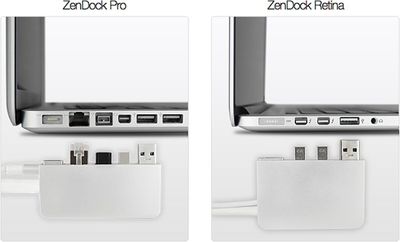
The ZenDock connects to the Thunderbolt, USB, Gigabit Ethernet, and FireWire ports, while leaving a clever gap for the MagSafe power adapter to slide through. A single cable connects to a mountable base equipped for desktop accessories to be permanently connected to.
Zendock

Our team of 4 has been developing ZenDock for just a year. About 4 months ago we tested the concept and the response was overwhelming and so we dove head first into creating our vision. We set out to build ZenDock with 2 design principles in mind. First was to build an elegant solution that would seamlessly integrate with your MacBook. Second was to build a device that just works, yet doesn't get in your way. Both versions always leave at least one USB, SD and headphone port accessible right on your Macbook, while allowing more permanent devices to be connected to the base. The ZenDock is CNC milled from solid blocks of ultra high quality T6061 aluminum, bead blasted and anodized to beautifully match your MacBook.

The ZenDock is available to Kickstarter backers starting at $109 for a limited early-bird backing price, though the company expects to sell the dock for $179 when it hits retail shelves. ZenDock expects to ship to backers in October of this year.

There are a number of Thunderbolt docks on the market that perform a similar function, but they are significantly more expensive -- though they do provide much more functionality. Sonnet has announced a dock with an internal drive bay and optical drive starting at $400, while Matrox and Belkin have announced their own Thunderbolt docking stations.


Top Rated Comments

ColeFlournoy Avatar
177 months ago
A Public Service Announcement from the ZenBoxx Founder.

Hello MacRumor people!

I’m the creator of ZenDock. It has come to my attention some people may have been on psychedelic drugs while viewing our Kickstarter page. Please allow me to clear the air:

To my knowledge:


* ZenDock is the only dock for the Macbook Pro and Retina that allows you to actually dock with a single connection since it also holds your Magsafe power adapter.

* ZenDock is the only dock for the Macbook Pro and Retina designed to allow you to completely clear the mess of wires from your desk, by mounting the dock behind your desk.

* ZenDock Retina can definitely support multiple monitors. In fact, I often use 4 monitors (one monitor connected via mini DisplayPort on the ZenDock Retina base, one connected through the ZenDock Retina Thunderbolt pass through, one via HDMI on the other side of the Macbook, and the Macbook screen itself).

* Many consider Zendock to have a much higher build quality and to better match the Macbook than any other similar dock due to it's high quality CNC'ed aluminum construction.

* Removing the ZenDock is easy, and does NOT require messing with any RJ-45 latch or other.

* The ZenDock Pro includes Firewire and Ethernet.

* The ZenDock Retina can support Firewire by using the Apple Thunderbolt to Firewire adapter, which you probably already own if you have a Macbook Retina and a Firewire harddrive that you use.

* The ZenBoxx team found that many users only wanted to connect a mini-display port monitor to the Zendock Retina base, and decided to convert that base port to mini-display port only since the cost savings would allow the ZenDock to be priced significantly less than any other Thunderbolt docks available.

* The ZenDock Retina optionally includes Ethernet via USB 3.0 (therefore not tying up the thunderbolt pass through).

* Zendock does not require an external power brick, and considered more portable than similar solutions.

* Versus one of the only close competitors with a product currently available the ZenDock has more USB 3.0 ports, allows you to connect twice as many monitors, doesn't require a power brick, matches its ability with audio ports, still has more USB 3.0 ports AFTER attaching the optional Ethernet adapter, and costs close to half as much if you get the Kick Starter special available at http://www.kickstarter.com/projects/coleflournoy/zendock-the-best-dock-for-your-macbook?ref=live

* The Zenboxx team is better at making websites then videos.

* The Zenboxx team thought they would be cool by taking odd camera shots.

* Unbenounced to Zenboxx, odd camera shots were in fact - not cool.

* Luckily the product kicks ass, and is currently the number 2 most popular Kickstarter project in it's category.


All in good fun people, I hope you enjoy the ZenDock, we truly think it’s the best solution out there for most (but not all) people.

For more info see our website at www.ZenBoxx.com or if you want to get the ZenDock cheaper and faster than anybody else, you can pre-order it for $139 on the Kickstarter page http://www.kickstarter.com/projects/coleflournoy/zendock-the-best-dock-for-your-macbook/
Score: 6 Votes (Like | Disagree)
rdas7 Avatar
177 months ago
The Retina one takes out two thunderbolt ports and only gives you one? It should at least include an ethernet port to make up for this

No, worse: it takes up 2 Thunderbolt ports and gives you one DISPLAYPORT. That's a major oversight.

With those Sonnet or Belkin Thunderbolt solutions you don't even really need a dock. You can just connect the one Thunderbolt cable, and you're done —*leaving all the ports on your laptop free.

Looks like they somewhat missed the point of Thunderbolt :/
Score: 5 Votes (Like | Disagree)
roland.g Avatar
177 months ago
As did this (http://www.kickstarter.com/projects/1251721352/w1pps-the-cord-integration-solution-for-apple-macb). Not identical but in the same ballpark.

That video was painful.
Score: 3 Votes (Like | Disagree)
177 months ago
Nice until Apple refreshes the ports and changes the entire getup rendering the device useless.
Score: 3 Votes (Like | Disagree)
Repo Avatar
177 months ago
Nice until Apple refreshes the ports and changes the entire getup rendering the device useless.

It's pretty much the same for any Windows laptop.
Score: 2 Votes (Like | Disagree)
177 months ago
No, worse: it takes up 2 Thunderbolt ports and gives you one DISPLAYPORT. That's a major oversight.

With those Sonnet or Belkin Thunderbolt solutions you don't even really need a dock. You can just connect the one Thunderbolt cable, and you're done —*leaving all the ports on your laptop free.

Looks like they somewhat missed the point of Thunderbolt :/
you hit the nail on the head, thank you for posting!

many people miss the point of Thuderbolt, it acts a lot like the PCIe slots on a Mac Pro, a direct injection into the brain of your computer. it's backwards compatible with all previous connectors like FW and USB, and has plenty of thoughput to handle multiple instances of each, it's wonderful tech that often gets a bad rap from those without a clue! :eek:

anyway, those belkin/sonnet docks you mentioned take a single cable and in the end, turn it into what what looks like the back of a Mac Mini. :)
Score: 2 Votes (Like | Disagree)

Popular Stories

iphone duo screen crack

Apple Responds to iPhone Duo Display Cracking Reports

Monday October 26, 2026 10:20 am PDT by
Shortly after the iPhone Duo launched, a few users reported hinge issues that were causing cracks in the inner display. Apple has now responded to the reports in a statement to MacRumors, saying a small number of units are affected. The response to iPhone Duo from early users has been incredibly positive, and we are seeing exciting things from developers who are rapidly updating their apps...
iPad mini OLED feature 1

Apple Announces New iPad Mini With 8.5-Inch OLED Display, A20 Pro Chip, and More

Monday October 26, 2026 6:05 am PDT by
Apple today announced a new iPad mini with a larger 8.5-inch OLED display, a nano-texture display option, a thinner and lighter design, an A20 Pro chip, a new Acoustic Display audio system that eliminates speaker holes, IP67-rated water and dust resistance, a landscape front camera, Apple's N1 chip with Wi-Fi 7 and Bluetooth 6 support, and more. Altogether, Apple says this amounts to the iPad...
Apple MacBook Pro 14 in with M6 hero

Apple Announces New 14-Inch MacBook Pro With M6 Chip

Tuesday October 27, 2026 6:01 am PDT by
Apple today announced a refreshed 14-inch MacBook Pro featuring the M6 chip, upgraded connectivity specifications, and more. The M6 chip in the MacBook Pro features a 12-core CPU with 2 super cores, 4 performance cores, and 6 efficiency cores, paired with a 12-core GPU. This is up from the M5 chip with a 10-core CPU with 4 super cores and 6 efficiency cores, paired with a 10-core GPU. M6...
Latest Stories
Apple Shares New Apple Watch Survival Stories
10 hours ago
Apple Shares tvOS 27.2 Release Notes With List of New Features
11 hours ago
OLED Touchscreen MacBook Pro Could Start at $2,899
11 hours ago
M6 iMac Sticks With Its Five-Year-Old Color Lineup
13 hours ago
ChatGPT Can Now Access Your iCloud Mail and Calendar
14 hours ago
Best Buy Details Black Friday Plans With Early Deals Available on Halloween
16 hours ago
Apple Reportedly Plans to Release MacBook Neo 2 in First Half of 2027
17 hours ago
M5 vs. M6 MacBook Pro Buyer's Guide: All Differences Compared
18 hours ago
New iMac Available With 2.5 Gigabit Ethernet Port on Power Adapter
18 hours ago
M4 vs. M6 iMac Buyer's Guide: Should You Upgrade?
18 hours ago
Apple Expected to Announce MacBook Pro With Touchscreen Tomorrow
19 hours ago
Banktivity Offers 30% Off First Year Subscriptions for MacRumors Readers
19 hours ago
M6 MacBook Pro's 170GB/s Memory Bandwidth Skips Base 16GB Model
20 hours ago
M6 iMac Pre-Orders and Release Date Announced
20 hours ago
Apple Updates Creator Studio With New Tools and AI Features
20 hours ago
M6 14-Inch MacBook Pro: Pre-Orders and Release Date Announced
20 hours ago
Apple Announces New 14-Inch MacBook Pro With M6 Chip
21 hours ago
Apple Announces New iMac With M6 Chip and More
21 hours ago
Apple Fixes Possibly Exploited CoreGraphics Flaw on Older iPhones
22 hours ago
Apple's MacBook Pro Touch Bar Was Announced 10 Years Ago Today
23 hours ago
iPhone 18e Could Get Two Key Upgrades While Keeping 60Hz Display
23 hours ago
New iMac and 14-Inch MacBook Pro With M6 Chip Expected Tomorrow
1 day ago
JAŸ-Z to Headline 2027 Apple Music Super Bowl LXI Halftime Show
1 day ago
macOS 27.2 Stops Upgrades From Removing Rosetta
1 day ago
Older Siri Remotes Now Show Up in Find My With iOS 27.2
1 day ago
iPhone Duo Features Independent Rotation Lock Controls
1 day ago
iOS 27.2 Features: Everything New in iOS 27.2
1 day ago
Why Can't iPhone Duo Users Make Eye Contact on FaceTime?
1 day ago
iOS 27.2 Fixes Over 160 Security Vulnerabilities
2 days ago
iPhone AI Images and Edits Now Have a Hidden Watermark
2 days ago







































