Design, Paint and Print Monsters With Autodesk's '123D Creature' - MacRumors
Skip to Content

Design, Paint and Print Monsters With Autodesk's '123D Creature'

by

Autodesk recently released a new iPad app for novice 3D modelers, 123D Creature, which allows creators to use gesture controls to mold monsters out of virtual clay.
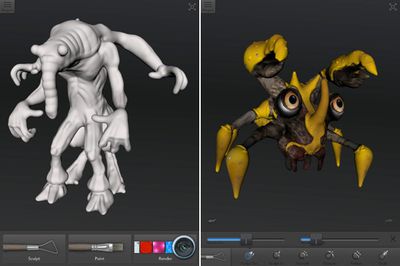
123dcreature
Creatures are designed from the ground up, with sculpted features and painted-on fur, feathers, and skin. Completed projects can be exported as an image, a 3D model, or printed using a 3D printer.

-Technology previously only available to professional 3D artists can now be easily used by anyone to create incredible 3D creatures from scratch directly on the iPad.

-Biped or quadruped, wings, fins, horns, claws or paws. If you can imagine it you can make it real in 123D Creature.

-Easy to use yet extremely powerful skeleton builder makes creating 3D creatures as easy as drawing a stick figure.

-3D texturing and painting lets you apply your own photos directly onto the skin of your creature.


123D Creature can be downloaded from the App Store for $1.99 on sale. The app is regularly priced at $7.99. [Direct Link]


Top Rated Comments

mw360 Avatar
171 months ago
Nothing you cant export them to anything
You can export to OBJ which will get you into any other 3D app, or you can export to a 3D printer. This info from the link in the article. Where did you get yours?
Score: 3 Votes (Like | Disagree)
171 months ago
This basically just looks like the creature editor from Spore, which, incidentally, was about the only fun part of that game, in my opinion.
Score: 3 Votes (Like | Disagree)
171 months ago
Autodesk must love the App Store. They've got so many (excellent) apps on there now, just goes to show how much of a difference the App Store does make.
Score: 3 Votes (Like | Disagree)
thelink Avatar
171 months ago
What a monster!! :O #ballin
Score: 1 Votes (Like | Disagree)

Popular Stories

iOS 26

iOS 26.4 Adds Two New Features to CarPlay

Tuesday March 24, 2026 1:55 pm PDT by
iOS 26.4 was released today, and it includes a couple of new features for CarPlay: an Ambient Music widget and support for voice-based chatbot apps. To update your iPhone 11 or newer to iOS 26.4, open the Settings app and tap on General → Software Update. CarPlay will automatically offer the new features so long as the iPhone connected to your vehicle is running iOS 26.4 or later....
AirPods Pro Firmware Feature

Apple Releases New Firmware for AirPods Pro 3, AirPods Pro 2 and AirPods 4

Tuesday March 24, 2026 12:31 pm PDT by
Apple today released new firmware for the AirPods Pro 2, AirPods Pro 3, and the AirPods 4. The firmware has a version number of 8B39, up from 8B34 on the AirPods Pro 3, 8B28 on the AirPods Pro 2, and 8B21 on the AirPods 4. There is no word on what's included in the firmware, but Apple has a support document with limited notes. Most updates are limited to bug fixes and performance...
apple tv 4k new orange

tvOS 26.4 Adds These New Features to Your Apple TV

Wednesday March 25, 2026 3:33 pm PDT by
Apple this week released tvOS 26.4, and the software update includes a handful of new features and changes for the Apple TV. tvOS 26.4 is compatible with all Apple TV 4K and Apple TV HD models released since 2015. To update your Apple TV, open the Settings app on the device, navigate to System → Software Updates, and select Update Software. Below, we have recapped what is new in tvOS...