iOS 6.1 Tidbits: Music Controls on Lock Screen, Maps 'Report a Problem' Button, Diagonal Swiping Bug - MacRumors
Skip to Content

iOS 6.1 Tidbits: Music Controls on Lock Screen, Maps 'Report a Problem' Button, Diagonal Swiping Bug

by

While iOS 6.1 brought several widely publicized new features such as support for several dozen new LTE carriers and new support for ordering Fandango movie tickets through Siri in the United States, a number of other minor changes were also included in the update. Given the frequency with which our readers have been pointing some of them out, we thought it would be appropriate to make note of them in a brief roundup.

- Lock screen music controls: The music controls on the iPhone's lock screen have been enhanced as noted by TUAW, bringing them in line with those in the Music app.


music
music-prev
The shortcut controls, accessed by pressing the home button twice while on the lock screen, have adopted both the look and layout of the Music app. One notable change is that the previous and next buttons are now much further apart from the play/pause button, making them much less likely to be pressed accidentally.

The volume knob also copies the Music app's visual trick of using the phone's accelerometer to vary the angle of virtual reflections on it.

- Maps "Report a Problem" button: Apple has tweaked the "Report a Problem" button in its Maps app, accessible in the preferences section by tapping at the lower right corner of the map page. The option had previously been a small text link, but Apple has now made it a much more prominent and accessible button which is actually now the largest button on the page.
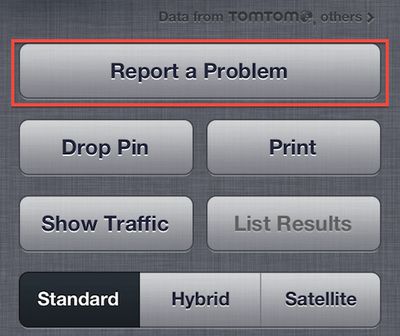
maps_report_problem_button
- Rapid diagonal swiping issue improved: Several readers have noted that an issue with rapid diagonal swiping on the iPhone 5 and fifth-generation iPod touch resulting in loss of touch recognition appears to have been fixed or at least improved in iOS 6.1. Not all readers have experienced improvements, however, with some indicating that performance remains the same under iOS 6.1.
Related Forums: iPhone, iPod touch and iPod

Top Rated Comments

178 months ago
Hallelujah! I'm sure a lot of people will consider this an insignificant update, but it's a big improvement for me.

I listen to a lot of audiobooks. I can't tell you how many times I've accidentally hit the forward or backward button instead of the play/pause button and then spent several minutes trying to find where I was in the book.
Score: 18 Votes (Like | Disagree)
utwarreng Avatar
178 months ago
I concur...give us features that we actually care about.

I'm sure this little reflection change won't even make it to iOS7

The reflection has been in since iOS 6 came out, just only within the Music app (and possibly Podcast...?).

Complaining about how much time they spent on this "feature" is a moot point, as they most certainly just copied the code over from these other apps and replaced the existing button. Come down from your soapbox and put the razorblade down, chicken little. The sky is not falling.
Score: 10 Votes (Like | Disagree)
Chumburro2U Avatar
178 months ago
speak for yourself

I concur...give us features that we actually care about.

I'm sure this little reflection change won't even make it to iOS7

I like this, abeit small touch. It says to me that Apple cares about small niceties. And, why wouldn't it make it to iOS 7? :apple:
Score: 6 Votes (Like | Disagree)
Apple Key Avatar
178 months ago
I love that the reflection changes as you move your phone via the accelerometer. Wonderful detail here! Just like the icon on icloud.com when you move your mouse.
Score: 5 Votes (Like | Disagree)
178 months ago
I'm also able to control my music from my iPhone when it's connected via usb in my car. It used to say accessory connected and I either had to use the car controls or select my music then plug it in. I love this!
Score: 4 Votes (Like | Disagree)
178 months ago
The maps 'report a problem' button is not new (which I know you stated). It's been there from the beginning. People just dont bother as Apple dont fix the problems.

Moving the button and making it more prominent really wont fix maps. It just makes it more obvious that Apple are having a hard time doing it themselves.

Stuff I reported on launch day is still not fixed.
Score: 4 Votes (Like | Disagree)

Popular Stories

iphone duo

Apple Announces Foldable 'iPhone Duo'

Wednesday September 9, 2026 10:56 am PDT by
Apple today announced the "iPhone Duo," a new kind of iPhone featuring two screens and a foldable inner display. The two halves of the iPhone Duo connect into a single continuous frame with the same aspect ratio across both displays, and Apple said the transition between open and closed is designed to feel fluid. When fully open, Apple says it is the thinnest iPhone ever made, with an...
Surprise and Shine Live Coverage Article

Apple Event Live Blog: iPhone Duo, iPhone 18 Pro, and More

Wednesday September 9, 2026 9:10 am PDT by
Apple's "Surprise and Shine" event kicks off today at 10:00 a.m. Pacific Time, where we're expecting to see the foldable iPhone Duo, the iPhone 18 Pro and Pro Max, Apple Watch Series 12 and Ultra 4 models, new AirPods 5 earphones, and perhaps some other announcements. Apple is providing a live video stream on its website, on YouTube, and in the company's TV app across various platforms. We...
iOS 27 Feature Dark

Apple Announces iOS 27 Release Date

Wednesday September 9, 2026 10:46 am PDT by
At its event today unveiling the iPhone 18 Pro, AirPods 5, Apple Watch Series 12, and more, Apple announced that iOS 27 will be released later this month. iOS 27 has already been available as a developer beta since June and as a public beta since July, and Apple today said that the update will be released for all users with a compatible iPhone model on Monday, September 14. iOS 27 is...