

Fantastical, the excellent calendar app for the Mac, has finally been ported to the iPhone. The app has been totally redesigned for the smaller screen, rolling out a new feature called the 'DayTicker'
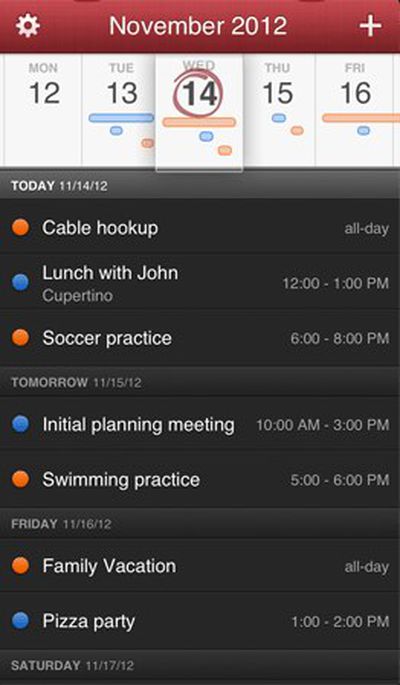
dayticker
The Verge and The Next Web both have extensive reviews of the new app. TNW's Matt Panzarino had this to say:

I’m not what you’d call a productivity guru. I don’t use any interesting methods or cool combinations of software to do what I do. My philosophy is more along the lines of ‘start doing and stop when you’re dead’.

That’s one of the reasons that I love Fantastical for the Mac so much. It’s a small icon that sits in my menu bar and allows me to quickly dash off appointments and reminders in plain english. It’s blazing fast and it helps me avoid all of the nit picky fields and tick boxes that infest calendar apps, including Apple’s poor built-in option. No fussing, no scripts, no precariously balanced suite of productivity apps that eat up half my day just maintaining.

Today, Fantastical comes to the iPhone bearing that same spirit of no-nonsense calendar management, but with an additional intuitive layer of greatness.

The app features the same natural language parsing engine as it does on the Mac, with the addition of a feature called the DayTicker. The DayTicker is at the heart of the reason Fantastical for iPhone has replaced Calendar for me. It’s a ribbon-shaped display of your current day and the surrounding days that makes it incredibly fast to see what you’ve got coming up at a glance.


Fantastical for Mac is available as a free trial download from the developer's site, or directly from the Mac App Store for the temporary sale price of $9.99. [Direct Link]

Fantastical for iPhone is available through the App Store for $1.99. [Direct Link]

Flexibits is also the company that we've hired to develop the MacRumors iOS app, currently in the works.


Top Rated Comments

JaySoul Avatar
172 months ago
I'd like it more if it accomplished my Things To Do without needing to involve me at all.
Score: 6 Votes (Like | Disagree)
dahauss Avatar
172 months ago
Well I purchased it today..I just dont see what is so special about it over the built in iPhone 5.1.1 Calendar App. it does evderything the built in app I already have does and nothing more. it doesnt show me the current date on the icon like the built in app does. I also cant turn the phone in landscape to scroll through the week view like I can on the built in app. Also it doesnt tie into SIRI ... Also other apps open the regular calendar anyway so this is useless as a replacement app...

Can someone tell me what makes this a better app then the built in one? I see lots of people raving about it but I just dont see the need.
Score: 3 Votes (Like | Disagree)
MsQueen Avatar
172 months ago
The Mac version is outrageously overpriced.
Score: 2 Votes (Like | Disagree)
shorn Avatar
172 months ago
The Mac app i superb, and from my initial play with it on iOS, it's just as good.
Native calendar app is now redundant!
Score: 2 Votes (Like | Disagree)
GIZBUG Avatar
172 months ago
Looks interesting. Already paid for and use Pocket Informant though....
Score: 1 Votes (Like | Disagree)
Pared Avatar
172 months ago
Why can't I copy/paste an event? Seems like its extremely difficult to do since no one has done it yet. Frustrating. It also can't avoid adding the default 30 mins before reminder that Google calendar does. The default calendar app does not do this.
Score: 1 Votes (Like | Disagree)

Popular Stories

maxresdefault

Apple Shows Off a Key Reason to Upgrade to the iPhone 17

Saturday February 7, 2026 9:26 am PST by
Apple today shared an ad that shows how the upgraded Center Stage front camera on the latest iPhones improves the process of taking a group selfie. "Watch how the new front facing camera on iPhone 17 Pro takes group selfies that automatically expand and rotate as more people come into frame," says Apple. While the ad is focused on the iPhone 17 Pro and iPhone 17 Pro Max, the regular iPhone...
apple wallet drivers license feature iPhone 15 pro

Apple Says These 7 U.S. States Plan to Offer iPhone Driver's Licenses

Monday February 9, 2026 6:24 am PST by
In select U.S. states, residents can add their driver's license or state ID to the Apple Wallet app on the iPhone and Apple Watch, and then use it to display proof of identity or age at select airports and businesses, and in select apps. The feature is currently available in 13 U.S. states and Puerto Rico, and it is expected to launch in at least seven more in the future. To set up the...
m5 macbook pro deal

Why You Shouldn't Buy the Next MacBook Pro

Tuesday February 10, 2026 4:27 pm PST by
Apple is planning to launch new MacBook Pro models as soon as early March, but if you can, this is one generation you should skip because there's something much better in the works. We're waiting on 14-inch and 16-inch MacBook Pro models with M5 Pro and M5 Max chips, with few changes other than the processor upgrade. There won't be any tweaks to the design or the display, but later this...
Apple Logo Zoomed

Apple Expected to Launch These 10+ Products Over the Coming Months

Tuesday February 10, 2026 6:33 am PST by
It has been a slow start to 2026 for Apple product launches, with only a new AirTag and a special Apple Watch band released so far. We are still waiting for MacBook Pro models with M5 Pro and M5 Max chips, the iPhone 17e, a lower-cost MacBook with an iPhone chip, long-rumored updates to the Apple TV and HomePod mini, and much more. Apple is expected to release/update the following products...
14 inch MacBook Pro Keyboard

New MacBook Pros Could Now Arrive in March

Sunday February 8, 2026 6:02 am PST by
New MacBook Pro models with the M5 Pro and M5 Max chips could arrive as soon as Monday, March 2, according to Bloomberg's Mark Gurman. In today's "Power On" newsletter, Gurman said that the release of new MacBook Pro models is tied to the release of macOS Tahoe 26.3. The launch is said to be slated for as early as the week of March 2. He added that the M4 Pro and M4 Max models on sale today...















