kindle ios magazines textbooks
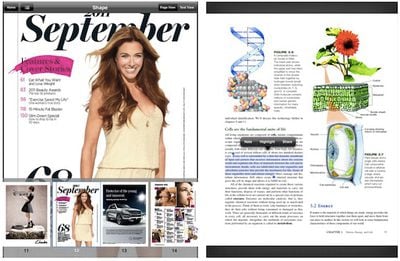
Amazon today updated its Kindle app for iOS, taking on Apple's Newsstand feature by adding compatibility with hundreds of magazines on the iPad. In addition, Kindle for iPad can now handle "print replica" textbooks, preserving the original formatting and layout from print editions for improved usability.

- New Design for Magazines: Kindle for iPad customers now have access to the huge selection of over 400 magazines and newspapers that are available on Kindle Fire. Magazines such as Martha Stewart Living, Food Network Magazine, Cosmopolitan, Men’s Health, Popular Science and many more are displayed in rich full-color pages. Customers can buy a single issue or subscribe to popular magazines and leading newspapers and have them wirelessly delivered to the Kindle for iPad app.

- Read print replica textbooks including rich formatting and layout of the print editions and support for notes and highlights, zoom and pan, and linked table of contents.

In addition, Amazon has added support for Send-to-Kindle on all iOS devices, allowing users to send documents to their Kindle devices and apps for reading while also storing them in the cloud. Finally, Kindle for iOS now sports a new library view and support for PDF import and viewing.


Top Rated Comments

Master Atrus Avatar
183 months ago
Interesting

Sounds interesting ... Really it is just the look and feel of the iBook App (the smoothness of the page turning etc) that keeps me interested. The Kindle, though a bit more clunky has a much greater selection and I can read it on my computer!
Score: 2 Votes (Like | Disagree)
Joe-Diver Avatar
183 months ago
I'm really enjoying my Kindle Fire. I take it with me to appointments, out on my sailboat, when traveling....and I keep it on my nightstand for getting in that before bed reading session.

Moving to eBooks was the last step in going digital for me. I haven't bought a CD in at least 5 years, quit buying DVD's a couple years ago, so books/magazines were the last step. I get all my music via iTunes, movies are rented/purchased through iTunes and AppleTV2 or Netflix, and now books/magazines are through Kindle.

I can keep stuff on the device or in the Cloud...nice because I can use the Kindle App on my MBP to read the books/magazines if I'm not using the Kindle Fire...plus, if I ever move to an iPad I'm not losing any investment in content.

I love the form factor of the KF. I have it in a nice case so it's the size of an average paperback book, maybe just a little bigger, easy to hold and does web, email, apps, streams Netflix as well as being a great eReader.

I have no issues reading on it. I keep the brightness turned down and use the tan background so it's very, very close to reading an older, slightly yellowed paperback. I spend at least 2 hours every night reading in bed before going to sleep.

Why would an Apple Fanboi buy a Kindle Fire and not an iPad? Mainly because I have a 17" MacBook Pro. If I didn't have the MBP, would be a different story. The iPad just doesn't give me anything my MBP can't do, except the cool form factor. Spending the $$$ on an iPad compared to the cost of the Fire...just for an eReader....just couldn't see it. It was the right decision for me personally, my needs, and budget.
Score: 1 Votes (Like | Disagree)
fanchee Avatar
183 months ago
I have an iPad 2 and recently purchased a Kindle Touch for reading. I love the Kindle and only wish I had purchased it sooner. Especially for night reading, it seems easier on the eyes. No bright screen to absorb and keep you awake. Plus, it's much smaller and easier to hold.

I like being able to sync all my books across all devices, too. And that now includes a Kindle Touch. Works great!
Score: 1 Votes (Like | Disagree)
Datalinks Avatar
183 months ago
I like having my entire library in one spot, synced between all my mobile devices and computers, along with a tap dictionary and the ability to see what other people thought were important. I also like the money I save from buying the Kindle version instead of the print version.

I too like the convenience of having all of my documents with me at all times, that's why I got an iPad in the first place. Carrying all of my library is neither here or there; I do not need access to all of the books I have ever read or might read all of the time. Actually studying or reading an academic book on the iPad has not been a satisfactory experience to me. Maybe I am a bit old-fashioned when it comes to books.
Score: 1 Votes (Like | Disagree)
Liquorpuki Avatar
183 months ago
Having tried both, I have reached the conclusion that I prefer reading proper books rather than staring at screens all day long.
I like having my entire library in one spot, synced between all my mobile devices and computers, along with a tap dictionary and the ability to see what other people thought were important. I also like the money I save from buying the Kindle version instead of the print version.
Score: 1 Votes (Like | Disagree)
mkrishnan Avatar
183 months ago
What's great about this update is personal documents can now be downloaded. This used to only work on hardware Kindles.

I'm interested to check out this new feature, too.
Score: 1 Votes (Like | Disagree)

Popular Stories

iOS 26

iOS 26.4 and iOS 27 Features Revealed in New Leak

Friday December 12, 2025 10:56 am PST by
Macworld's Filipe Espósito today revealed a handful of features that Apple is allegedly planning for iOS 26.4, iOS 27, and even iOS 28. The report said the features are referenced within the code for a leaked internal build of iOS 26 that is not meant to be seen by the public. However, it appears that Espósito and/or his sources managed to gain access to it, providing us with a sneak peek...
iOS 26

iOS 26.2 Coming Soon With These 8 New Features on Your iPhone

Thursday December 11, 2025 8:49 am PST by
Apple seeded the second iOS 26.2 Release Candidate to developers earlier this week, meaning the update will be released to the general public very soon. Apple confirmed iOS 26.2 would be released in December, but it did not provide a specific date. We expect the update to be released by early next week. iOS 26.2 includes a handful of new features and changes on the iPhone, such as a new...
iOS 26

Apple Releases iOS 26.2 With Alarms for Reminders, Lock Screen Changes, Enhanced Safety Alerts and More

Friday December 12, 2025 10:10 am PST by
Apple today released iOS 26.2, the second major update to the iOS 26 operating system that came out in September, iOS 26.2 comes a little over a month after iOS 26.1 launched. ‌iOS 26‌.2 is compatible with the ‌iPhone‌ 11 series and later, as well as the second-generation ‌iPhone‌ SE. The new software can be downloaded on eligible iPhones over-the-air by going to Settings >...
AirPods Pro Firmware Feature

Apple Releases New Firmware for AirPods Pro 2 and AirPods Pro 3

Thursday December 11, 2025 11:28 am PST by
Apple today released new firmware designed for the AirPods Pro 3 and the prior-generation AirPods Pro 2. The AirPods Pro 3 firmware is 8B30, up from 8B25, while the AirPods Pro 2 firmware is 8B28, up from 8B21. There's no word on what's include in the updated firmware, but the AirPods Pro 2 and AirPods Pro 3 are getting expanded support for Live Translation in the European Union in iOS...
macOS Tahoe 26 Thumb

Apple Releases macOS Tahoe 26.2 With Edge Light

Friday December 12, 2025 10:08 am PST by
Apple today released macOS Tahoe 26.2, the second major update to the macOS Tahoe operating system that came out in September. macOS Tahoe 26.2 comes five weeks after Apple released macOS Tahoe 26.1. Mac users can download the macOS Tahoe update by using the Software Update section of System Settings. macOS Tahoe 26.2 includes Edge Light, a feature that illuminates your face with soft...
AirTag 2 Mock Feature

Apple AirTag 2: Four New Features Found in iOS 26 Code

Thursday December 11, 2025 10:31 am PST by
The AirTag 2 will include a handful of new features that will improve tracking capabilities, according to a new report from Macworld. The site says that it was able to access an internal build of iOS 26, which includes references to multiple unreleased products. Here's what's supposedly coming: An improved pairing process, though no details were provided. AirTag pairing is already...
ipados 26 1 slide over

Apple Releases iPadOS 26.2 With Multitasking Improvements

Friday December 12, 2025 10:09 am PST by
Apple today released iPadOS 26.2, the second major update to the iPadOS 26 operating system released in September. iPadOS 26.2 comes a month after iPadOS 26.1. The new software can be downloaded on eligible iPads over-the-air by going to Settings > General > Software Update. iPadOS 26.2 continues with the multitasking improvements that were added with iPadOS 26.1. You can now drag and...
bug security vulnerability issue fix larry

Update Now: iOS 26.2 Fixes 20+ Security Vulnerabilities

Friday December 12, 2025 11:11 am PST by
Apple today released iOS 26.2, iPadOS 26.2, and macOS 26.2, all of which introduce new features, bug fixes, and security improvements. Apple says that the updates address over 20 vulnerabilities, including two bugs that are known to have been actively exploited. There are a pair of WebKit vulnerabilities that could allow maliciously crafted web content to execute code or cause memory...