Skip to Content

Turn Off Time-Zone Sensing To Improve iPhone Battery Life?

by

Switching off automatic time-zone sensing in iOS 5 can improve iPhone battery life significantly, according to iDownloadBlog. The site claims that a bug in iOS 5's GM release causes the GPS-enabled location tracking connected to the automated time-zone function to run constantly. This unnecessary use of the GPS circuitry may drain the battery exceptionally quickly.

To fix the alleged bug and avoid the battery drain, head to the Settings app in iOS 5 and tap Location Services and then scroll to "System Services" at the bottom of that window. Then switch off "Setting Time Zone".
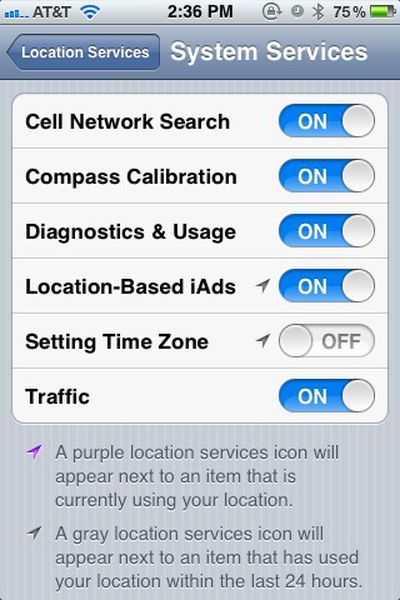
locationservices
It's not an official bug yet, though Apple is reportedly working on iOS 5's battery life issues. Anecdotal evidence suggests flipping this switch may significantly improve battery life.


Top Rated Comments

Macopotamus Avatar
187 months ago
Doesn't work, despite every tech website on the face of the earth claiming it does.

What DOES work is turning off just about every feature that is new to iOS 5. It's obviously just a bug that Apple will fix ASAP because the betas didn't drain like this.
Score: 11 Votes (Like | Disagree)
Tronic Avatar
187 months ago
Tried it last week and haven't seen it make a difference
Score: 9 Votes (Like | Disagree)
187 months ago
iMessage too, anything else?
Turn on airplane mode. ;)
Score: 7 Votes (Like | Disagree)
187 months ago
I tried something this morning that seemed to help tremendously, i turned off the compass calibration. Havent gone below 90% all day.

What does this feature do? Don't we calibrate the compass by waving the phone around like a madman?
Score: 6 Votes (Like | Disagree)
bushido Avatar
187 months ago
i always love those suggestions:

turn off 3G
turn off wifi
turn off location service
turn off push nots
turn off weather

what u have left is a phone without any usefulness

here's an idea, turn off the phone. it saves u battery life :p
Score: 5 Votes (Like | Disagree)
187 months ago
Yeah... I think this is magical thinking.

Just because the arrow is purple, doesn't mean "GPS IS ON RIGHT NOW AND I'M DRAINING ALL YOUR POWER! MUHAHAHA!" It simply means the service "Setting Time Zone" it's doing something with your location.

Furthermore, just because your location is "being used", this doesn't mean that your phone has to do any power hungry operation to obtain your location. It likely just looks at the cell environment that you're currently in which doesn't require constant transmissions to cell towers! I assume it's looking at the most recent cached tower information (within a reasonable time frame) and uses that.
Score: 5 Votes (Like | Disagree)

Popular Stories

Apple MacBook Pro M4 hero

Apple Planning 'MacBook Ultra' With Touchscreen and Higher Price

Sunday March 8, 2026 8:05 am PDT by
Apple is planning to launch an all-new "MacBook Ultra" model this year, featuring an OLED display, touchscreen, and a higher price point, Bloomberg's Mark Gurman reports. Gurman revealed the information in his latest "Power On" newsletter. While Apple has been widely expected to launch new M6-series MacBook Pro models with OLED displays, touchscreen functionality, and a new, thinner design...
imac video apple feature

Apple Unveils Seven New Products

Friday March 6, 2026 11:48 am PST by
Apple this week unveiled seven products, including an iPhone 17e, an iPad Air with the M4 chip, updated MacBook Air and MacBook Pro models, a new Studio Display, a higher-end Studio Display XDR, and an all-new MacBook Neo that starts at just $599. iPhone 17e features the same overall design as the iPhone 16e, but it gains Apple's A19 chip, MagSafe for magnetic wireless charging and magnetic...
ios 26 4 yellow

Everything New in iOS 26.4 Beta 4

Monday March 9, 2026 3:50 pm PDT by
Apple is continuing to test the iOS 26.4 beta, and the latest update is now available for developers and public beta testers. As testing goes on, there are fewer new features in each beta, but today’s release adds new emoji characters and a few other changes. New Emoji Apple added new emoji characters, including trombone, treasure chest, distorted face, hairy creature, fight cloud, orca,...