

Apple Quietly Releases Fix for Flickering on 24-Inch LED Cinema Display over Thunderbolt [Update: Pulled] - MacRumors
Skip to Content

Apple Quietly Releases Fix for Flickering on 24-Inch LED Cinema Display over Thunderbolt [Update: Pulled]

Ever since Apple released its first Thunderbolt-equipped machines earlier this year, reports have been surfacing from a number of users complaining about flickering issues on company's 24-inch LED Apple Cinema Display when used with the new Thunderbolt-equipped machines.
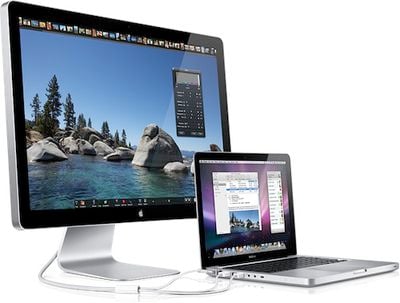
24 inch led cinema display
Apple has apparently quietly released a firmware fix for the issue, although the update has not been publicly announced and its existence appears to have only been revealed to a small number of customers who have escalated their issues through Apple's support systems.

A link (.dmg download) to the firmware update was posted to Apple's discussion forums earlier today, and a number of users who have applied the update have reported at least initial success with addressing the flickering issues. Users report having to reboot their systems and power cycle their displays in order for the displays to function properly after applying the update.

From the description included in the download file:

The 24-inch LED Cinema Display Firmware Update addresses an issue that may cause intermittent display flickering. This firmware will only install on the Apple 24-inch LED Cinema Display when it is connected to a Thunderbolt-enabled Mac.

IMPORTANT:
This firmware update may not resolve the flickering issue if a Mini DisplayPort extender cable is used.

NOTE:
Some USB and FireWire devices may prevent firmware updates from installing correctly; disconnect non-essential devices and use only an Apple keyboard and mouse to apply the update.

Full instructions for installing the firmware update are also included in the documentation.

It is unclear why Apple has yet to publicly issue the firmware update for all 24-inch Apple Cinema Display users, and thus users should exercise caution in deciding whether to apply the update and prefer to check with Apple support regarding their specific issues.

Apple introduced the 24-inch LED Cinema Display in October 2008 and officially discontinued the model in July 2010 when Apple consolidated its display offerings with the 27-inch LED Cinema Display as its sole offering. Apple did, however, continue to sell off its remaining stock of 24-inch displays for a number of weeks after the official discontinuation.

Update: Apple appears to have pulled the firmware update without explanation.

Related Roundup: Studio Display
Buyer's Guide: Displays (Buy Now)
Related Forum: Mac Accessories

Popular Stories

studio display blue

Studio Display and Studio Display XDR Get Firmware Update

Tuesday March 24, 2026 12:01 pm PDT by
Apple today released a new firmware update for the Studio Display and Studio Display XDR, its two new monitors that came out earlier in March. The Studio Display Firmware 26.4 update is only for the new Studio Display options, and it is not available on the older model. Studio Display firmware can be updated by connecting the display to a Mac and going to System Settings > Software...
Mac Pro Feature Teal

Apple Discontinued More Than Just the Mac Pro This Month

Monday March 30, 2026 9:35 am PDT by
While it felt inevitable, it was still big news last week when Apple announced that the Mac Pro was discontinued after a nearly 20-year run. Apple discontinued a lot more than just the Mac Pro this month, though, as outlined below. Mac Studio with 512GB of RAM Apple no longer allows customers to configure the Mac Studio with 512GB of RAM, with the maximum amount of unified memory now...
studio display xdr medical presets

Apple Studio Display XDR Now FDA-Cleared for Diagnostic Radiology Use

Tuesday April 7, 2026 12:04 pm PDT by
The Studio Display XDR's medical image calibration feature received FDA clearance, which means radiologists are now able to use the display for viewing medical images. Apple marketing chief Greg Joswiak confirmed today that U.S. radiologists can connect the Studio Display XDR to a Mac running macOS 26.4 to use DICOM medical imaging presets. The Studio Display XDR supports DICOM and has a...

Top Rated Comments

fekimoki Avatar
190 months ago
Apple only care about their new product. What about MacBook Pro late 2008 flickering issue on nvidia 9400M? It's been 3 years, and still no fix.
Score: 6 Votes (Like | Disagree)
190 months ago
Seriously..

Quite some time? The very longest is 8 weeks! the hardware has only been available since July. In this period of time you've had plenty of opportunity to return the product or have it repaired/replaced by Apple.
They'd rather complain than admit they failed to by AppleCare or didn't think it would cover it.
If you pay 1000$ for a monitor, it should at least work when you get it. I would never buy a product with "Apple Care" why should you pay extra, to get a regular warranty, that products must include by LAW.
Score: 5 Votes (Like | Disagree)
190 months ago
Apple only care about their new product. What about MacBook Pro late 2008 flickering issue on nvidia 9400M? It's been 3 years, and still no fix.

Do you have AppleCare? I took mine in for a loose hinge and they ended up replacing my whole screen assembly cause they noticed it was flickering. Not sure if it got to the root of the problem but the screen no longer flickers.
Score: 5 Votes (Like | Disagree)
NY Guitarist Avatar
190 months ago
Apple only care about their new product. What about MacBook Pro late 2008 flickering issue on nvidia 9400M? It's been 3 years, and still no fix.

I have this exact same problem. And apparently so do many others out there too. Just do a search.
Score: 3 Votes (Like | Disagree)
190 months ago
I've had this issue since upgrading my MacBook Pro earlier this year... 23 weeks ago. It's been very frustrating to live with and unpredictable... I didn't take my Mac & Display into the Apple Store, as I figured it'd probably behave itself and waste my time. I'm pleased to hear that some people had their 24" swapped for a 27". Makes me wish I'd taken my set up in and had the same good fortune.

Although I think the fix should've been released months ago, I'm pleased it's now here. I just hope it works!

I called apple help AND took it to an apple store. They treated me like I was lying about it and refused to admit they had a fix or do anything about it.

Glad to see they were lying the whole time. Too bad I sold the cinema display thinking it would never work with my brand new macbook pro. Lost money on the deal too.
Score: 2 Votes (Like | Disagree)
jav6454 Avatar
190 months ago
I have this exact same problem. And apparently so do many others out there too. Just do a search.

I had the problem. Just go to Apple and complain. I got my screen fixed.
Score: 2 Votes (Like | Disagree)















