Lion-Optimized VMware Fusion 4 Debuts with Over 90 New Features

vmware fusion 4 multiple os
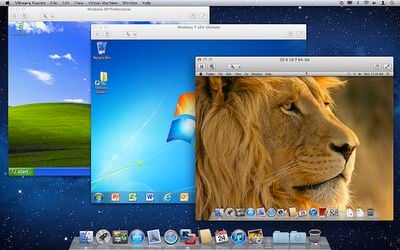
Virtualization firm VMware today announced the launch of its new Fusion 4 software to allow Mac users to run Windows and other operating systems virtualized alongside their native OS X operating systems. Optimized for OS X Lion, VMware Fusion 4 offers more than 90 new features, including the ability to run OS X Lion in a virtual machine as is now permitted by Apple's licensing.

With more than 90 new features and now optimized for today’s multi-core Macs and OS X Lion, key features in VMware Fusion 4 include:

- Built for OS X Lion – VMware Fusion 4 is designed to provide the best Windows experience on OS X Lion. Add Windows programs to Launchpad, experience them in Mission Control, view them in full screen or switch between them using Mac gestures.

- Better Performance and Faster Graphics – VMware Fusion 4 has been engineered to run Windows and Mac applications side-by-side with incredible speed and reliability. As a 64-bit Cocoa application, it is optimized for today’s multi-core Macs and delivers 3D graphics up to 2.5-times faster than previous versions of Fusion.

- Even More "Mac-like" Experience – VMware Fusion 4 enhances the way Windows programs run on a Mac. From the brand new settings menu to the redesigned virtual machine library and snapshot menu, users have even more Mac-like experiences when running Windows programs.

- Lion Squared – VMware Fusion 4 now supports OS X Lion in a virtual machine, allowing users to get more from their Mac by running OS X Lion, OS X Lion Server, Mac OS X Snow Leopard Server and Mac OS X Leopard Server in virtual machines.

VMware Fusion 4 is being offered at a promotional price of $49.99 until the the end of the year, after which time pricing will be set at $79.99. Users who purchased Fusion 3 on or after July 20th are eligible for a free upgrade to Fusion 4.

VMware's primary competitor in the virtualization market is Parallels, which released its own Lion-optimized version two weeks ago.


Popular Stories

iOS 26

iOS 26.2 Coming Soon With These 8 New Features on Your iPhone

Thursday December 11, 2025 8:49 am PST by
Apple seeded the second iOS 26.2 Release Candidate to developers earlier this week, meaning the update will be released to the general public very soon. Apple confirmed iOS 26.2 would be released in December, but it did not provide a specific date. We expect the update to be released by early next week. iOS 26.2 includes a handful of new features and changes on the iPhone, such as a new...
iOS 26

iOS 26.4 and iOS 27 Features Revealed in New Leak

Friday December 12, 2025 10:56 am PST by
Macworld's Filipe Espósito today revealed a handful of features that Apple is allegedly planning for iOS 26.4, iOS 27, and even iOS 28. The report said the features are referenced within the code for a leaked internal build of iOS 26 that is not meant to be seen by the public. However, it appears that Espósito and/or his sources managed to gain access to it, providing us with a sneak peek...
AirPods Pro Firmware Feature

Apple Releases New Firmware for AirPods Pro 2 and AirPods Pro 3

Thursday December 11, 2025 11:28 am PST by
Apple today released new firmware designed for the AirPods Pro 3 and the prior-generation AirPods Pro 2. The AirPods Pro 3 firmware is 8B30, up from 8B25, while the AirPods Pro 2 firmware is 8B28, up from 8B21. There's no word on what's include in the updated firmware, but the AirPods Pro 2 and AirPods Pro 3 are getting expanded support for Live Translation in the European Union in iOS...
iOS 26

Apple Releases iOS 26.2 With Alarms for Reminders, Lock Screen Changes, Enhanced Safety Alerts and More

Friday December 12, 2025 10:10 am PST by
Apple today released iOS 26.2, the second major update to the iOS 26 operating system that came out in September, iOS 26.2 comes a little over a month after iOS 26.1 launched. ‌iOS 26‌.2 is compatible with the ‌iPhone‌ 11 series and later, as well as the second-generation ‌iPhone‌ SE. The new software can be downloaded on eligible iPhones over-the-air by going to Settings >...
Google maps feaure

Google Maps Quietly Added This Long-Overdue Feature for Drivers

Wednesday December 10, 2025 2:52 am PST by
Google Maps on iOS quietly gained a new feature recently that automatically recognizes where you've parked your vehicle and saves the location for you. Announced on LinkedIn by Rio Akasaka, Google Maps' senior product manager, the new feature auto-detects your parked location even if you don't use the parking pin function, saves it for up to 48 hours, and then automatically removes it once...
AirTag 2 Mock Feature

Apple AirTag 2: Four New Features Found in iOS 26 Code

Thursday December 11, 2025 10:31 am PST by
The AirTag 2 will include a handful of new features that will improve tracking capabilities, according to a new report from Macworld. The site says that it was able to access an internal build of iOS 26, which includes references to multiple unreleased products. Here's what's supposedly coming: An improved pairing process, though no details were provided. AirTag pairing is already...
macOS Tahoe 26 Thumb

Apple Releases macOS Tahoe 26.2 With Edge Light

Friday December 12, 2025 10:08 am PST by
Apple today released macOS Tahoe 26.2, the second major update to the macOS Tahoe operating system that came out in September. macOS Tahoe 26.2 comes five weeks after Apple released macOS Tahoe 26.1. Mac users can download the macOS Tahoe update by using the Software Update section of System Settings. macOS Tahoe 26.2 includes Edge Light, a feature that illuminates your face with soft...
iOS 26

15 New Things Your iPhone Can Do in iOS 26.2

Friday December 5, 2025 9:40 am PST by
Apple is about to release iOS 26.2, the second major point update for iPhones since iOS 26 was rolled out in September, and there are at least 15 notable changes and improvements worth checking out. We've rounded them up below. Apple is expected to roll out iOS 26.2 to compatible devices sometime between December 8 and December 16. When the update drops, you can check Apple's servers for the ...

Top Rated Comments

psxguru Avatar
186 months ago
There's a discount code that knocks $10 off or £6.57 if you're in the UK - it should work for other currencies too.

Use FUSION20

For UK users it brings it down to £26.28 but there's VAT to go on top :(
Final UK price is £30.22
Score: 14 Votes (Like | Disagree)
movielad Avatar
186 months ago
Apparently, all those artists were using the wrong software platform. When you need Windows to run a mission critical application, then Linux is NOT the right choice for you. Whatever ran on those Linux boxes probably would also have run on Windows or could have been written for Windows in the first place. Except for trying hard to not use what everyone else in the world uses was probably the only motivation for going with Linux in the first place, and that alone is not a good enough reason.

Sigh. That's perhaps the most crazy statement I've read today.

When you have several hundred workstations, over a thousand HPC render machines - Windows tends to become a bit pricey. For VFX, Linux *is* the industry standard platform. 95% of the standard 3D modelling and 2D/3D compositing systems run on Linux. You must remember that SGI's IRIX was the dominant OS of that industry for a long time until commodity hardware and Linux took hold and replaced it. SGIs soon became bricks and doorstops.

Photoshop was one of the rare exceptions. Disney and a few other facilities contributed funds to the Wine project to develop it sufficiently to allow Photoshop to run well enough under Linux using the Wine system. Ultimately as hardware got cheaper, VMs were a better solution. There was no other application - open source or commercial that could match Photoshop's feature set. There are one or two other products that required Windows. These were used by a very small number of artists out of the several hundred coming and going through the facility.

You're doing NOBODY a favor by adding unnecessary complexity to a system. Having to instal a VM to run a mission critical application only shows that you made a poor choice. In my book, VMs are only acceptable on developer machines or when you need to make sure that a client system meets certain security and quality standards.
I work for a web hosting firm now. I'd say the majority of all production web sites and applications that we and our customers are running are running on virtual machines. I've been using VMs now in live production environments for years and I couldn't disagree more with your statements.

Martyn
Score: 7 Votes (Like | Disagree)
MrMoonX Avatar
186 months ago
I've never seen the reason for a VM running Windows on a Mac because the price is almost the same as just buying a low-end laptop with Windows 7.

For school, I needed windows and looked into Parallels and realized that for a few dollars more, I could just buy a separate Toshiba laptop. At least this allows for redundancy because if one computer breaks, I have another.

With a VM, if your Mac breaks, it breaks and that's it.

serious LOL

VMware 4 is about $50 i got win 7 for about the same, so you tell me where I can get a $100 laptop??
Score: 7 Votes (Like | Disagree)
KnightWRX Avatar
186 months ago
In my book, VMs are only acceptable on developer machines or when you need to make sure that a client system meets certain security and quality standards.

Good thing we're not all you. :rolleyes:

A lot of movie editing/artwork is done on alternative platforms. Breaking Microsoft's stranglehold on the industry would help bolster innovation some. They have turned the PC industry into a stagnant cesspool. You're preaching stagnation and immobility. "Hey it works on Windows only, use Windows!". Yeah, way to spur innovation and development.
Score: 6 Votes (Like | Disagree)
KnightWRX Avatar
186 months ago
The laptop I bought was $299 (no tax or shipping charge). Parallels was almost $200. Why pay to put Windows on an existing computer when you can have redundancy by having Windows on a separate laptop?
Virtual Box is 0$. Parallels is 90$.

Carrying only 1 computer with all the tools on it, and be able to interact with your data with software on any OS at the same time : Priceless.

Sorry you can't see the advantages in virtualizations.

Having a VM on a computer IS having two computers. I don't see how a VM with a second desktop operating system running in it actually makes life easier or less complex.
Let's see :

- Share data with cables or external media or a network - Check
- Copy/paste without having to use a network based clipboard server that might or might not work properly - Check
- Carrying only 1 physical computer around with all my software - Check again.

Yep, a VM is just like a 2nd computer, except for those little annoyances of actual owning 2 physical computers. :rolleyes:

I still firmly believe that when you need a VM with a second desktop OS in it, then you are basically walking with a crutch and your preferred host operating system was not the right choice for you.
My VM is for work. My computer insists on using proprietary technologies that only have Windows client. If it weren't for that, I wouldn't even need the VM. No, my work laptop is not an option (a huge hulking Dell Lattitude... I'm not carrying that POS around).
Score: 6 Votes (Like | Disagree)
thedbp Avatar
186 months ago
Oh boy

Why would you want to run a virtual machine running lion, if you're already running lion?

If you have to ask, you'll never know.
Score: 6 Votes (Like | Disagree)