

Need a controller for your Mac or iOS-based game, but don't have a physical controller handy? Pull out your iPhone and install Joypad.
The app turns your iPhone or iPod touch into a wireless virtual controller with a configurable set of buttons. It syncs up to a desktop client and remaps the buttons on the Joypad to keyboard buttons on your desktop. It's very clever, and is a free download.
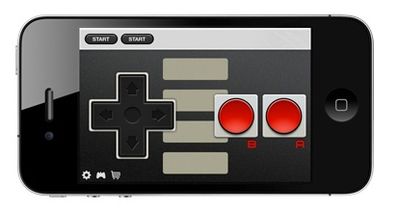
Taking the app to the next level, the two-man development team, Zell Interactive, offers several sets of skins to give Joypad that retro feel, including classic NES and Super Nintendo controllers. Sounds perfect for some MAME-emulation, doesn't it?
Finally, the makers of Joypad have developed an iOS SDK to allow other developers to incorporate Joypad support into their games. Similar to how the Scrabble iPad game lets users store their tiles on their iPhone to hide them from other players, JoyPad let's you control a game on your iPad from your iPhone. It works via Bluetooth and it's awesome:
The app itself is free, with 8 skins available individually for $0.99 or all together for a discounted price.

















Top Rated Comments
This is true for some games, but for others it's really not an issue. The movement controls with a d-pad or analog stick don't really need to be constantly monitored, and if you don't need to use a ton of buttons at once then they are large enough that you don't really need to keep your eyes on those either. More complex button setups or games where you need to push multiple buttons at the same time can be difficult to play though, but for the most part it works pretty well.
What I think is really cool is the mouse integration for playing desktop games. It lets you control the mouse cursor using the accelerometer, and click the mouse using the screen. It works really well and is totally handy if you travel and play games on a laptop a lot. Here's a vid of Minecraft being played with a Joypad:
If you're on a busy WiFi network then yeah it can have some lag problems. If it's not too crowded though it works really well. Also you can connect via Bluetooth now which eliminates the need for using a WiFi network at all.
So yeah, I'm definitely an advocate of the Joypad, but that's because I've used it quite a lot and think it works really well. Plus I see a ton of potential with the availability of an SDK for integrating easy Joypad support into games. But really, don't take my word for it, just try it yourself! It's free to download the app and desktop client, and it's pretty easy to get it set up and running. You may find it's actually a pretty handy thing to have around if you are out and about and feel like gaming and aren't equipped with a proper Bluetooth controller.
Here's the original article I did about this on TouchArcade: http://toucharcade.com/2011/06/13/wwdc-2011-joypad-game-controller/