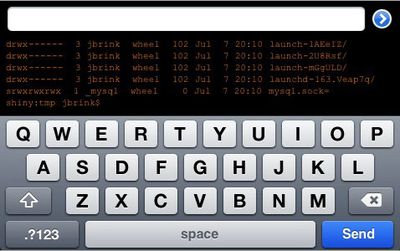
JBrink.net has released TouchTerm [$2.99, App Store], the first SSH client for the iPhone. Features include:
- Wi-Fi and EDGE/3G support: access and administer your servers from anywhere
- Control over font size and color
- Landscape mode support
- The ability to scroll over terminal output
- Saved connection parameters and passwords (if desired)
- A cross-session command history for quickly re-executing or editing previously entered commands
- No terminal emulation
Power users may want to wait until TouchTerm Pro is released which promises "a powerful, easy-to-use remote administration tool over SSH."
Terminal emulation, however, appears to be lacking in the current version of TouchTerm which makes it only useful for the simplest of tasks. Anything requiring any screen formatting (top, vi, emacs, pico) will fail. While the developer promises Terminal emulation to be available in a future free update, it's hard to recommend this app without it.
If you are willing to wait a little longer, Zinger-Soft is planning on releasing a more full featured SSH client for $4.99 called iSSH:
That being said, zinger-soft's app is complete and is simply awaiting government approval. It includes VT100, VT102, VT220, ANSI, xterm, and xterm-color emulation. It supports dynamically resizable terminals, fonts, and portrait and landscape mode (and, depending on the font, anywhere from 40x21 to 80x40). All the exotic key combinations (Ctrl-Shift-Up, for instance) are there. It has support for multiple simultaneous connections and maintains a list of open connections (as well as a default connection configuration list) that one will be able to reference and reconnect to on reopening the application. There is a scroll back buffer implemented in the standard iPhone scroll view interface, along with gesture arrow keys. Finally, it contains an X Server so one can switch between graphical and console input as necessary (and possible). Of course, for all the open sessions, the X Server is the same, so multiple machines will send their X clients to the same X Server.