

 In Chrome 66, rolling out now for Mac and iOS, Google has added a password export option to the web browser so that you can easily migrate your login details to another browser via a third-party password manager app. In this article, we'll show you how to export your passwords from Chrome on Mac and iOS.
At the end of the process, you'll be left with a CSV file containing all your login credentials. Popular password managers like Enpass and 1Password accept CSV files for importing login data. Just be aware that the CSV file you export from Chrome is in plain text. That means your credentials could be read by anyone with access to it, so make sure you securely delete the file once you've imported the data into your password manager of choice.
How to Export Passwords From Chrome on Mac
- Launch Chrome browser on your Mac.
- Select Chrome -> Preferences... from the Chrome menu bar.
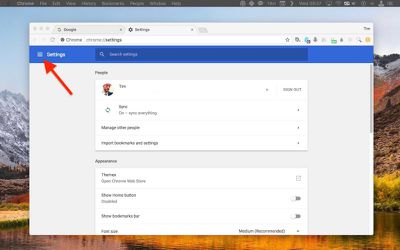
- Click the Settings button in the upper left corner of the tabbed Settings screen.

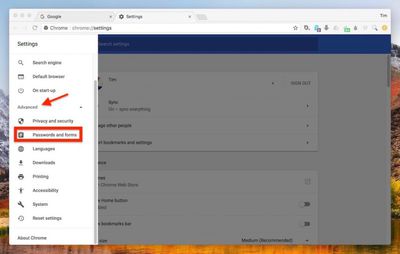
- Click Advanced in the Settings side panel.
- Click Passwords and forms in the dropdown menu.
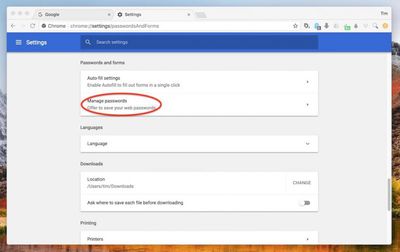
- Click Manage Passwords.
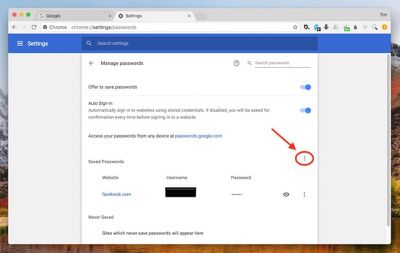
- Click the column of vertical dots at the top-right of your list of Save Passwords.
- Click Export passwords... in the pop-up.
- Acknowledge the pop-up warning dialog by clicking the blue Export Passwords... button.
- Enter your system password if requested to do so.
- In the Export window, choose a location on your Mac to export the CSV file to, and click Save.
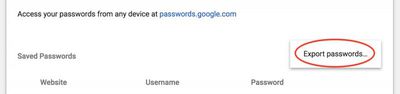
With the login data exported to your computer, open your password manager of choice and look for the import option, usually found in the app's menu bar under File. Once you've imported the data from the CSV file, be sure to delete it, preferably with a file shredding app like Secure Delete or Incinerator.
How to Export Chrome Passwords in iOS
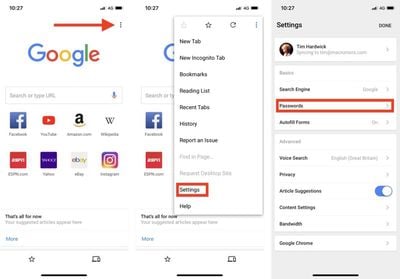
- Launch the Chrome app on your iPhone or iPad.
- Tap the three dots in the upper right of the browser tab.
- Tap Settings in the dropdown menu.
- Tap Passwords.
- Tap Export Passwords....
- Acknowledge the pop-up warning dialog by tapping Export Passwords....
- Using the Share Sheet, choose a secure method (i.e. not Mail) for exporting the CSV file. Tapping Save to Files lets you save it on your iOS device or in iCloud Drive, for example.
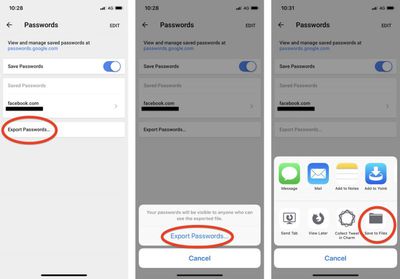
Again, once you've imported the CSV file into your password manager of choice, be sure to delete the file.
















Top Rated Comments
In Google all data saves linked to your account- so I just need to login in the browser via the acc and then always use it- and will have the same data on all devices. This way i have one chrome with all data on my PC at home, on my MacBook and on my android cell phone.