

Apple Watch depends on the iPhone for almost all of its functionality, connecting to and communicating with the iPhone using two methods: Bluetooth and Wi-Fi. If your iPhone and Apple Watch are connected to the same Wi-Fi network (an Apple Watch connection to a known Wi-Fi network is established through the iPhone), they can be as far apart from each other as the Wi-Fi signal will allow.
The two devices are also connected to each other through Bluetooth. Bluetooth requires both devices to be within 30 feet of each other or they will disconnect.
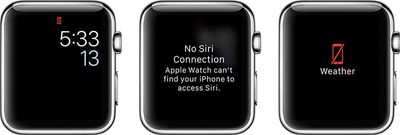
A few days ago, I experienced an issue that showed my iPhone and Apple Watch disconnected, even though they were on the same Wi-Fi network and only about two feet from each other.
While I don't know why it happened, I do know how to fix it. If you run into the same connection problems, give these quick fixes a try.
Airplane Mode
If you see the disconnect icon the first thing you should try is Airplane mode on Apple Watch to end and re-establish a connection.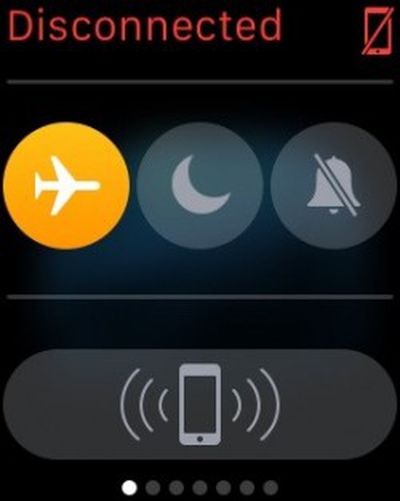
- From the watch face on Apple Watch, swipe up from the bottom of the screen.
- Swipe to the right until you see the Control Center.
- Tap the airplane icon to turn Airplane mode on.
- Tap it again to turn it off.
This should reset Bluetooth so that the devices sync back together.
Bluetooth Reset
If that doesn't work, try turning Bluetooth off on your iPhone and turn it back on again.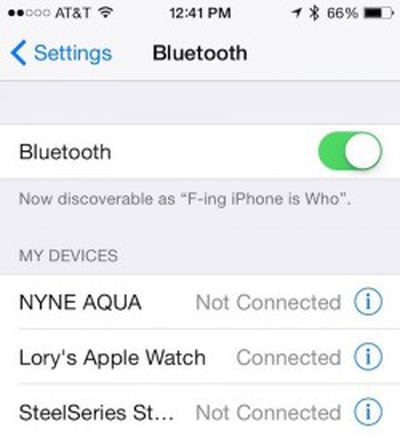
- Open the Settings app on your iPhone.
- Tap Bluetooth.
- Toggle the switch to the Off position.
- Toggle the switch back on.
- Tap Apple Watch to reconnect it with your iPhone.
If those two methods don't work, you can try the trick that fixes a lot of iOS-related problems: turning your device on and off again, which is what ultimately worked for me.
I powered off my iPhone for just a minute by holding down the Lock Screen button until the slide-to-turn-off button appeared. Then, I turned it back on again by holding down the Lock screen button again. Once my iPhone was back on, both devices were connected again.
We've also seen some issues with Apple Watch and iPhone connections working fine over Bluetooth but failing to fall back to Wi-Fi when out of Bluetooth range or Bluetooth on the phone is turned off. One solution that has worked for some involves turning off the Apple Watch, forgetting the current Wi-Fi network in the iPhone's Settings app, re-adding the Wi-Fi network, and turning the Apple Watch back on.
These appears to be isolated issues that probably won't happen to you. However, if they do, don't perform a hard reset or un-pair and repair of your Apple Watch until you've tried the above methods first. It could save you a lot of time and hassle.















Top Rated Comments
----------
It does, but just like everything in reality, things can and do come up sometimes.
Is it strange or hard to ignore things that don't interest you? I mean internet has been like that all the time, and even books and newspapers and news and everything in life--you focus on things that interest you and ignore things that don't.
roll your eyes all you want. i've had :apple:WATCH for three weeks and "it just works."
It just works
:rolleyes: