What's New in iOS 14 Beta 6: Spatial Audio Settings, Maps Splash Screen and More - MacRumors
Skip to Content

What's New in iOS 14 Beta 6: Spatial Audio Settings, Maps Splash Screen and More

Apple today seeded the sixth betas of iOS 14 and iPadOS 14 to developers for testing purposes, updating and refining some of the features that are included in the software.

As the beta testing period goes on, changes get much smaller and less notable. The sixth beta has some minor tweaks and feature additions, but there are no real major changes in the update. We've listed all of what's new in the sixth beta of iOS 14 below.

- Time Picker Design - The time picker interface, available in the Clock app when setting an alarm and other places in iOS, has seen a slight design tweak that adds an orange box around the time to make it more obvious that it can be interacted with to change the time.
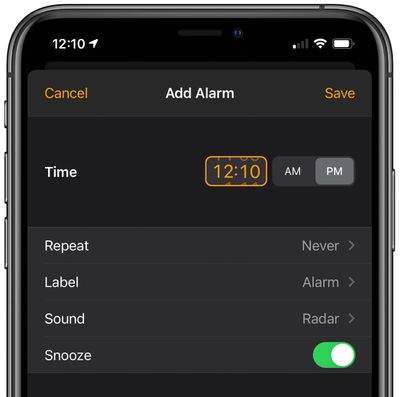
ios14timepicker
- Spatial Audio - Spatial Audio, the feature that brings surround sound to the AirPods Pro, isn't implemented as of yet, but Apple appears to be gearing up to add the feature to iOS 14 and the AirPods Pro. In today's beta, there's a new Spatial Audio toggle available in the Accessibility section of the Settings app. Choose AirPods and then at the bottom of the screen, there's a "Follow iPhone" toggle. Follow iPhone makes audio for supported movies and TV shows sound like it's coming from the phone instead of following head movement. There's also new code and internal messaging related to the spatial audio feature. Though this toggle is available, Spatial Audio is not yet functional.
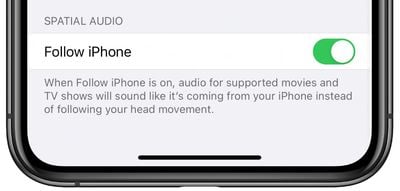
spatialaudioios14
- Maps Splash Screen - There's a new splash screen for the Maps app that lets you know about new features that include cycling directions, curated guides, and support for speed cameras.
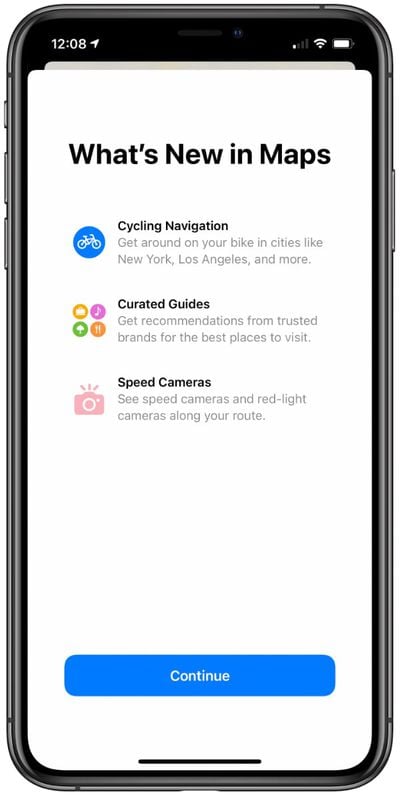
ios14mapssplashscreen
Know of any other changes in ‌iOS 14‌ beta 6 that we didn't list here? Let us know in the comments and we'll add them.

Related Forum: iOS 14

Popular Stories

Apple iCloud Plus expansion hero

iCloud+ Now Includes Apple TV, Apple Arcade, and Curated Apple Music Stations in Over 100 Countries

Tuesday September 15, 2026 1:43 am PDT by
Apple today announced a new subscription initiative that turns paid iCloud+ subscriptions into a broader services bundle in more than 100 countries. In select countries, Apple says every paid iCloud+ plan, including the cheapest 50GB tier, now includes Apple TV and Apple Arcade "at no additional cost," while family sharing extends the storage, TV and Arcade access to up to five people....
Everything New Your iPhone Can Do on iOS 27 Feature 1

50 New Things Your iPhone Can Do in iOS 27 - Out Now!

Monday September 14, 2026 10:48 pm PDT by
Apple released iOS 27 this week, and despite the company's focus this year on refining its flagship operating system and nixing bugs, there are still many additional features to explore, not least of which is Apple's new context-aware Siri, re-tooled for the generative AI era. Which iPhones Support Every iOS 27 Feature? This year's major iPhone software update isn't all about AI, though,...
iOS 27 Icon iPhone

iOS 27 Available Now With These 8 New Features

Monday September 14, 2026 9:00 am PDT by
Update — 10 a.m. Pacific Time: Apple has released iOS 27. During its iPhone 18 Pro and iPhone Duo event last week, Apple announced that iOS 27 will be released widely on Monday, September 14. iOS 27 should be available around 10 a.m. Pacific Time / 1 p.m. Eastern Time today via the Settings app, under General → Software Update. Below, we have highlighted eight new features and...

Top Rated Comments

zorinlynx Avatar
79 months ago
Any speculation on what was wrong with the old time picker UI and why they felt the need to change it?

The old one feels more intuitive and easier to use.
Score: 19 Votes (Like | Disagree)
Krazy_Peanut Avatar
79 months ago
I hate how you have to add time now. I keep fu**ing it up when setting the time within calendar. It really isn’t that user friendly at all.
Score: 13 Votes (Like | Disagree)
AngerDanger Avatar
79 months ago

The time picker interface … has seen a slight design tweak that adds an orange box around the time
Be still my beating heart!
Score: 10 Votes (Like | Disagree)
SkimPappa Avatar
79 months ago

You could not have possibly redesigned the app in a more less user-friendly or intuitive way. I am dead serious. It is probably the worst example of user interface design I’ve ever seen as a 34 year old. They need to fire whoever has been designing their UI lately IMO, because most of it has been awful or questionable.
I hate using the alarm clock now.
Score: 9 Votes (Like | Disagree)
jrodri7 Avatar
79 months ago

So what features do you guys think will be cut ahead of release and pushed off to a later iOS 14.X update? Seems to happen every year now. I think Spatial Audio might be delayed.

I wonder if they are going to allow us to change our default mail and internet browser apps during the Beta.

Edit: Also I believe that "time picker" design was implemented prior to Beta 6.
The orange box around the time picker box is what changed in beta 6. It was not there in beta 5.
Score: 8 Votes (Like | Disagree)
79 months ago

That spatial audio function sounds really weird. Why would I want the sound to appear like it's coming from my phone instead of playing directly into my skull as usual?
I think Spatial audio with movies is just a stepping stone until they release Apple AR glasses, when positioning audio relative to your environment will be a key feature for suspension of belief.
Score: 7 Votes (Like | Disagree)