

Bluetooth and Wi-Fi Aren't Fully Disabled When Toggled Off in Control Center on iOS 11 - MacRumors
Skip to Content

Bluetooth and Wi-Fi Aren't Fully Disabled When Toggled Off in Control Center on iOS 11

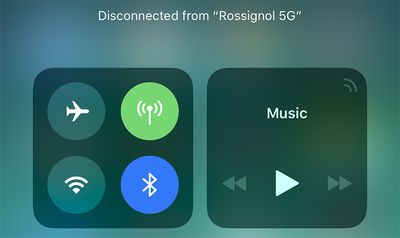
Apple has confirmed that Bluetooth and Wi-Fi are not fully disabled when toggled off in Control Center on iOS 11.
bluetooth wifi control center ios 11
Even when toggled off in Control Center on an iPhone, iPad, or iPod touch running iOS 11 and later, a new support document says Bluetooth and Wi-Fi will continue to be available for AirDrop, AirPlay, Apple Pencil, Apple Watch, Location Services, and Continuity features like Handoff and Instant Hotspot.

Toggling off Bluetooth or Wi-Fi in Control Center only disconnects accessories now, rather than disabling connectivity entirely.

If Bluetooth is turned off, the iOS device can't be connected to any Bluetooth accessories until one of these conditions is met:

  • You turn on Bluetooth in Control Center.
  • You connect to a Bluetooth accessory in Settings > Bluetooth.
  • It's 5 a.m. local time.
  • You restart your device.

While Wi-Fi is disabled, auto-join for any nearby Wi-Fi networks will also be disabled until one of these conditions is met:

  • You turn on Wi-Fi in Control Center.
  • You connect to a Wi-Fi network in Settings > Wi-Fi.
  • You walk or drive to a new location.
  • It's 5 a.m. local time.
  • You restart your device.

Apple made this change in the iOS 11 beta, and it gained more attention after the software was publicly released yesterday.

iOS 11 users can still completely disable Wi-Fi and Bluetooth for all networks and devices by toggling them off in the Settings app.

Apple says users should try to keep Wi-Fi and Bluetooth turned on for the best experience on an iOS device.

(Thanks, FlunkedFlank!)

Related Forum: iOS 11

Popular Stories

Apple iCloud Plus expansion hero

iCloud+ Now Includes Apple TV, Apple Arcade, and Curated Apple Music Stations in Over 100 Countries

Tuesday September 15, 2026 1:43 am PDT by
Apple today announced a new subscription initiative that turns paid iCloud+ subscriptions into a broader services bundle in more than 100 countries. In select countries, Apple says every paid iCloud+ plan, including the cheapest 50GB tier, now includes Apple TV and Apple Arcade "at no additional cost," while family sharing extends the storage, TV and Arcade access to up to five people....
Everything New Your iPhone Can Do on iOS 27 Feature 1

50 New Things Your iPhone Can Do in iOS 27 - Out Now!

Monday September 14, 2026 10:48 pm PDT by
Apple released iOS 27 this week, and despite the company's focus this year on refining its flagship operating system and nixing bugs, there are still many additional features to explore, not least of which is Apple's new context-aware Siri, re-tooled for the generative AI era. Which iPhones Support Every iOS 27 Feature? This year's major iPhone software update isn't all about AI, though,...
iOS 27 Icon iPhone

iOS 27 Available Now With These 8 New Features

Monday September 14, 2026 9:00 am PDT by
Update — 10 a.m. Pacific Time: Apple has released iOS 27. During its iPhone 18 Pro and iPhone Duo event last week, Apple announced that iOS 27 will be released widely on Monday, September 14. iOS 27 should be available around 10 a.m. Pacific Time / 1 p.m. Eastern Time today via the Settings app, under General → Software Update. Below, we have highlighted eight new features and...

Top Rated Comments

djeeyore25 Avatar
117 months ago
This feature is annoying.
Score: 95 Votes (Like | Disagree)
Moonjumper Avatar
117 months ago
The original iPhone famously came without a manual as everything was so obvious. That time is over.
Score: 91 Votes (Like | Disagree)
Mlrollin91 Avatar
117 months ago
Where did this 5am thing come from? How did they decided on 5am?
Score: 68 Votes (Like | Disagree)
ghostface147 Avatar
117 months ago
This annoys me. Add a 3D touch option to turn it off. Thanks.
Score: 42 Votes (Like | Disagree)
117 months ago
it's all about simplicity, right? :rolleyes:
Score: 37 Votes (Like | Disagree)
117 months ago
Can you press and hold one of the shortcuts to open the full settings page in the Settings app yet?
Nope... that's the annoying part.
I'd really want the previous behavior. This "feature" is completely useless for a "pro" user and I though it was a bug for 8 betas.

Also: why not to put a flag into settings to restore the complete switch off instead of this. Apple, wtf are you doing?!
Score: 36 Votes (Like | Disagree)















