Debate Rages Over Whether Apple Music Automatically Deletes Users' Owned Music Collections

Apple Music is the center of a heated debate this week, with involved parties arguing over whether or not the service is deleting Apple Music users' song collections from hard drives after uploading them to iCloud Music Library.

Vellum's James Pinkstone wrote a long complaint on May 4 accusing Apple Music of doing just that. According to Pinkstone, Apple Music deleted 122GB of his original music files after he joined Apple Music and had his music library scanned by Apple to make his personal content available across multiple devices.
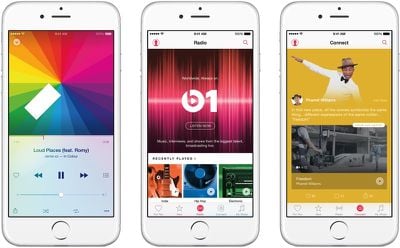
applemusic

When I signed up for Apple Music, iTunes evaluated my massive collection of Mp3s and WAV files, scanned Apple's database for what it considered matches, then removed the original files from my internal hard drive. REMOVED them. Deleted. If Apple Music saw a file it didn't recognize--which came up often, since I'm a freelance composer and have many music files that I created myself--it would then download it to Apple's database, delete it from my hard drive, and serve it back to me when I wanted to listen, just like it would with my other music files it had deleted.

The process Pinkstone describes above is not how Apple Music's matching feature works, according to an in-depth explanation shared by iMore. Apple will match songs and upload original songs by converting them into an appropriate format, but it does not delete without user intervention. iMore theorizes that Pinkstone accidentally wiped his own library by misunderstanding confusing dialog options.
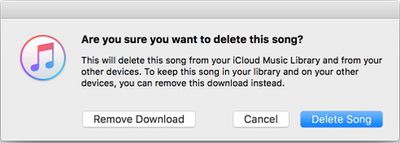
applemusicdelete

Whatever the case, Apple Music was never designed to delete Pinkstone's source library, and it won't delete yours. That's simply not how the service works on your primary Mac. But if you're not aware of how iCloud Music Library stores copies of tracks, you may delete your local copies to save space, thinking you can get them back -- and get screwed as a result.

Confusing the issue further is Pinkstone's conversation with an Apple Support Representative named Amber, who seems to be just as perplexed about how Apple Music functions when merging an existing music library with the Apple Music service.

"The software is functioning as intended," said Amber.
"Wait," I asked, "so it's supposed to delete my personal files from my internal hard drive without asking my permission?"
"Yes," she replied.

Amber's statement is inaccurate according to an Apple Music support document. Original files are never altered and remain available and deleting personal content is not the intended behavior of the service, but it continues to be unclear if Pinkstone and other Apple Music customers who have had content deleted have experienced a bug or mistakenly deleted their content themselves because of a confusing user interface. Multiple Apple Music listeners have disagreed with iMore's point of view and have said they too have experienced music deletions that weren't self-initiated.

Regardless of what actually happened, it's clear that Apple Music is in need of a serious overhaul. Rumors suggest Apple is working on revamping Apple Music and will unveil changes at the Worldwide Developers Conference in June. Hopefully that revamp will extend beyond cosmetic changes to clear up many of the confusing aspects of how music libraries are handled.

Apple Music users with personal music collections should create a backup on an external hard drive, which will ensure no music ever goes missing through user error or an Apple Music bug.

Popular Stories

m5 macbook pro deal

Why You Shouldn't Buy the Next MacBook Pro

Tuesday February 10, 2026 4:27 pm PST by
Apple is planning to launch new MacBook Pro models as soon as early March, but if you can, this is one generation you should skip because there's something much better in the works. We're waiting on 14-inch and 16-inch MacBook Pro models with M5 Pro and M5 Max chips, with few changes other than the processor upgrade. There won't be any tweaks to the design or the display, but later this...
maxresdefault

Apple Shows Off a Key Reason to Upgrade to the iPhone 17

Saturday February 7, 2026 9:26 am PST by
Apple today shared an ad that shows how the upgraded Center Stage front camera on the latest iPhones improves the process of taking a group selfie. "Watch how the new front facing camera on iPhone 17 Pro takes group selfies that automatically expand and rotate as more people come into frame," says Apple. While the ad is focused on the iPhone 17 Pro and iPhone 17 Pro Max, the regular iPhone...
iOS 26

Apple Releases iOS 26.3 and iPadOS 26.3

Wednesday February 11, 2026 10:07 am PST by
Apple today released iOS 26.3 and iPadOS 26.3, the latest updates to the iOS 26 and iPadOS 26 operating systems that came out in September. The new software comes almost two months after Apple released iOS 26.2 and iPadOS 26.2. The new software can be downloaded on eligible iPhones and iPads over-the-air by going to Settings > General > Software Update. According to Apple's release notes, ...
apple wallet drivers license feature iPhone 15 pro

Apple Says These 7 U.S. States Plan to Offer iPhone Driver's Licenses

Monday February 9, 2026 6:24 am PST by
In select U.S. states, residents can add their driver's license or state ID to the Apple Wallet app on the iPhone and Apple Watch, and then use it to display proof of identity or age at select airports and businesses, and in select apps. The feature is currently available in 13 U.S. states and Puerto Rico, and it is expected to launch in at least seven more in the future. To set up the...
Apple Logo Zoomed

Apple Expected to Launch These 10+ Products Over the Coming Months

Tuesday February 10, 2026 6:33 am PST by
It has been a slow start to 2026 for Apple product launches, with only a new AirTag and a special Apple Watch band released so far. We are still waiting for MacBook Pro models with M5 Pro and M5 Max chips, the iPhone 17e, a lower-cost MacBook with an iPhone chip, long-rumored updates to the Apple TV and HomePod mini, and much more. Apple is expected to release/update the following products...

Top Rated Comments

smacrumon Avatar
128 months ago
[SIZE=4]This is far from "it just works". Apple is paid handsomely to make the right design decisions. Unintended consequences should be captured by the design with a logical and thoughtful response provided by the software. The user need not make decisions like this, nor should the consequences be so dire. The user can be confused at each and every step, but it's the design of the software that gets the user from A to B safely. If the software can't do this, the software shouldn't be made available to be used.[/SIZE]
Score: 31 Votes (Like | Disagree)
128 months ago
Here's a thought: Just don't use Apple Music. Stick to Spotify or some other streaming service of your choice. For the music that you already own, just use iTunes to sync whatever you want to listen to to your device as needed.
Score: 28 Votes (Like | Disagree)
DudeDad Avatar
128 months ago
I have a 600GB music library on my Mac (external drive). I joined iTunes Match, and it took 3 days with a fast connection for Apple to upload and convert my library (the songs that it does not have in the iTunes library). All my apple lossless files I ripped myself are still on my external drive, and my onsite and offsite backups. I now use Apple Music and have no issues with losing music.
Score: 20 Votes (Like | Disagree)
Junipr Avatar
128 months ago
If they can automatically install music (U2 album), they can automatically delete music too
Score: 16 Votes (Like | Disagree)
128 months ago
Here's a thought: Just don't use Apple Music. Stick to Spotify or some other streaming service of your choice. For the music that you already own, just use iTunes to sync whatever you want to listen to to your device as needed.
Not paying for either steaming service. Didn't like the idea of leasing music indefinitely.
Score: 15 Votes (Like | Disagree)
128 months ago
Anybody who spent thousands of dollars and umpteen hours to create a music collection,
should spend a few more hours and $ more for a decent back up (better, even 2)

It has never been an issue of how and why storage media fails,
it has only been a question of WHEN!

As for iTunes, I stopped synching libraries long time ago when the messages of what would happen were not clear. Hasn't changed and I only use iTunes now to home share movies through Apple TV.

iTunes is a big bag of hurt (And Apple has many these days)
Score: 15 Votes (Like | Disagree)