

CES 2015: iDevices Announces HomeKit-Enabled 'Switch' Smart Plug - MacRumors
Skip to Content

CES 2015: iDevices Announces HomeKit-Enabled 'Switch' Smart Plug

iDevices today announced its upcoming Switch smart plug, a HomeKit-enabled device that allows users to remotely control a variety of devices around the home. The system takes advantage of the existing iDevices Connected app to give users control over the plug, which plugs into a standard electrical outlet and connects to the home's Wi-Fi network to provide control over a device plugged into Switch.
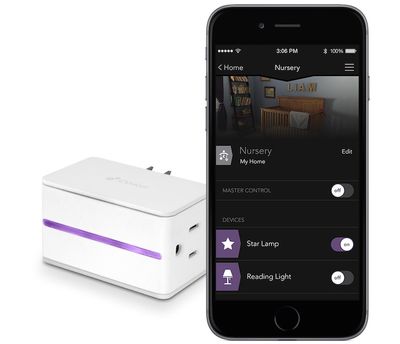
idevices_switch
With HomeKit integration for Switch, users will be able to take advantage of a number of iOS features in the system, including the ability to use Siri to control their devices. Switch requires no dedicated hub device or subscription services, making it simple to set up.

- Siri – Switch’s HomeKit integration provides an easy, secure way to control Switch using Siri on your iPhone, iPad or iPod touch. You can even create your own commands to control multiple home settings. For example, you can automatically turn off lamps connected to your iDevices Switch, lock your doors, close the garage door and set the thermostat to the desired temperature, all with one command.

- Remote Access – iDevices designed a custom IoT cloud for Switch so that users can access their home from wherever they are with no additional hub required.

- Create Custom Events and Schedules – Through the iDevices Connected app, users are able to design custom events (or schedules) that fit their lifestyle. The iDevices Switch has the unique ability to remember events and make sure they happen even when the user is away.


Switch also includes several personalization options including the ability to upload photos from around the home to personalize the control app and make it easier to identify devices, as well as a built-in highlight on the Switch itself with customizable color choices.

Switch launches later in the first half of 2015, and The Verge says the device will cost $49.99.

iHome is also announcing a similar iSP5 SmartPlug smart plug that will launch later this year, but details remain scant at this time. Like iDevices' Switch, iHome's SmartPlug supports HomeKit and is a Wi-Fi enabled plug that allows users to control individual devices without the need for a hub. iHome does tout that multiple SmartPlugs can be grouped together into "scenes" to control various devices together. Pricing and an exact launch timeframe for SmartPlug have yet to be announced.


Popular Stories

Dynamic Island iPhone 18 Pro Feature

11 Reasons to Wait for the iPhone 18 Pro

Monday May 11, 2026 9:01 am PDT by
We're only four months out from the launch of Apple's premium next-generation smartphone lineup, and while we're not expecting a sea change in terms of functionality, there are still several enhancements rumored to be coming to the iPhone 18 Pro and iPhone 18 Pro Max. One thing worth noting is that Apple is reportedly planning a major change to its iPhone release cycle this year, adopting a...
iOS 26

iOS 26.5 Features: Everything New in iOS 26.5

Monday May 11, 2026 5:09 pm PDT by
Apple released iOS 26.5 after a few months of beta testing, and while it doesn't have the Siri features we were hoping for since those are being held until iOS 27, there are a handful of useful changes worth knowing about. Subscribe to the MacRumors YouTube channel for more videos. End-to-End Encryption for RCS Support for end-to-end encryption (E2EE) for RCS messages between iPhone and...
General Apps Reddit Feature

Reddit Starts Blocking Mobile Website, Pushing Users to App Instead

Monday May 11, 2026 6:10 am PDT by
Social network Reddit recently began blocking mobile visitors to its website while pushing them to download the official Reddit app, and it's fair to say that the move is not going down well with users. If you visit reddit.com on your iPhone today, you may see a new popup that can't be dismissed, asking you to "get the app to keep using Reddit." A Reddit spokesperson told Ars Technica...

Top Rated Comments

148 months ago
$50 to automate my reading light? I'll manually flip the switch, thanks.
Score: 22 Votes (Like | Disagree)
148 months ago
Yup, better than:

Get your iPhone out of your pocket.
Unlock iPhone.
Look for HomeKit app.
Open Homekit.
Search for the switch.
Switch on/off.

:eek:

"Hey Siri, turn of the lights in my room." :cool:
Score: 17 Votes (Like | Disagree)
BornAgainMac Avatar
148 months ago
I want the dishes and floors and bathroom cleaned. I'll deal with the lights.
Score: 9 Votes (Like | Disagree)
justperry Avatar
148 months ago
$50 to automate my reading light? I'll manually flip the switch, thanks.

Yup, better than:

Get your iPhone out of your pocket.
Unlock iPhone.
Look for HomeKit app.
Open Homekit.
Search for the switch.
Switch on/off.

:eek:
Score: 9 Votes (Like | Disagree)
148 months ago
What's all this talk about unlocking your phone opening an app and all that?

Swipe down from the lock screen, press the button on the (hopefully existing) widget that corresponds to the switch. Done.
Score: 8 Votes (Like | Disagree)
148 months ago
"Hey Siri, turn of the lights in my room." :cool:

Siri: Sorry, I do not know how to burn oven lights go vroom. Would you like me to search the internet for that? :D
Score: 6 Votes (Like | Disagree)













