

Apple TV 6.1 Software Update Makes Hiding Channels Easier - MacRumors
Skip to Content

Apple TV 6.1 Software Update Makes Hiding Channels Easier

by

Alongside the launch of iOS 7.1, Apple today updated its Apple TV software to version 6.1, adding a much-requested feature that allows users to hide unwanted channel icons from the main screen without needing to access the Parental Controls menu. The hiding feature joins an already existing rearranging feature, letting users further customize their Apple TV home screens as the number of channels has grown significantly in recent months.
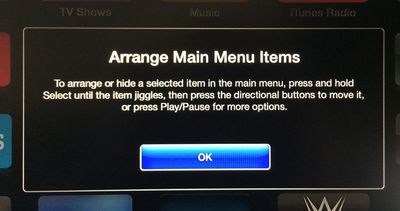
appletvarrange
Arranging or hiding icons can be initiated by selecting an item in the main menu and then pressing and holding on the Select button of the remote control until the icon jiggles, much as how icon rearranging functions within iOS. Icons can be moved using directional buttons, with Play/Pause available for more options.
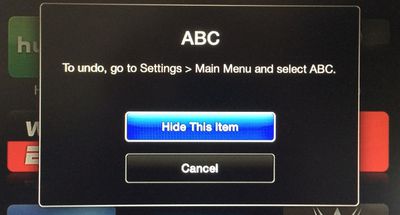
appletvhideitems
The Apple TV software was last updated to version 6.0.1 in October, following the release of the 6.0 software in September, which brought several new features including iTunes Radio and AirPlay from iCloud. Earlier this week, the Apple TV gained a new iTunes Festival channel ahead of SXSW.

Users can download the Apple TV 6.1 software through the Apple TV’s over-the-air update mechanism found in Settings --> General –-> Software Update.

Apple has also updated the Remote app for iOS devices to version 4.2, adding a feature that allows users to browse purchased movies and TV shows within the app and then play them on the Apple TV. The update also includes the ability to control iTunes Radio on the Apple TV and offers bug fixes and stability improvements. [Direct Link]


Top Rated Comments

dearfriendx Avatar
163 months ago
Sweet! An easy way for a grown man to hide 8 Disney channels
Score: 16 Votes (Like | Disagree)
musika Avatar
163 months ago
Add this feature to iOS for iPhone and iPad!
Score: 13 Votes (Like | Disagree)
GenesisST Avatar
163 months ago
Finally! No more annoying posts about not being able to hide apps (when you could, in a convoluted way)!
Score: 11 Votes (Like | Disagree)
Northgrove Avatar
163 months ago
BRB, hiding 80% of all icons...
Score: 8 Votes (Like | Disagree)
163 months ago
Safari feels.... oh sorry, wrong device.
Score: 8 Votes (Like | Disagree)
KylePowers Avatar
163 months ago
Neato.

Now release an App Store and a dope 4th gen AppleTV :D
Score: 5 Votes (Like | Disagree)

Popular Stories

Apple iCloud Plus expansion hero

iCloud+ Now Includes Apple TV, Apple Arcade, and Curated Apple Music Stations in Over 100 Countries

Tuesday September 15, 2026 1:43 am PDT by
Apple today announced a new subscription initiative that turns paid iCloud+ subscriptions into a broader services bundle in more than 100 countries. In select countries, Apple says every paid iCloud+ plan, including the cheapest 50GB tier, now includes Apple TV and Apple Arcade "at no additional cost," while family sharing extends the storage, TV and Arcade access to up to five people....
Everything New Your iPhone Can Do on iOS 27 Feature 1

50 New Things Your iPhone Can Do in iOS 27 - Out Now!

Monday September 14, 2026 10:48 pm PDT by
Apple released iOS 27 this week, and despite the company's focus this year on refining its flagship operating system and nixing bugs, there are still many additional features to explore, not least of which is Apple's new context-aware Siri, re-tooled for the generative AI era. Which iPhones Support Every iOS 27 Feature? This year's major iPhone software update isn't all about AI, though,...
iOS 27 Icon iPhone

iOS 27 Available Now With These 8 New Features

Monday September 14, 2026 9:00 am PDT by
Update — 10 a.m. Pacific Time: Apple has released iOS 27. During its iPhone 18 Pro and iPhone Duo event last week, Apple announced that iOS 27 will be released widely on Monday, September 14. iOS 27 should be available around 10 a.m. Pacific Time / 1 p.m. Eastern Time today via the Settings app, under General → Software Update. Below, we have highlighted eight new features and...













