The first thing many iTunes Match users will want to do upon purchasing the service is to upgrade all their matched music to the 256Kbps. Unfortunately, there is no push-button ability to do this, but it is possible with a few simple steps -- but make sure you've already turned iTunes Match on and it has finished running its initial match.

From Macworld:

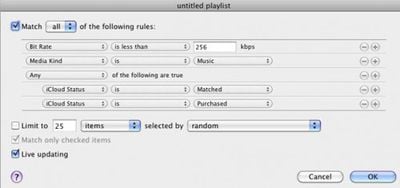
Make a Smart Playlist Create a Smart Playlist with the following attributes:

- Bit Rate is less than 256kbps
- Media Kind is Music
- Any of the following are true: (to create this conditional, option-click on the plus button in the Smart Playlist window) iCloud status is Matched, iCloud status is Purchased.

smartplay3 262656
This creates a list of all your low-bit-rate files that are upgradeable—namely, ones iTunes Match has deemed Matched or Purchased.
Once the smart playlist is created, select all the files by pressing Command-A or going to the Edit Menu and choosing "Select All." Then, press Option-Delete to remove all the songs from iTunes -- however, make sure not to select the box that removes the songs from iCloud. We only want to remove the local, lower quality sound files. When iTunes asks, select to move the files to the trash.

Finally, make sure that all the songs remain selected and right- or control-click any song and choose Download. This will start the long (depending on how many songs there are, possibly very long) downloading process. iTunes only downloads 3 items at one time, but Apple's iTunes servers are generally very responsive.

Top Rated Comments

zorinlynx Avatar
186 months ago
This is RISKY!!! iTunes Match might match a different version of the song you have, particularly in dance music where there might be different mixes of the same song.

You should NOT DO THIS unless you have a FULL backup of your library you can go back to if you suddenly find you have the wrong version of a song you like!

When in doubt, backup. Then make a backup of your backup.
Score: 11 Votes (Like | Disagree)
GroundLoop Avatar
186 months ago
Just make sure you don't delete anything less than 96 kbps! They don't go to iCloud and will be lost forever!

I don't believe that those songs are "matched" and they should not be in the smart playlist to begin with.

GL
Score: 8 Votes (Like | Disagree)
thelatinist Avatar
186 months ago
I don't believe that those songs are "matched" and they should not be in the smart playlist to begin with.

GL
And yet I had a song stuck on "Waiting" that showed up in the smart playlist. No clue why.

I hope that Apple will allow us to try to match the unmatched songs in our libraries again as the matching algorithm improves. As it is I've got a number of albums which partially matched depute having been ripped from CD together.


I have many playlists in iTunes. Surely this method will remove them from the tracks playlist :eek::confused:
No, the tracks should stay on all your playlists with cloud download links which will go away once you've re-downloaded everything. At least that's what happened on mine.
Score: 7 Votes (Like | Disagree)
ajcadoo Avatar
186 months ago
Thank God for Smart Playlists!
Score: 6 Votes (Like | Disagree)
186 months ago
Wow, this is awesome! Thanks MR and Macworld. I had over 4400 songs that it needs to redownload...
Score: 5 Votes (Like | Disagree)
iphone1105 Avatar
186 months ago


Does anyone know what happens to the songs if you cancel Match? With the originals deleted, are you able to download the songs to your computer one last time?

dude you should search and read, this has been covered.....relentlessly
Score: 4 Votes (Like | Disagree)

Popular Stories

m5 macbook pro deal

Why You Shouldn't Buy the Next MacBook Pro

Tuesday February 10, 2026 4:27 pm PST by
Apple is planning to launch new MacBook Pro models as soon as early March, but if you can, this is one generation you should skip because there's something much better in the works. We're waiting on 14-inch and 16-inch MacBook Pro models with M5 Pro and M5 Max chips, with few changes other than the processor upgrade. There won't be any tweaks to the design or the display, but later this...
iOS 26

Apple Releases iOS 26.3 and iPadOS 26.3

Wednesday February 11, 2026 10:07 am PST by
Apple today released iOS 26.3 and iPadOS 26.3, the latest updates to the iOS 26 and iPadOS 26 operating systems that came out in September. The new software comes almost two months after Apple released iOS 26.2 and iPadOS 26.2. The new software can be downloaded on eligible iPhones and iPads over-the-air by going to Settings > General > Software Update. According to Apple's release notes, ...
Apple Logo Zoomed

Apple Expected to Launch These 10+ Products Over the Coming Months

Tuesday February 10, 2026 6:33 am PST by
It has been a slow start to 2026 for Apple product launches, with only a new AirTag and a special Apple Watch band released so far. We are still waiting for MacBook Pro models with M5 Pro and M5 Max chips, the iPhone 17e, a lower-cost MacBook with an iPhone chip, long-rumored updates to the Apple TV and HomePod mini, and much more. Apple is expected to release/update the following products...
iPhone 16e Bottom Crop

Apple Reportedly Unveiling a New iPhone Next Week

Tuesday February 10, 2026 1:51 pm PST by
Apple plans to announce the iPhone 17e on Thursday, February 19, according to Macwelt, the German equivalent of Macworld. The report said the iPhone 17e will be announced in a press release on the Apple Newsroom website, so do not expect an event for this device specifically. The iPhone 17e will be a spec-bumped successor to the iPhone 16e. Rumors claim the device will have four key...
Apple Logo Black

Apple Acquires New Database App

Wednesday February 11, 2026 6:44 am PST by
Apple acquired Canadian graph database company Kuzu last year, it has emerged. The acquisition, spotted by AppleInsider, was completed in October 2025 for an undisclosed sum. The company's website was subsequently taken down and its Github repository was archived, as is commonplace for Apple acquisitions. Kuzu was "an embedded graph database built for query speed, scalability, and easy of ...