How To Put Newsstand In A Folder - MacRumors
Skip to Content

How To Put Newsstand In A Folder

by

newsstand1
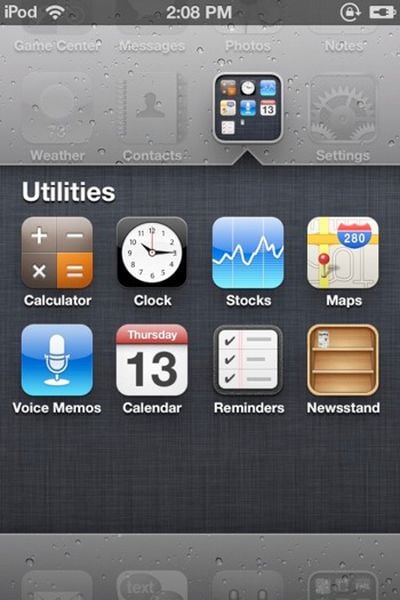
The Coding Massacre has discovered a trick to force the iOS 5 Newsstand into a folder. The only reason to do this is to tuck Newsstand away and hide it -- users who have performed this trick discovered that opening Newsstand when its in a folder crashes Springboard, the main home screen on the iPhone.

Simply follow these steps:

- Take two apps and go to create a folder
- The second the apps are in the folder and it’s doing the folder creation animation, drag Newsstand into the folder
- As long as you’re quick enough Newsstand will go into the folder!

If you wish to use Newsstand at some point, simply remove it from the folder and place it back on the main level.


Top Rated Comments

firestarter Avatar
195 months ago
Message to Apple: Please allow us to turn off features like this that we don't want/need!
Score: 42 Votes (Like | Disagree)
Icaras Avatar
195 months ago


A folder within a folder.

Inception? :D
Score: 19 Votes (Like | Disagree)
195 months ago
It's not just Newsstand, it's any folder.

Score: 19 Votes (Like | Disagree)
pellets007 Avatar
195 months ago


A folder within a folder.

Score: 17 Votes (Like | Disagree)
195 months ago
Message to Apple: Please allow us to turn off features like this that we don't want/need!
Agreed. Like contacts... it seems redundant to have a contacts app if I can access my contacts from the phone app.
Score: 12 Votes (Like | Disagree)
195 months ago
Wow, i cant believe my trick actually got posted on MacRumors. This is awesome :3 And yes, on the source link i did mention folder within a folder is possible using this method, but its not very practical, since it crashes everytime you try to open the folder. But if your trying to hide a folder from like your friends or something, its a perfect solution. Funny thing is, i tried this trick on an iOS4 device.. It worked. Its been an iOS glitch for over a year and i hadn't realized it till now xD
Score: 11 Votes (Like | Disagree)

Popular Stories

Apple iCloud Plus expansion hero

iCloud+ Now Includes Apple TV, Apple Arcade, and Curated Apple Music Stations in Over 100 Countries

Tuesday September 15, 2026 1:43 am PDT by
Apple today announced a new subscription initiative that turns paid iCloud+ subscriptions into a broader services bundle in more than 100 countries. In select countries, Apple says every paid iCloud+ plan, including the cheapest 50GB tier, now includes Apple TV and Apple Arcade "at no additional cost," while family sharing extends the storage, TV and Arcade access to up to five people....
Everything New Your iPhone Can Do on iOS 27 Feature 1

50 New Things Your iPhone Can Do in iOS 27 - Out Now!

Monday September 14, 2026 10:48 pm PDT by
Apple released iOS 27 this week, and despite the company's focus this year on refining its flagship operating system and nixing bugs, there are still many additional features to explore, not least of which is Apple's new context-aware Siri, re-tooled for the generative AI era. Which iPhones Support Every iOS 27 Feature? This year's major iPhone software update isn't all about AI, though,...
iOS 27 Icon iPhone

iOS 27 Available Now With These 8 New Features

Monday September 14, 2026 9:00 am PDT by
Update — 10 a.m. Pacific Time: Apple has released iOS 27. During its iPhone 18 Pro and iPhone Duo event last week, Apple announced that iOS 27 will be released widely on Monday, September 14. iOS 27 should be available around 10 a.m. Pacific Time / 1 p.m. Eastern Time today via the Settings app, under General → Software Update. Below, we have highlighted eight new features and...