'AirPort Utility' for iOS 5 Hits the App Store
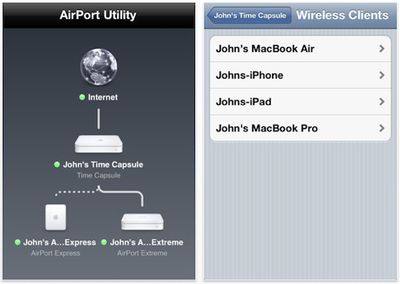
Apple continues to make preparations for today's iOS 5 launch with the release of its new AirPort Utility [App Store] app to allow users to administer AirPort Extreme, AirPort Express, and Time Capsule base stations.
Use AirPort Utility to manage your Wi-Fi network and AirPort base stations, including AirPort Express, AirPort Extreme, and TimeCapsule – right from your iPad, iPhone, ir iPod touch. See a graphical overview of your Wi-Fi network and devices. Change base station and network settings, or manage advanced features such as security modes, wireless channels, and more. AirPort Utility works with all Apple 802.11n Wi-Fi base stations, including AirPort Express, AirPort Extreme, and Time Capsule.
Apple appeared to originally be preparing to integrate AirPort Utility directly into iOS 5, but apparently decided to break the functionality out into a separate app. Users entering the Wi-Fi portion of the Settings app in iOS 5 will be offered the ability to download the app to manage their networks. AirPort Utility is a universal app compatible with iPhone, iPad, and iPod touch, and requires iOS 5.
Popular Stories
Apple is launching five new products on Friday, November 6, following pre-orders that opened last week, including its first touchscreen MacBook Pro models.
The following new products will be available from today:
iPad mini with OLED display and A20 Pro chip
iMac with M6 chip
14-inch MacBook Pro with M6 chip
14-inch MacBook Pro with OLED touchscreen
16-inch MacBook Pro with OLED...
Apple today announced that its Festival Place store in Basingstoke, England will be permanently closing on Saturday, November 21.
Apple Festival Place
Apple had already announced that the store would be closing in November, but it had not provided the public with a specific date until now.
Apple's store inside the Festival Place shopping center opened in 2011, so it had a 15-year run....
YouTuber Marques Brownlee has switched back to the iPhone 18 Pro after spending more than two weeks with the iPhone Duo. On the latest episode of the "Waveform" podcast, Brownlee said he missed the Pro's cameras and Face ID. He added that he would miss opening the iPhone Duo, using it in portrait, and reading on the larger screen.
Despite strong initial demand for Apple's first foldable...