

Skip to Content

How To Disable Lion's 'Resume' Feature

by

lionrestore
Resume is one of the main new features to OS X Lion, one taken directly from iOS:

Now apps you close will reopen right where you left off, so you never have to start from scratch again. And when you install software updates, you no longer need to save your work, close your apps, and spend valuable time setting everything up again. With Resume, you can restart your Mac and return to what you were doing — with all your apps in the places where you left them.

Now, this feature might be all well and good, but what if you want your Mac to behave like it did in Snow Leopard? Resume can be easily disabled, but the option is fairly hidden.

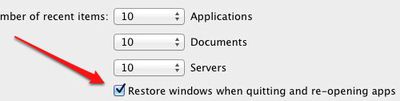
Head to System Preferences and select the General tab. At the bottom of that page is a checkbox labeled "Restore windows when quitting and re-opening apps." If you uncheck that, your apps will continue to behave as they did in Snow Leopard.

Hat tip OS X Daily.

Top Rated Comments

ovrlrd Avatar
191 months ago
This is the best tip and I am surprised it's not mentioned in the article:

Hate the new resume feature and how you end up with a bunch of old windows/tabs open when you launch Safari, QuickTime, or any app that uses Lion's new resume feature?

Well a simple three button keyboard shortcut will save you all the trouble:

⌥ + ⌘ + Q
(thats Option + Command + Q)

Simply press these keys when you want to quit an app and the next time you open it, the last opened windows/tabs will not be resumed and you will start with a fresh app.
Score: 14 Votes (Like | Disagree)
191 months ago


Resume is a really good feature, just not while using Safari.

I hope when you say that you're referring to 'online banking' ;)
Score: 13 Votes (Like | Disagree)
GenesisST Avatar
191 months ago
I hope when you say that you're referring to 'online banking' ;)

There's private browsing for 'online banking', so your wife doesn't your weird tastes in "bank accounts"... :D
Score: 10 Votes (Like | Disagree)
Tronic Avatar
191 months ago
I wish you could pick and choose what apps to use this for. There are certain programs I like to start fresh with whenever I close them. Ie firefox, iTunes, Photoshop.
Score: 9 Votes (Like | Disagree)
191 months ago
How is that "fairly hidden"?
Score: 8 Votes (Like | Disagree)
191 months ago
am i the only one that likes this feature?
Score: 6 Votes (Like | Disagree)

Popular Stories

MacBook Neo Feature Pastel 1

First MacBook Neo Benchmarks Are In: Here's How It Compares to the M1 MacBook Air

Thursday March 5, 2026 4:07 pm PST by
Benchmarks for the new MacBook Neo surfaced today, and unsurprisingly, CPU performance is almost identical to the iPhone 16 Pro. The MacBook Neo uses the same 6-core A18 Pro chip that was first introduced in the iPhone 16 Pro, but it has one fewer GPU core. The MacBook Neo earned a single-core score of 3461 and a multi-core score of 8668, along with a Metal score of 31286. Here's how the...
imac video apple feature

Apple Unveils Seven New Products

Friday March 6, 2026 11:48 am PST by
Apple this week unveiled seven products, including an iPhone 17e, an iPad Air with the M4 chip, updated MacBook Air and MacBook Pro models, a new Studio Display, a higher-end Studio Display XDR, and an all-new MacBook Neo that starts at just $599. iPhone 17e features the same overall design as the iPhone 16e, but it gains Apple's A19 chip, MagSafe for magnetic wireless charging and magnetic...
Apple MacBook Pro M4 hero

Apple Planning 'MacBook Ultra' With Touchscreen and Higher Price

Sunday March 8, 2026 8:05 am PDT by
Apple is planning to launch an all-new "MacBook Ultra" model this year, featuring an OLED display, touchscreen, and a higher price point, Bloomberg's Mark Gurman reports. Gurman revealed the information in his latest "Power On" newsletter. While Apple has been widely expected to launch new M6-series MacBook Pro models with OLED displays, touchscreen functionality, and a new, thinner design...














