

Got a tip for us? Share it...

Apple's Site Again Hints at iWork for iPhone

Earlier this month, a screenshot highlighting the iPhone's ability with iOS 4 to open attachments in external applications hinted at the possibility of a release of an iPhone version of Apple's iWork productivity suite. The screenshot was quickly replaced with one mentioning iBooks instead of Keynote, although many continued to wonder whether it was a marketing mistake or a product development revelation.
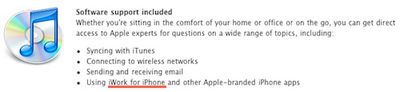

A new discovery on Apple's site again points to the possibility of iWork for iPhone. The mention comes on a number of Apple's international online stores, including sites in Canada, the UK, and Australia. When ordering unlocked iPhones through Apple's online stores in these countries, customers are presented with the option of adding AppleCare to their orders. Clicking the "Learn more" link for AppleCare on the ordering page reveals additional information on the program, with a section devoted to software support specifically mentioning "Using iWork for iPhone and other Apple-branded iPhone apps" as a topic for which users can receive assistance.

A release of iWork for iPhone would not be a tremendous surprise given that Apple has already created iPad versions of Keynote, Pages and Numbers, although the iPhone's smaller screen size would undoubtedly introduce additional challenges for content creation and editing.

Top Rated Comments

(View all)

21 months ago
Would it come with a magnifying glass???:D
Rating: 0 Positives / 0 Negatives
21 months ago
Cool in a pinch I guess, but the screen is pretty small to be practical.
Rating: 0 Positives / 0 Negatives
21 months ago
I can not see word processing on an iPhone. I personally would never be typing a paper for school one my phone...
Rating: 0 Positives / 0 Negatives
21 months ago
Owing to the screen size, I wouldn't use it unless in an emergency.
Rating: 0 Positives / 0 Negatives
21 months ago
You would have to be a serious masochist to want to type a paper on a 3.5 inch screen.
Rating: 0 Positives / 0 Negatives
21 months ago
The readme for iOS 4 also claimed that the iPhone 3G was getting "tap-to-focus for video". Whereas it got neither tap-to-focus nor video.

"tap-to-focus for video" had a double-asterisk next to it, which, when you looked at the bottom, said that ** applied to iPhone 4, iPhone 3GS, and iPhone 3. A single asterisk applied to just 3GS and 4. So, really, the feature should have had a single asterisk, like multitasking, and they goofed.

While it would be marginally useful to have iWork on the iPhone, I don't know how well it would work on the pre-iP4 480x360 screens. (And even with the higher resolution, the small physical screen size would limit its usability on the iP4.)
Rating: 0 Positives / 0 Negatives
21 months ago
I could definitely see it being useful for small changes to existing documents while you're on the go. They better not attempt to resell it to those who already bought the iPad versions. Universal or bust!
Rating: 0 Positives / 0 Negatives
21 months ago
Then again, I, personally, never thought video editing would be practical on a 3.5" screen until I saw iMovie for iPhone.

I say Apple could surprise us with a brilliant iWork interface.
Rating: 0 Positives / 0 Negatives
21 months ago
I want to see Apple perfect iPad content creation first.... then worry about the iPhone. I can only speak for myself, but you couldn't pay me to create content on the iPhone. I mean, just allow the iPhone to read iWork content. I think that would be good enough. Do we really need to edit it as well? So we are now creating content on our iMacs, MacBook Pros, iPads, iPhones? I just don't want Apple getting carried away now and wasting time and money developing for a platform that is less than ideal for such content creation.

If I have an iPad, I probably have an iPhone, and if I have both, I probably have a Mac as well.
Rating: 0 Positives / 0 Negatives
21 months ago
I hope it comes soon. Though the iPhone screen may be small, I would probably end up using it occasionally.
Rating: 0 Positives / 0 Negatives

[ Read All Comments ]















