


Got a tip for us? Share it...

MWSF 2010 Demo: Ten One Design's Inklet


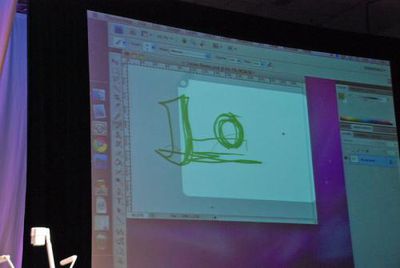
Ten One Design showed off their Inklet trackpad tablet software for the Mac. Inklet is a $25 application that allows you to use your MacBook, Pro and Air multi-touch trackpad as a pressure sensitive drawing tablet. The drawing area is shown in the second screen and can be resized (pinch/zoom) and panned around (two finger drag). This video shows it in action:


Macworld hosted a DEMO presentation showing off 6 of the "best of" products being shown at the expo.


Top Rated Comments

(View all)

26 months ago
Wow this is awesome :eek:
Rating: 0 Positives / 0 Negatives
26 months ago

... allows you to use your MacBook, Pro and Air multi-touch tablet as a pressure sensitive drawing tablet.


This made no sense to me at all. Until I watched the video and realised they mean using the *laptop touchpad* as a drawing tablet.

Bad writeup!
Rating: 0 Positives / 0 Negatives
26 months ago
I love it
Rating: 0 Positives / 0 Negatives
26 months ago
It seems like it would be nice to have, but $25 is a bit too high IMO since I already have a tablet. I don't always have it with me though, so I'll probably wait until a sale or a MacHeist bundle type promotion.

Really cool idea. I assume the pressure sensitivity comes from the surface area of the finger touching the surface? Less = lighter, more = heavier, etc.
Rating: 0 Positives / 0 Negatives
26 months ago
They have had this software for like 2 or 3 months now...
Rating: 0 Positives / 0 Negatives
26 months ago

Really cool idea. I assume the pressure sensitivity comes from the surface area of the finger touching the surface? Less = lighter, more = heavier, etc.


Actually, the video shows them using a stylus. Perhaps the MBP touchpad has "real" pressure sensitivity built in (the surface area trick has been known to work on old trackpads too).
Rating: 0 Positives / 0 Negatives
26 months ago

It seems like it would be nice to have, but $25 is a bit too high IMO since I already have a tablet. I don't always have it with me though, so I'll probably wait until a sale or a MacHeist bundle type promotion.

Really cool idea. I assume the pressure sensitivity comes from the surface area of the finger touching the surface? Less = lighter, more = heavier, etc.


I'm pretty sure you have to use the Pogo Stylus to get the pressure sensitivity.
Rating: 0 Positives / 0 Negatives
26 months ago
It looks to me that the stylus has a soft tip. As more pressure is applied, the area in contact with track pad is increased.
Rating: 0 Positives / 0 Negatives
26 months ago
I've been trying the DEMO of this app. and it works much better on the video demo than it does in real life situations.

This app. definitely goes in the right direction and I laud them for that. However, it still has a long way to go. As such, the asking price of $25. is not consonant with the product's value in its current iteration. As it is now, they should not be asking for more than $12 IMHO.

My 2¢
Rating: 0 Positives / 0 Negatives
26 months ago
Just bought it with a Pogo Sketch for €45 including shipping to Ireland :D

Great little tool for when away from the Cintiq and need to touch up a few bits with my MBP.


Oh yeah. You need the stylus for pressure sensitivity according to the site, besides you really need a stylus for proper tablet/trackpad editing in stuff like Sketch book pro, or Photoshop anyway so the $10 extra for the Pogo Stylus is worth it. Besides I can use it on my iPhone too when I'm wearing gloves...
Rating: 0 Positives / 0 Negatives

[ Read All Comments ]













