To create a custom ringtone 1. Set up a cycle region that covers the area you wish to use in the GarageBand song. Note: This area must be 40 seconds or less in length. 2. Once the cycle area has been set, choose Share > Send Ringtone to iTunes.
Requirements - GarageBand 4.1.1 or later - iTunes 7.5 or later - iPhone with software version 1.1.2 or later
Apple introduced Ringtone support into iTunes and the iPhone in September of this year. The feature, however, was originally limited to converting iTunes Store songs at the price of $.99/each. A number of workarounds and 3rd party utilities have since appeared to fill the gap for free custom iTunes ringtones, but each iTunes revision has caused issues with these tools.
Thursday September 17, 2026 4:17 am PDT by Tim Hardwick
In iOS 27, available now, CarPlay gets its biggest update in years, but some features depend on what type of car you have rather than your iPhone model. Some of the biggest additions won't do anything in the vast majority of vehicles on the road today. Here's how the new features pan out.
Works in Any CarPlay Vehicle
Custom widgets: In iOS 27, CarPlay is no longer limited to Apple's handful ...
Wednesday September 16, 2026 8:53 am PDT by Joe Rossignol
The new Apple Watch Series 12 and Apple Watch Ultra 4 have hardware changes that allow for faster charging, but you will need to use the new version of the Apple Watch Magnetic Fast Charger included in the box in order to achieve this boost. If you need extra ones for your own charging stands or travel or so forth, Apple released the new version of the charger on its online store last week, with...
Wednesday September 16, 2026 1:32 pm PDT by Juli Clover
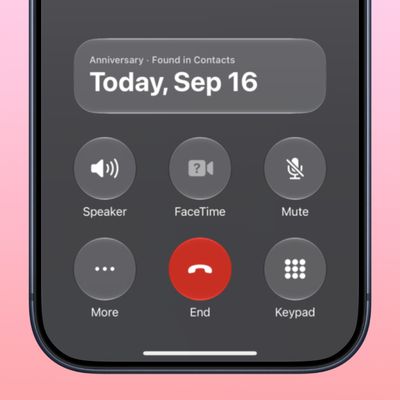
The iOS 27.2 beta that Apple released today adds a feature that reminds you it's your anniversary when you call someone, as long as you've added the date in the Contacts app.
On the date of your anniversary, when you go to call the person, you'll see a reminder that it's an important day so you don't forget to say something. The anniversary alert uses Call Context, a feature Apple added in...
Apple's first foldable iPhone, with a book-style design featuring a 5.5-inch outer display and a 7.6-inch inner display with a minimal crease down the middle.