

Exclusive Preview: Ambrosia Software's WireTap Studio
MacRumors has been given the opportunity to provide an exclusive preview of an unreleased and unannounced application from Ambrosia Software called WireTap Studio, due for first release later this month.
While WireTap Studio shares a name with WireTap Pro, it is an entirely new application with a broader range and appeal. The major feature of the original WireTap Pro application was the ability to selectively record audio from any Mac application and save it to a variety of formats. Uses ranged from recording Internet radio to ripping audio from DVDs. WireTap Studio promises to provide a more complete solution with tools to record, edit and manage your audio. A few standout features should make it particularly compelling for both amateurs and professionals who distribute audio over the Internet.
As a preview, we are simply touching on the major features of the application, and this shouldn't be seen as a review. I do think that the most compelling feature is the patent pending LivePreview technology, so if you read nothing else you should at least watch the video below. Beyond that, lossless editing and lossless format selection are also very attractive features.The Controller
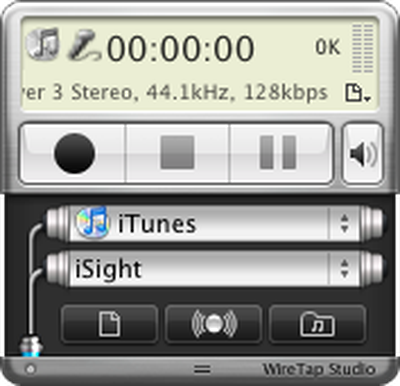
The WireTap Studio Controller provides you with an "always on top" window that gives you access to many of the features of the application in a compact interface:
Controller
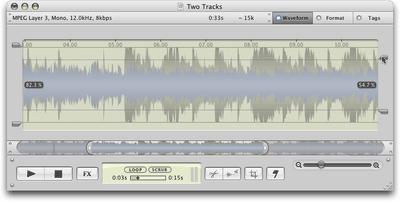
As you can see, two different sources can be selected. Either source can be an active application or an audio input device: microphone, iSight, Line In, etc. For example, podcasters can record from their microphone as well as a second application such as iTunes or Skype. This means you can perform over-the-Internet audio interviews or lay down a background track to your voice. Most useful, perhaps, is that each track can later be normalized independently, allowing you to calibrate the volumes to match:
Normalize volume on two different tracks
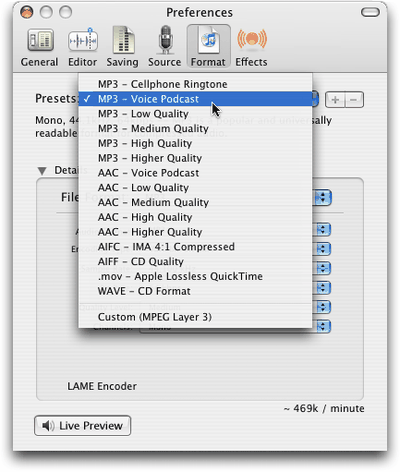
Audio can of course be recorded and exported in a variety of formats and qualities, including MP3, AAC, AIFC, AIFF, Apple Lossless and WAVE formats. You can choose from presets or specify exact parameters:
Preset formats
The Library
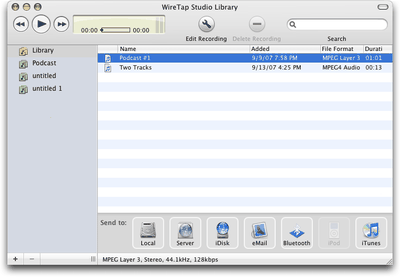
Recordings are organized in an iTunes-like library view, which can be organized into folders and searched by keywords/tags. Audio recordings can be distributed conveniently, simply by dragging the title to the appropriate icon on the bottom "Send to" toolbar. Ambrosia tells us that they will be including "iPhone" as an export option before the application is released.
Library view
LivePreview
Now, on to the good stuff. One challenge for audio distribution on the Internet is finding the sweet spot between file size and audio quality. To address this, WireTap Studio provides a new feature called LivePreview. LivePreview gives you realtime conversion of the source audio into any supported format. This allows you to preview encoding quality on the fly.
Describing LivePreview doesn't quite capture the ease and utility of the feature, so I encourage you to watch this QuickTime movie of LivePreview in action:
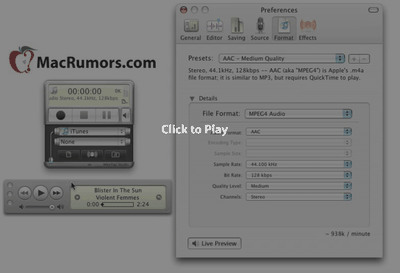
Audio starts about 25 seconds into the video. The audio source is a CD.
Lossless Recording and Editing
While changing audio encoding on the fly is nice, getting to change your mind is even better. Once audio has been recorded, the audio encoding decision that you make is not set in stone.
Under the hood, WireTap Studio records everything in a full-quality lossless format. For instance, if you use WireTap Studio to record off of a CD into a 64kbps MP3 file, you can later (days, weeks, etc...) change the format to 128kbps (or 320kbps) MP3 and see the expected gain in quality. The full uncompressed audio remains available to the software "behind the scenes" to allow format conversions to work as expected.
Another related feature is lossless editing. No matter how many changes you've made to the recording, you can always go back to the original recording (at the highest quality). This feature is similar to how Apple's iPhoto and Aperture applications work on digital photos, keeping the originals intact while you apply edits over time.
Other Features
- Timed recordings with Pre-recording actions and Post-recording actions
- Scheduled recordings with auto wake from sleep and auto power on for the computer
- Support for Audio Unit plug-ins
- Automatically Crop Leading and Trailing Silence
- Mark and Crop at Silence
WireTap Studio will be offered as shareware and is expected to be released later this month with upgrade options for existing WireTap Pro customers.

While WireTap Studio shares a name with WireTap Pro, it is an entirely new application with a broader range and appeal. The major feature of the original WireTap Pro application was the ability to selectively record audio from any Mac application and save it to a variety of formats. Uses ranged from recording Internet radio to ripping audio from DVDs. WireTap Studio promises to provide a more complete solution with tools to record, edit and manage your audio. A few standout features should make it particularly compelling for both amateurs and professionals who distribute audio over the Internet.
As a preview, we are simply touching on the major features of the application, and this shouldn't be seen as a review. I do think that the most compelling feature is the patent pending LivePreview technology, so if you read nothing else you should at least watch the video below. Beyond that, lossless editing and lossless format selection are also very attractive features.The Controller
The WireTap Studio Controller provides you with an "always on top" window that gives you access to many of the features of the application in a compact interface:
Controller
As you can see, two different sources can be selected. Either source can be an active application or an audio input device: microphone, iSight, Line In, etc. For example, podcasters can record from their microphone as well as a second application such as iTunes or Skype. This means you can perform over-the-Internet audio interviews or lay down a background track to your voice. Most useful, perhaps, is that each track can later be normalized independently, allowing you to calibrate the volumes to match:
Normalize volume on two different tracks
Audio can of course be recorded and exported in a variety of formats and qualities, including MP3, AAC, AIFC, AIFF, Apple Lossless and WAVE formats. You can choose from presets or specify exact parameters:
Preset formats
The Library
Recordings are organized in an iTunes-like library view, which can be organized into folders and searched by keywords/tags. Audio recordings can be distributed conveniently, simply by dragging the title to the appropriate icon on the bottom "Send to" toolbar. Ambrosia tells us that they will be including "iPhone" as an export option before the application is released.
Library view
LivePreview
Now, on to the good stuff. One challenge for audio distribution on the Internet is finding the sweet spot between file size and audio quality. To address this, WireTap Studio provides a new feature called LivePreview. LivePreview gives you realtime conversion of the source audio into any supported format. This allows you to preview encoding quality on the fly.
Describing LivePreview doesn't quite capture the ease and utility of the feature, so I encourage you to watch this QuickTime movie of LivePreview in action:
Lossless Recording and Editing
While changing audio encoding on the fly is nice, getting to change your mind is even better. Once audio has been recorded, the audio encoding decision that you make is not set in stone.
Under the hood, WireTap Studio records everything in a full-quality lossless format. For instance, if you use WireTap Studio to record off of a CD into a 64kbps MP3 file, you can later (days, weeks, etc...) change the format to 128kbps (or 320kbps) MP3 and see the expected gain in quality. The full uncompressed audio remains available to the software "behind the scenes" to allow format conversions to work as expected.
Another related feature is lossless editing. No matter how many changes you've made to the recording, you can always go back to the original recording (at the highest quality). This feature is similar to how Apple's iPhoto and Aperture applications work on digital photos, keeping the originals intact while you apply edits over time.
Other Features
- Timed recordings with Pre-recording actions and Post-recording actions
- Scheduled recordings with auto wake from sleep and auto power on for the computer
- Support for Audio Unit plug-ins
- Automatically Crop Leading and Trailing Silence
- Mark and Crop at Silence
WireTap Studio will be offered as shareware and is expected to be released later this month with upgrade options for existing WireTap Pro customers.

Top Rated Comments
(View all)58 months ago
To calm the suspicious, this is not an advertisement, and we receive no direct financial gain for this content. Instead, it's to expand a little bit of our content in a meaningful and appropriate way.
You can direct general content feedback to this feedback thread, but please keep this news thread on-topic. Any off-topic posts there will be deleted.
This thread is for discussion of the preview of WireTap Studio article.
You can direct general content feedback to this feedback thread, but please keep this news thread on-topic. Any off-topic posts there will be deleted.
This thread is for discussion of the preview of WireTap Studio article.
58 months ago
I once used WireTap to record Jack Johnson's KFOG radio concert. Awesome and free. Then I think they started charging for it, and it became less awesome since I only had one type of use for it, and they took away the "free" part of it.
58 months ago
So if I understand this correctly if you can hear it on your mac wiretap will let it be saved in different formats. If so bring it on. I don't think $19.00 is to high a price too pay for this.
58 months ago
This is very impressive, I've always wanted something like this for recording songs off of internet radio. Granted, not enough to look on my own :o, so it may be out there with other programs, but this looks like it's very easy to use, and that Live Preview and the Lossless options are awesome!
58 months ago
[admin edit: General feedback copied to feedback thread]
As far as the post itself goes, the app sounds exactly like a combination of Rogue Amoeba's Audio Hijack and Fission. I don't see anything featured there that sell it over the two, but then the screenshots are hardly a complete picture of the app. I have no particular loyalty to Rogue Amoeba, but then I have to admit I dislike Ambrosia. I have tried out their shareware apps from time to time, but none of them have remained on my hard drive let alone merited purchase.
I do appreciate Snapz Pro, though. It is a well-designed app and as such seems to have found an excellent niche. The only problem is, it's a very expensive niche. There is no way I would spend $70 on a piece of software for video screenshots - $30, maybe.
I apologize for my bluntness and tendency to rant about the company. I do appreciate that Ambrosia's developer is an active member of the community and will read this, and I assure you my comments are not personal. Put it that based on my past experience with the company I don't have high hopes for this app, but the screenshots look moderately promising and I look forward to trying out a demo. And I would suggest that you price it below the $50 price point of Rogue Amoeba's Fission/Audio Hijack combo deal - most of Ambrosia's products, as touched on by Abstract, are rather overpriced.
[/wordy rant]
As far as the post itself goes, the app sounds exactly like a combination of Rogue Amoeba's Audio Hijack and Fission. I don't see anything featured there that sell it over the two, but then the screenshots are hardly a complete picture of the app. I have no particular loyalty to Rogue Amoeba, but then I have to admit I dislike Ambrosia. I have tried out their shareware apps from time to time, but none of them have remained on my hard drive let alone merited purchase.
I do appreciate Snapz Pro, though. It is a well-designed app and as such seems to have found an excellent niche. The only problem is, it's a very expensive niche. There is no way I would spend $70 on a piece of software for video screenshots - $30, maybe.
I apologize for my bluntness and tendency to rant about the company. I do appreciate that Ambrosia's developer is an active member of the community and will read this, and I assure you my comments are not personal. Put it that based on my past experience with the company I don't have high hopes for this app, but the screenshots look moderately promising and I look forward to trying out a demo. And I would suggest that you price it below the $50 price point of Rogue Amoeba's Fission/Audio Hijack combo deal - most of Ambrosia's products, as touched on by Abstract, are rather overpriced.
[/wordy rant]
58 months ago
I'd like to hear about comparisons, pro's and con's with WireTap & AudioHiJack.
Check out iShowU, it's similar to SnapzPro and is right around $30. Great Application.
I do appreciate Snapz Pro, though. It is a well-designed app and as such seems to have found an excellent niche. The only problem is, it's a very expensive niche. There is no way I would spend $70 on a piece of software for video screenshots - $30, maybe.
Check out iShowU, it's similar to SnapzPro and is right around $30. Great Application.
58 months ago
guys, just get audiohijack.
its freeware
it captures amazing sound quality from any specific app on your mac or any input
its freeware
it captures amazing sound quality from any specific app on your mac or any input
58 months ago
So, how well will this work with converting audio on youtube music videos? There are some songs that I really like on youtube that aren't released yet. I used zamzar to convert the files to audio but the quality obviously turned out to be a lot worse. Would this be a better way to convert youtube to audio?
58 months ago
guys, just get audiohijack.
its freeware
it captures amazing sound quality from any specific app on your mac or any input
Are you talking about Audio HiJack from Roque Amoeba? It's $16, not free. And the Pro version is $32. Details here.
58 months ago
guys, just get audiohijack.
its freeware
It is? versiontracker has it listed as shareware with a price.
[ Read All Comments ]


Analytics firm Chitika today released a report showing that by its metrics iOS has now surpassed OS X in overall web traffic share in the United States. Chitika's methodology involves an analysis...
One of the most frequent reasons for an iPhone to go on a trip to the Apple Store's Genius Bar is because of water damage. Typically, a water damaged iPhone can be replaced for a flat $199...
TheVerge's Joshua Topolsky summarizes the iPad 3 casing findings reported earlier today, but also adds his own sources regarding some details of the iPad 3.
Image from RepairLabs
As...
Last July, Apple discontinued the white MacBook from its consumer lineup, pushing consumers toward the company's popular MacBook Air line or the 13-inch MacBook Pro. The company didn't kill...
Popular iPhone Twitter client Tweetbot has finally arrived on the iPad, with a user interface instantly familiar to any current Tweetbot user. Designed for the Twitter power-user, Tweetbot packs a...













