

Last month, Ring began taking pre-orders for its Ring Alarm home security system, and today it begins shipping. I've had a chance to spend some time with Ring Alarm, and I've found it's an easy-to-use security system that's useful with or without professional monitoring.
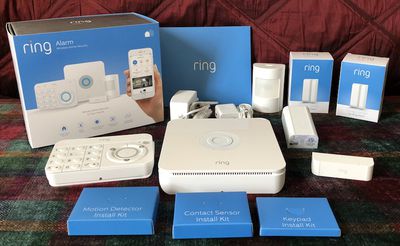
Priced at $199 for the base kit, the Ring Alarm comes with a base station, a separate keypad, one motion detector, one contact sensor for a door or window, and a range extender to help make sure all of your Ring accessories remain connected to your network.
Additional contact sensors ($20), motion detectors ($30), keypads ($50), and range extenders ($25) can be purchased separately to expand your system. Other Ring Alarm accessories including a flood and freeze sensor as well as a smoke and CO listener to integrate your existing detectors into the Ring ecosystem are coming later.
I'm a Ring user, with a Video Doorbell 2 and a Floodlight Cam already installed at my house, but I don't have any prior experience with home security systems. That made for a bit of a learning curve just in terms of figuring out how I wanted to set things up and remembering to arm/disarm the system at the appropriate times. But Ring Alarm is intended as a simple do-it-yourself system that makes it easy for even novice users to get up and running, so perhaps I'm an ideal candidate for testing things out.
Setup
Setup of Ring Alarm is quite simple, and the whole process only took me about half an hour, although I used the included adhesive strips to mount sensors and didn't mount the base station and keypad to my walls, so it would have taken a bit longer if I'd gone all-in with hardware mounting options. I may yet do that once I've decided for sure where I want to put the various components.
Regardless of whether you go the adhesive or hardware route, Ring provides everything you need right in the box, with installation kits for each component of the system conveniently boxed and labeled to make it easy to find what you need. All you'll need if you want to use the included screws and anchors for hardware mounting are a screwdriver and a drill.
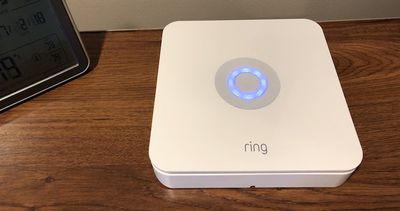
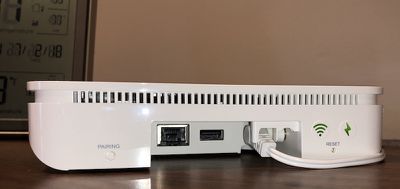
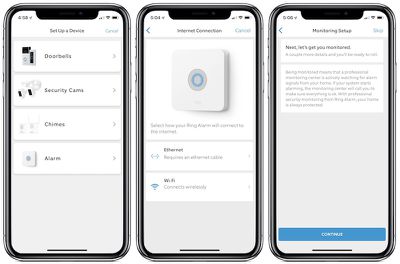
The first step of installation involves simply plugging in the base station and hitting a pairing button on the back to start configuring the system via Bluetooth. The Ring app, which is getting a significant redesign to provide quick access to Ring Alarm and improve functionality for other Ring products, walks you through the entire setup process step-by-step, so it's hard to mess things up. Once the base station starts up, you can connect to your home network via either Wi-Fi or Ethernet, and I elected to use Wi-Fi to minimize wires.
With the base station up and running, I was able to verify the address associated with my Ring account, enter my closest cross street to assist emergency responders, and add emergency contacts to be notified if the alarm trips. Adding a verbal password to authenticate my account when Ring calls due to an alarm event was the last step, and I was good to go with the 30-day free trial of professional monitoring. After the free trial, professional monitoring costs $10 per month or $100 per year, and it also includes cloud video storage for any other Ring camera and doorbell products you have in your home.
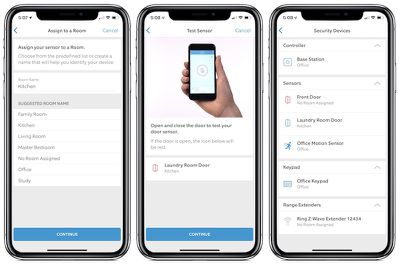
Once the base station is online and your account set up for monitoring, the rest of the devices in your starter kit are automatically identified in the Ring app and you can set them up one by one. With each one, you can provide a name and room location to help identify the accessories in notifications and the app. With the keypad, you'll set up an access code that lets you arm and disarm the alarm, and you can set up different codes for different people. As you set up each motion detector and contact sensor, the app will have you test each one to ensure that they're probably detecting events.
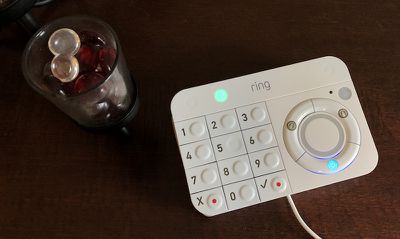
The keypad includes a reversible mount that can be attached to a wall as a bracket or flipped over and used as a tabletop stand at a slight incline. Ring includes a micro-USB cable and an adapter to power the keypad, but it also has an internal rechargeable battery that can last up to a year depending on your settings, so it's handy to be able to set it up wirelessly on a table or mounted to the wall, only recharging periodically as needed.
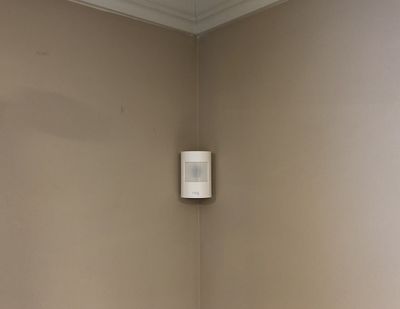
Ring suggests that the motion detector should be placed in a location with a good view of a high-traffic area likely to be passed by any intruders, with the detector placed about seven feet off the floor. Motion detection sensitivity can be adjusted in the app if you find you're getting too many false alerts such as from a pet. The detector can be mounted using either adhesive or included screws that attach a bracket to the wall for easy removal of the detector itself.
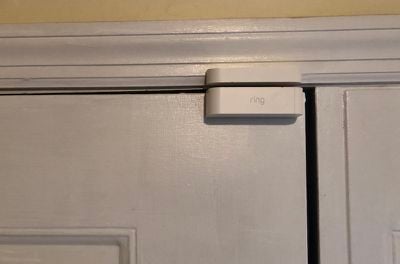
Contact sensors come in two pieces, a large sensor part and a smaller magnet part, and both pieces must be aligned within 1/4 inch of each other when the door or window is closed. One piece goes on the door or window while the second part goes on the frame, but it doesn't matter which part goes on which side. When the door or window is opened, the two parts are separated, and the sensor triggers.
The Ring Alarm also includes a Z-Wave range extender that helps make sure everything in your alarm system is able to reach your network, but I found I did not need the extender.
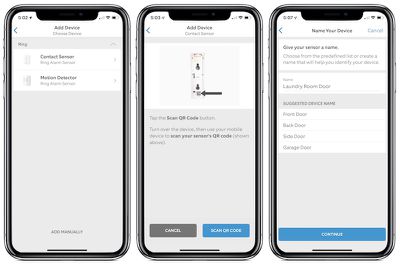
Standalone accessories can be added to your setup in a similar manner to those included in the base kit, although you'll have to scan a QR code on the back of them using the Ring app in order to get them to appear. From there, it's the same process of choosing the sensor type, naming it, assigning it to a room, and testing to make sure it's registering properly.
Operation
With everything up and running, you're ready to go. Ring Alarm supports three modes: disarmed, home, and away. Disarmed mode, unsurprisingly, will not activate the alarm if any of your sensors are tripped. The base station will chirp by default when a door is opened in disarmed mode, for example, but these chirps can also be turned off.
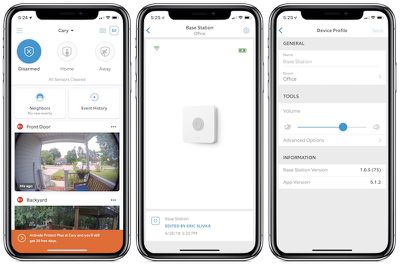
In home mode, the default setup is for motion sensors to be ignored while door/window sensors will trigger the alarm to activate. This mode is obviously intended for when you're moving around inside your home but want to be protected if someone enters the house through a monitored door or window. Finally, away mode arms all sensors so that any opened monitored door or window or movement within the house will set off the alarm.
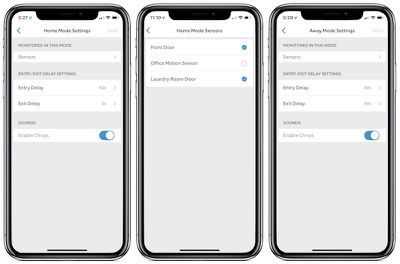
With home and away modes, you're able to customize entry and exit delays up to two minutes before the alarm goes off, giving you enough time to leave the house after arming and enter the access code on the keypad upon returning home. When an event is detected, you'll get a notification on your phone, and the Ring app will display a countdown giving you the configured period of time to disarm the system before the alarm goes off. If you fail to enter the keypad code or disarm from the Ring app within the allowed time, the base station will emit a very loud beeping sound, and if you are signed up for professional monitoring, authorities will be notified.
Ring Alarm supports a sensor bypass mode, which allows you to arm the system even if one of the sensors is currently tripped. For example, if you want to arm the alarm but leave a monitored window open, the system will notify you upon arming that one of the sensors is currently faulted. You can choose to close the window to clear the sensor or bypass it, which will arm the system but not monitor that sensor until the next disarm/arm cycle.
Monitoring
As part of the Ring Protect Plus plan priced at $10 per month or $100 per year, you'll get 24/7 professional monitoring on your Ring Alarm. When your sensors trip and the base station sounds an alarm, after 30 seconds it also sends a signal to Ring's central monitoring system. A support agent will attempt to call you to see if everything is okay, and then tries your emergency contacts if you can't be reached.
Either you or one of your emergency contacts must give the correct verbal password in order to confirm authorization to deal with the alarm situation. Emergency responders will be dispatched if you give the incorrect password, request a response after giving the correct password, or if you and your emergency contacts can not be reached.
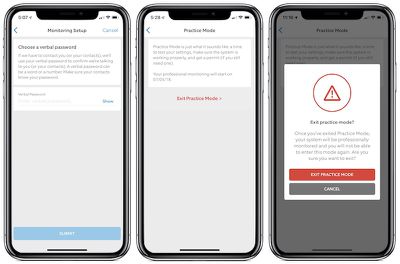
Ring does include a practice mode with its professional monitoring, and by default for the first seven days after activating your account authorities will not be contacted if the alarm is triggered. This gives you time to learn how your system works without burdening authorities with false alarms. If you wish to exit practice mode before the seven-day period is up, you can do that, but Ring will warn you in the app about the importance of making sure everything is working properly before you do that.
Some jurisdictions require permits for monitored alarm systems, and Ring will guide you based on the address where you're using Ring Alarm. In some areas, Ring can obtain the permit on your behalf once you pay required fees, but in other jurisdictions you'll need to handle it on your own. Either way, once you have your permit, you can enter the permit number and expiration date in the Ring app to make all parties aware that your system is properly registered. My town does not require permits, so I did not need to go through this step.
As part of professional monitoring, the Ring Protect Plus plan also includes cellular backup connectivity, allowing your base station to contact the monitoring center even if your internet goes down. The base station itself also includes a battery backup that lasts up to 24 hours, so you're even protected if the power goes out.
Beyond monitoring, Ring Protect Plus includes cloud video recording for an unlimited number of Ring cameras and doorbells at your home, an extended warranty for as long as you're on the plan, and a 10 percent discount on Ring doorbells and cameras.
If you don't want professional monitoring, you can forego the Protect Plus plan. You'll still get notifications of alarm events and the base station can sound an alarm, but there will be no connection to a monitoring center and thus no automatic deployment of emergency responders.
Wrap-up
Ring's entire philosophy revolves around making technologically advanced home security simple to install and use without being intimidating, and Ring Alarm certainly achieves that.
What's also important about Ring Alarm is that it sets the stage for future products and integration. The Ring app already serves as the hub to integrate the alarm system with the company's existing cameras and doorbells, but it's easy to see how the alarm can also become the hardware hub for new capabilities and products from Ring and eventually third-party vendors.
Many alarm systems integrate base station and keypad functionalities into a single unit, but Ring has made an interesting decision to separate the two, recognizing that these don't always need to be colocated. The base station serves best located centrally in the home in order to optimize wireless connections to all sensors and to centralize the alarm sound, while the keypad is likely to be placed close to the main point of entry for easy access.
At $199, the Ring Alarm base kit is a relatively low-cost, do-it-yourself way to get into home security, although you'll likely want to spring for a few additional sensors to fill out coverage of your home. Ring's professional monitoring plan is also quite competitive, and overall Ring Alarm looks like a well thought out system.
The one thing Apple fans might miss is HomeKit support, which isn't included in Ring Alarm and still has yet to come several other Ring products for which HomeKit support was promised long ago. Ring declined to offer any new details on its HomeKit plans, but acknowledged that customers continue to request it and promised the company is still working on it.
Note: Ring provided the Ring Alarm base kit and two additional contact sensors to MacRumors free of charge for the purposes of this review. No other compensation was received.



















Top Rated Comments
We went with SimpliSafe instead. I don't have any experience with their newest version, but their "version 2" which is still for sale has been flawless for the ~4-5 years we have had it. Never a false alarm and more importantly, NEVER a "can't connect to base station ..." error. It is $15/month for monitoring through SimpliSafe, but I'll gladly pay $5 more a month for reliability.
SimpliSafe also uses a wireless cell phone connection (Verizon in our case) with a built in battery, not wifi. So your alarm will work even if power or wifi is out.