

Sleep tracking has become a popular activity for many people, since the practice can result in major benefits to your daily wellbeing, restfulness, stress levels, and mental health. There are many ways you can go about tracking your sleep, and Apple itself sells a few products that can help, including the Apple Watch (paired with a third-party app like Pillow) and the Beddit Sleep Monitor.
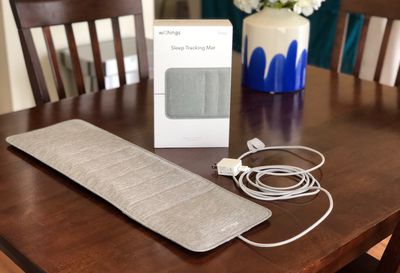
Withings' solution to sleep tracking is similar to Beddit's, coming in the shape of a slim mat that you place beneath you as you sleep to automatically track and assess your sleep quality, heart rate, snoring, duration, and more. With the latest update, Withings Sleep can even detect breathing disturbances, and later this year the device will add an ability to detect the symptoms of sleep apnea.
Design and Setup
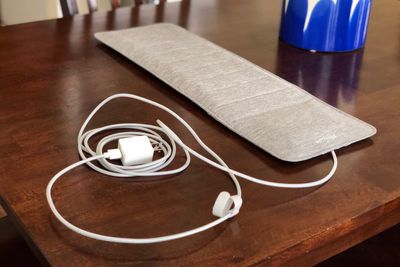
Withings Sleep is a 25" x 7.5" mat that has a straightforward design with a very nice and premium fabric finish, which matches well with the braided power cord. In reality, you don't ever really see Withings Sleep once it's placed where it needs to go, but it's easy to see that the company strived to make a nice-looking product despite the fact that it's not something everyone coming over to your house will see.
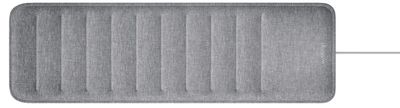
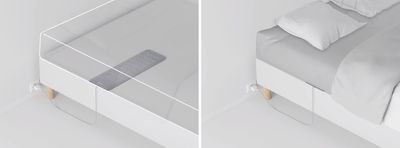
Withings Sleep is also super easy to install: you simply unroll the mat from the box, plug in the included USB power adapter into an outlet near your bed, and place Withings Sleep underneath your mattress at chest level.
This is a crucial difference between Withings and Beddit's sleep trackers, since the Beddit Sleep Monitor sits right below your fitted sheet and above the mattress. With Withings, I never noticed the mat while I slept, and some nights I even forgot that it was tracking my sleep. I just placed the mat under my mattress the first night, and guided the power cord through slats in my bed, and I haven't touched it or needed to adjust it since.
Once it's plugged in, Withings Sleep goes through a brief pairing process with the iOS Health Mate app [Direct Link]. If you're new to Health Mate, which is Withings' iOS hub app, you'll have to create an account with an email address, password, name, sex, birthdate, weight, height and consent to allowing Withings to process your personal data (which in this case could include your heart rate, sleep cycles, snoring episodes, etc). Withings says it does not sell your data, and only uses anonymized data to develop new products and services and sometimes conduct data studies.
After creating an account, Withings Sleep will calibrate and once that quick process is done the mat will be ready to track your sleep. This is done automatically, so the first time you sit in your bed to fall asleep, the sensors in the mat will begin accumulating data.
What Data is Tracked in the App?
Withings Sleep tracks the following nighttime data:
- Sleep duration (this includes the time it takes you to fall asleep and wake up)
- Sleep cycles (deep, light, and REM phases)
- Continuous and average heart-rate
- Snoring duration
- Sleep quality score
- Sleep regularity
- Breathing disturbances
Each morning, this data is presented to you on the main "Timeline" tab of the Health Mate app, which also encompasses your daily steps (if you want to sync to Health), average heart rate, and your currently enrolled Wellness Programs. When you tap on a night you'll see your Sleep Score (Withings uses a basic 100-point scale), a chart of your sleep cycles, and all of the other tracked data in little squares.
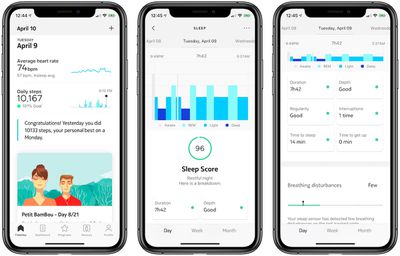
Each of these can be tapped on to expand the data and to learn some more about each metric. Overall, Withings has taken a no-frills approach to presenting sleep data in its app, and I really appreciated how simple it was to understand my previous night's sleep. Over time you're also able to combine all of your data into weekly and monthly charts to really get a wide glimpse at your sleep habits.
Of course, the question is whether this data is helpful and can it actively change your sleep cycles for the better? In the weeks I've used Withings Sleep, I've found these data snippets to be fun and interesting recaps of my nighttime routines rather than integral stats that I could use to change any negative habits.
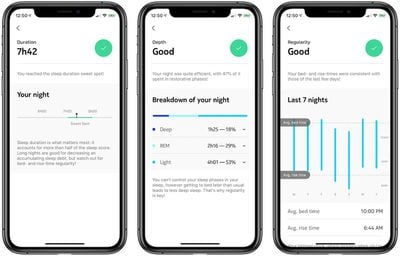
According to Withings Sleep, I don't have too many bad sleep habits. My Sleep Score consistently remained above 90 and -- as I could have told anyone before owning a high-tech sleep mat -- my worst area was always the time it took me to fall asleep. Withings's Wellness Programs told me to stop staring at my iPhone before bed and to dim my lights, but these are already things I do (or I at least have Night Shift enabled), and I've long since accepted the fact that I simply will always need to be in bed about 30 minutes before the time I actually want to be asleep.
Withings Sleep didn't really change that for me or provide new solutions to the issue, and there were a few problems with some of its findings, particularly with the time to get up stat. For every single day I've used the mat, it's placed my time to get up at zero minutes. I consistently set my alarm to go off earlier than I intend to actually get out of bed (another no-no according to Withings), which could be anywhere from 10 to 20 minutes. This is definitely a nuanced statistic that the mat missed every morning.
On the positive side of things, my time to sleep was always between 20 to 30 minutes (the app wanted me to be under 20), and on one particularly tiring day where I couldn't wait to get into bed, Withings Sleep tracked me at falling asleep in seven minutes, which proved very accurate.
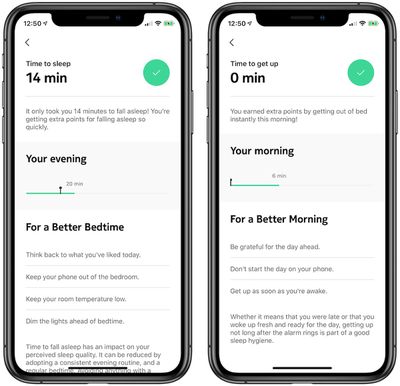
Other stats that feed into your overall Sleep Score include interruptions, which was accurate save one or two nights when I know I was awoken by a loud noise before falling back asleep, which the mat didn't detect. The mat also tracked my breathing disturbances over the course of a few weeks, which was an interesting chart to watch evolve and the feature should become a bit more impactful when full sleep apnea detection is added later in 2019. Lastly, the snoring and heart rate tracking appeared consistently accurate throughout my testing, no matter what position I laid in at night.
As to the sleep cycle tracking, it's a bit harder for me to determine whether or not Withings' middle-of-the-night tracking is on point or not. Each night followed an expected falling asleep pattern: I first entered light sleep for about an hour to 90 minutes, fell into deep sleep for another 45 minutes, and then entered the Rapid Eye Movement (REM) stage. The pattern wasn't exactly the same every night, but Withings Sleep said I entered the REM stage about four to six times every night, which is accurate for the average adult.
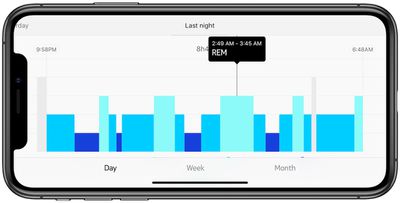
Some irregularities appeared in the early morning and waking hours, where sometimes the mat indicated I was in REM sleep the minute I woke up and got out of bed. Most mornings I lightly doze in the minutes before I actually get up, and am definitely not in any sort of deep sleep.
After using Withings Sleep for a few weeks, I began questioning the method Withings was using to add up to my overall Sleep Score when I received a few 100, so-called "perfect nights." I had solid sleep duration, good depth, no interruptions, and decent regularity and time to sleep numbers, which is all good, but these nights didn't particularly stand out to me as exceptionally great or anywhere near perfect.
Withings says that it grants Sleep Scores that even reach above 100 in some instances, depending on the quality of each parameter on each night. Some parameters (like sleep duration) hold more weight than others, so if you get an extra lengthy night of sleep that's full of poorer, light sleep periods, you could still reach a near-perfect night. This exact example happened to me one night, resulting in a score that definitely did not mirror my fatigue the next day.
Wellness Programs
On the middle tab of the Health Mate app, Withings encourages users to participate in its Wellness Programs, which are daily activities that are built to help you meditate, sleep better, lose weight, learn more about cardiovascular health, track a pregnancy, and even compare activity stats with friends. I joined the mindfulness and sleep programs early on, and was largely disappointed with this aspect of the company's overarching health goals.
While the tab still has a sleek design like the rest of the app, the programs themselves feel hollow. Particularly the "Meditate with Petit BamBou" class that I joined for a few days, which has every traditional mindfulness exercise like body scans, posture work, anchored breathing, etc. I've been a big fan of Calm and have found some success with that app, and comparatively Withings' version is very anemic.
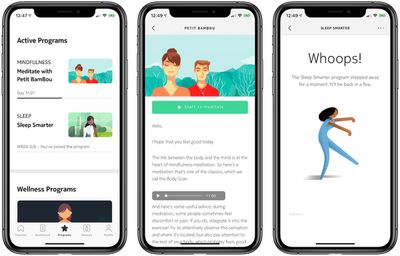
You can look at a schedule of the 21-day class, start a session, read about what you'll be doing that day, and then hit play. The UI in each daily session is poor and makes these additions feel like an afterthought, and the voice over work is a bit stilted and not relaxed enough. The classes will also move forward each day no matter if you've completed them or not, making it particularly confusing to keep track of your progress. On the plus side, I like that Withings adds in offbeat meditation days, like some that have a brief story to read or an animated video to watch.
The other Wellness Programs offer essentially the same idea as the mindfulness one, but focused on other topics. Unfortunately, there is some bugginess to this area of the app, as I consistently could not continue my Sleep Smarter program and got an error message every day.
IFTTT Automation
With Withings Sleep, you can connect the mat to other IFTTT automation platforms and activate lights or thermostats just by getting in to or out of your bed. Keeping with other aspects of Withings Sleep, this is something that I've been enjoying during my time with the mat and it works quite well, but it felt a bit like a superfluous addition to my daily schedule.
That's especially true of the Nest Learning Thermostat IFTTT integration. With this automation, I set my Nest thermostat to drop to 65 degrees when I got into bed at night, and then to rise to 72 degrees when I got out of bed in the morning. This is something that is entirely unnecessary because the Nest Learning Thermostat's main draw is that it learns your schedule and automates a weekly routine for you, so even before Withings Sleep my thermostat was dropping around 9 p.m. every night and rising at 6 a.m. every morning.
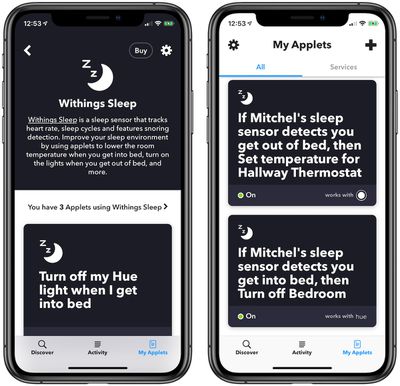
The Philips Hue automation offers a bit more utility. Before Withings Sleep, when I would get into bed I would activate my Goodnight HomeKit scene via a nearby HomePod, which turns off all my Philips Hue lights and turns on my bedside fan. Thanks to the Withings Sleep IFTTT automation, I was able to turn off my lights simply by getting into bed (there is about a 10 second delay), so I didn't need to speak to turn off the lights. However, I did still need to use HomeKit to activate the iDevices smart plug connected to my fan.
This slightly expedited my bedtime routine, but not in such a way that it felt like I couldn't just go back to using Siri. There were also some nights where I wanted to get into bed and keep the lights on to read, and although you can set boundaries to activate the IFTTT scene only during certain times of the day, the feature lacks any more nuanced settings.
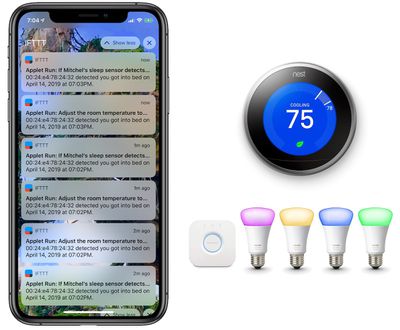
Lastly, there were some bugs with the IFTTT features of the Withings Sleep, although they were rare. One evening, I began receiving frequent notifications on my iPhone that my IFTTT applet had been activated, turning off my lights and dialing down my Nest. I was on my couch at the time and no one was in my bed, and the notifications became so frequent (about 20 within 5 minutes), that I eventually had to temporarily turn off each applet in the IFTTT app. I turned them on again the next day and things went back to normal.
Bottom Line
Withings Sleep is a worthy addition to the growing sleep tracker market, and it earns a lot of points for its unobtrusive placement, clear-cut app statistics, and mostly accurate sleep data. For someone who wants to take an active approach to tracking their sleep, Withings is a good place to start, but there are caveats.
Some of the mat's data readouts aren't consistent, the app can be buggy, its Wellness Programs aren't very deep, and the various IFTTT automations are more of an interesting afterthought rather than a selling point. For $99.95 ($50 cheaper than Apple's $149.95 Beddit device), these downsides are easier to deal with, especially because the company has already committed to ongoing updates for the mat, like the sleep apnea detection add-on coming later in the year.
How to Buy
Withings Sleep is available to buy for $99.95 on the company's website and on Amazon.
Note: Withings provided MacRumors with a Withings Sleep mat for the purposes of this review. No other compensation was received. MacRumors is also an affiliate partner with Amazon, so you click a link and make a purchase, we may receive a small payment, which helps us keep the site running.














Top Rated Comments
I don't feel like I need one of these because I already know I sleep horribly. I don't need to buy something to tell me that, lol.
This seems to be a problem with a lot of these sleep tracking systems. They all seem to be built on the assumption of tracking a single person. Adding a spouse, and/or insistent pet seems to throw them off.
If this is an accurate statement, and there's not any weasel-wording in the details, good for them - this is not the usual position most companies take anymore.
I recently got diagnosed with sleep apnea, which is neither here nor there except that the company which provides my BiPap breathing machine, ResMed, reserves the right to turn a profit from my sleep data! Their machines have a built-in 3G network card which auto-reports your data to their servers every morning. It can be used in conjunction with their app, which gives you a general progress report... but their terms of use also claim the right to re-use the data.
I'm just getting used to the device, so I've left its network functionality enabled while I'm learning to use it. But shortly the thing is going to find itself in Airplane Mode, where it will remain until the end of its days.