

The Logi Circle, a home monitoring camera, is one of the first products Logitech is selling under its new Logi brand, which it's using for devices that are part of the Internet of Things. The Logi Circle is a palm-sized connected camera designed to let its users monitor their home and interact with pets, children, and other people when away.
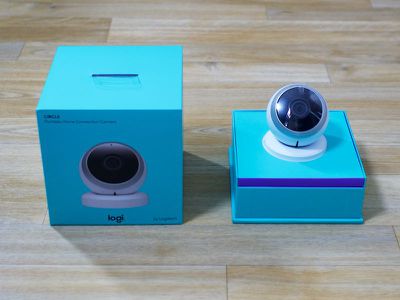
I've been using the Logi Circle in my home for the past few weeks to get a feel for how it works and how it compares to some of the other camera options on the market, and the major takeaway is that the Logi Circle is not a home security device. It's not meant to notify you of intruders, but it is a way to connect to the home and those inside of it at all times.
Hardware
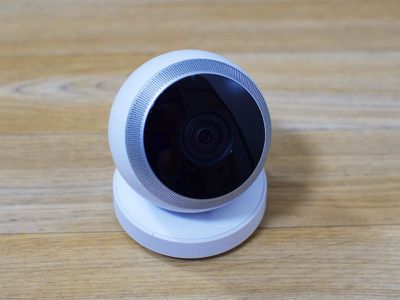
The Logi Circle camera has an attractive, simple design that looks like a modernized version of a classic webcam. Made of black or white plastic, it's about the size of a tennis ball, with a circular base that fits magnetically into an included charging stand. A lot of companies don't pay attention to minor product details like cords, but that's not true of Logitech.
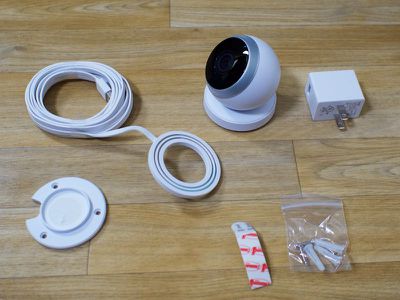
Attached to the charging stand is a flat white USB cord that's able to plug into the included power brick or any other USB-based charger. I don't know about most people, but I hate ugly, bulky black cords that stand out, so it was nice to see an unobtrusive, clean white cord included with the Logi Circle. The cord is also quite long at 10 feet, so it will reach to plug in behind furniture.
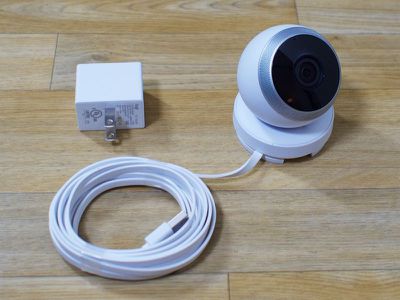
The front of the Logi Circle contains the camera, which has a 135 degree wide field of view. It's wide enough to capture most of a room, depending on the size of the room. Around the camera there's a ring-shaped speaker and a microphone for two-way communication. An activity light on the front indicates when the camera is turned on, and the light blinks when someone is viewing the feed.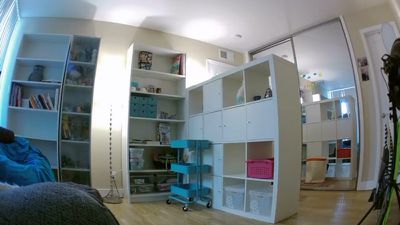
To adjust the field of view, the camera can be angled up or down. If it's positioned on something tall, like a bookshelf, it'll need to be angled downwards, or upwards if it's placed somewhere low like a nightstand. It can be angled upwards 90 degrees, which allows it to be in the correct position for wall mounting. With all of the different viewing positions, the Logi Circle can be placed almost anywhere in a home on its mounting base, meeting a wide variety of use cases.
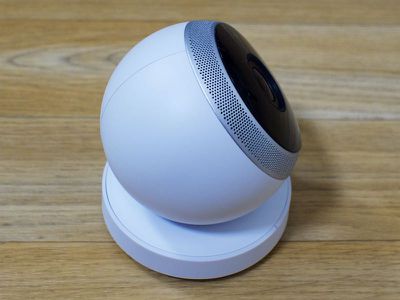
Even when mounted to a wall or affixed to a table, the Logi Circle remains portable because the camera portion of the device can be removed from the charging base. When used this way, it's powered by an internal battery. The battery can last for up to three hours in optimal conditions, which seems short to me, but Logitech envisions the Circle being used on battery for brief moments of time rather than used continuously in a room without its charger. The light on the Circle will turn red when the battery is low.
A use case for the battery might be a child who comes home from school and brings the camera into his or her room to interact with a parent. Someone at home could use the camera to communicate with someone who's away, and in much of the marketing for the Logi Circle, it shows the device being used in that manner. I was not enthralled with the idea of using the Logi Circle as a two-way communicator because it seems redundant when there are so many other methods of communications like FaceTime.
If I had a child and primarily wanted a way to chat face to face I'd be more inclined to put $200 towards an iPad than to spend $200 on the Logi Circle. Without kids, though, I didn't have a strong use case for the portability built into the Logi Circle, so someone interested in purchasing it could have a very different opinion of the feature.
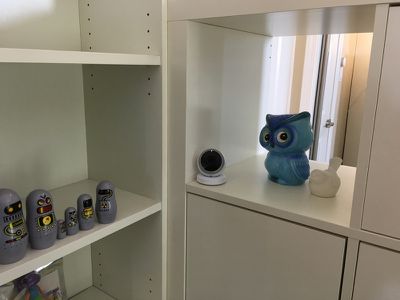
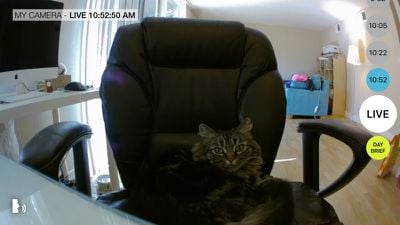
Since I only have pets, I preferred to keep the Logi Circle stationary, and I think checking in on pets during the day is one of the best uses for this device. I have cats that are relatively well-behaved, but this could be a useful tool to keep an eye on pets who need more supervision during the day. With two-way talk and audio, you can listen to what's going on in your home or speak through the camera to talk to children or pets. In my experience, the audio was clear and easy to understand from both ends. My cats didn't care that I was talking to them from afar, but it was fun to do so.
When using the Logi Circle under battery power, I got under two hours of time before it died, which was under the three hours Logitech advertises. Things like low Wi-Fi signal can drain the battery, and there are some areas where my signal isn't superb, which is presumably why I saw low battery life. There's also a power saving mode that extends battery life for up to 12 hours. Power saving mode turns off the recording feature and only displays what's happening live when the app is opened. Once drained, it seemed to take a long time to charge the battery back up -- more than eight hours.
There's a 720p camera in the Logi Circle, and while I wished it was 1080p, the quality was decent and gave me a clear picture of what was going on at home. The Logi Circle has a built-in night vision mode that kicks in whenever the lights go out, and I found the image quality at night to be crisp enough to see what was going on, even with no lighting in the room. The camera quality is not on par with some other home security cameras, namely Dropcam, but it's definitely passable and could be used in a child's room at night. During the day, the Logi Circle has some trouble with bright light. When there's a window letting in a lot of bright direct light, it's difficult to see the darker areas of the room.
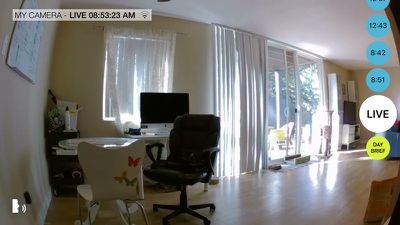
When not being actively used, the Logi Circle records everything that's going on in a room. It activates whenever there's motion, which it determines using a proprietary Scene Intuition algorithm. When the Scene Intuition feature detects movement, the camera automatically begins recording to the cloud.
With a lot of other home cameras, there are movement thresholds that determine when activity is recording, but Logitech does all of this under the hood automatically, which makes using the camera simple, but gives little user control over the recording process. If Scene Intuition doesn't think something is worth recording, it doesn't get recorded, which is troublesome if someone is planning to use this as a security camera.
The Logi Circle App
Using the Logi Circle requires downloading the accompanying app, which is used to view the live stream. Logitech's Logi brand was created on the premise of streamlining the buying and owning process, but Logitech has some work to do to achieve that goal.
When I unboxed the Logi Circle, I had a lengthy firmware update to apply right away, and then when I went to confirm my email address, I received a 404 error. Aside from that, the setup process was foolproof enough, with instructions that didn't go much beyond turning the camera on.
The app can only be used in landscape mode because of the wide field of view of the camera. After setting up the app, it'll open directly to the live view of the camera for a current view of what's going on. At the top of the screen, there's a time listing and a Wi-Fi indicator to let you know the strength of the Wi-Fi signal.
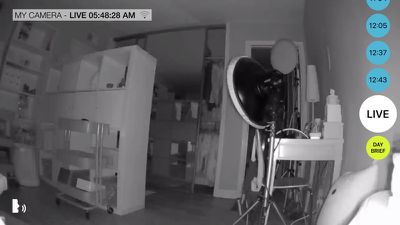
Using the proprietary Scene Intuition feature I mentioned earlier, the Logi Circle starts recording whenever there's a movement and lists each moment where it detected motion and made a recording on the right side of the app. The list is organized by time and tapping on one of the moments will play the recording that was captured at that time. The length of the recording will vary based on how long the movement the camera was picking up went on for.
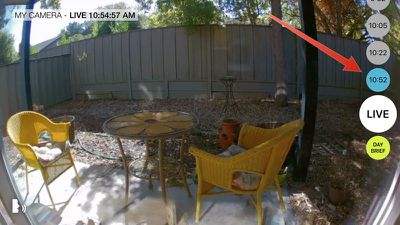
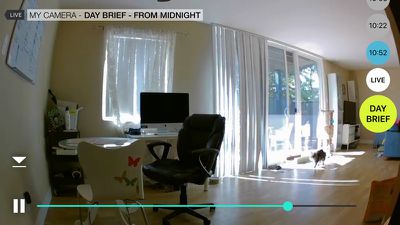
Scrolling down through the list of recordings will bring you back to the live view, and scrolling a bit further brings up the Day Brief, which is a fun feature. The Day Brief shows an accelerated look at the highlights of the past 24 hours in a quick time-lapse video.
The Day Brief and any of the time-based recordings can be saved to the camera roll by clicking the small download button that appears on the screen during playback. Videos can also be shared over AirDrop, sent via Messages or Mail, or shared on social networks like Facebook and Twitter. If something cute happens with a pet or a child, it's easy to share a quick video of the exact event, which is handy.
When using the app, if you use pinch gestures, you can zoom in up to 8x. The zoomed in view isn't always clear because of the 720p resolution, but at least the option exists if it's needed.

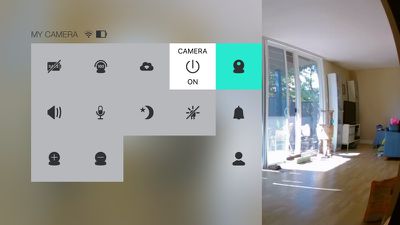
Swiping to the right side of the screen in the app brings up a settings menu where the camera's functions can be adjusted. Available settings include toggles for the camera itself and options to turn off the speaker and the microphone. There are also settings for updating the firmware, turning on low power mode to use less battery when the camera is away from the charging base, rotating the view upside down, toggling night vision on and off, turning off the LED on the camera, adding another camera, and modifying notifications.
The app will send a notification whenever the camera detects movement. If the camera is in a high traffic area, this has the potential to be distracting as it sends a lot of notifications. The notification text also isn't particularly helpful, as it only says "Activity Detected." With the Logi Circle's Scene Intuition, I had hoped it would be able to distinguish between the every day movements I make (such as typing) and things out of the ordinary to send alerts, but it does not, and I can't set up zones to have it ignore things.
When recording myself in my office during the day, Scene Intuition kept the camera on almost all the time even though my movements were very slight. According to Logitech, Scene Intuition is able to filter out movement like shifting shadows from a tree outside, but that filtering technology apparently doesn't extend to repetitive human movement.
I would have liked some control over the Scene Intuition feature, or at least better information on how it works. It would have been nice to be able to set movement sensitivity levels or to get some insight on when and what it chose to filter, but Scene Intuition and recording all happens behind the scenes with no user input.
For multiple nights in a row, Scene Intuition has failed to record me getting up at night, which is a major problem. It's directly in the pathway of the door, so there's a lot of motion going on that should not have been missed. Night time is the exact time when I want to be sure the camera is functional and recording what's going on around me. I'd much prefer to turn on continual recording at times. When it comes down to it, I don't have any way of knowing just what Scene Intuition is filtering out.
The Logi Circle app is straightforward and easy to use, but it is limited in the amount of control that it gives the user. There are options for toggling camera features on and off, but if you want more control over what's being recorded, you're out of luck. You're also out of luck if you want to view the Logi Circle from a web browser - there's no log in for this. It only works with the Logi Circle app. There's also no way to access footage if you don't have an Internet connection.
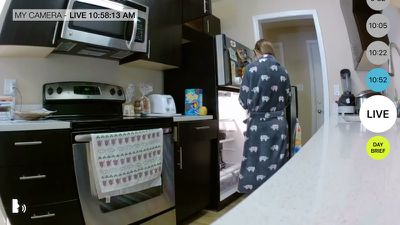
I would have liked to invite other users to view my in-home camera, but I was not able to do so in the Logi Circle app. Logitech tells me this is a feature being considered for the future, but for now, customers who want to access the Logi Circle on multiple devices will need to log in with the same account.
It would also be nice to see the Logi Circle interact with other connected home products. At a time when manufacturers are rolling out HomeKit support and developing devices to work with other connected products, the Logi Circle feels a little antiquated.
At the current time, the Logi Circle is only able to store 24 hours of video. After that, it's gone, so if there's anything worth saving, it's necessary to save it right away. Logitech is planning to introduce subscription options in the future that will allow users to record more than 24 hours of video. These subscriptions will cost money while the 24 hour video recording is free.
Bottom Line
If you're looking for a home security solution, the Logi Circle is not the camera to get. It's simply not designed to monitor the home, and it doesn't have the same features you will find in more complex systems from competitors like Dropcam, Flir FX, or Netgear's Arlo.
If you're looking for something that will let you check in on and interact with kids, pets, and other people in the home during the day, the Logi Circle is well-suited to that purpose. It's easy to use, it has an attractive, portable design that goes anywhere, and the app is simple and straightforward.
As a pet owner, I've found it to be a useful way to keep an eye on my cats, and I will appreciate it even more during the times when I need to leave them alone for long periods of time. When traveling during the holidays, they're often left at home with a pet sitter, so a camera like the Logi Circle is perfect for checking in.
At $199, the Logi Circle isn't cheap, so I'd recommend taking a good look at the features of the device to see if they meet your needs before purchasing. The Logi Circle has its uses, but it's aimed at those looking for a way to connect to their home and the people in it when away rather than those who are looking for home security cameras. Because many competing home security cameras share features with the Logi Circle, a product that has more versatility may make more sense for many people.
Pros:
- Portable, can move from room to room
- Easy to use
- Night vision works well
- Daily summary is nice
- Two-way audio
- Free 24 hours of recording
Cons:
- Video limited to 720p
- Battery life isn't great
- Doesn't support multiple users
- Expensive
- Only stores 24 hours of footage
- No control over what's recorded
- Gaps in recording at night
How to Buy
The Logi Circle can be purchased from the Logitech website for $199.
Note: MacRumors received no compensation for this review.

















































Top Rated Comments
Also, not really seeing how this is anything new. It's basically just a refined version of the IPcams that have been on the market for YEARS.