

With Apple's discontinuation of the Pro Display XDR earlier this year, Mac users looking for a larger high-resolution display suddenly found themselves with fewer options on the market. Apple's current display lineup now includes its 27-inch Studio Display and Studio Display XDR, both of which offer excellent image quality and tight macOS integration, but neither provides the larger 32-inch form factor that some users prefer.
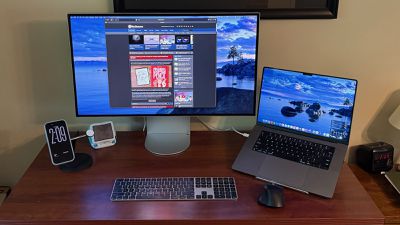
LG's UltraFine 6K (32U990A) display helps fill that gap. The display, which was unveiled way back in January 2025 but didn't launch until last October, features a 32-inch 6K Nano IPS Black panel, Thunderbolt 5 connectivity, and a design that feels more Apple-inspired than previous UltraFine displays. After using it for several weeks in my daily setup, I've found it to be a compelling alternative to Apple's own displays, albeit with a few tradeoffs.
The first thing that stands out about the UltraFine 6K is simply how much workspace it provides. Compared to Apple's 27-inch displays and my trusty 27-inch UltraFine 5K displays that have anchored my workspace for nearly a decade, the extra screen area is immediately noticeable. Multiple apps can sit side by side in large windows without feeling cramped to support my typical "command center" view of our editorial operations, while creative apps that need the canvas all to themselves benefit from the additional room for toolbars and timelines.
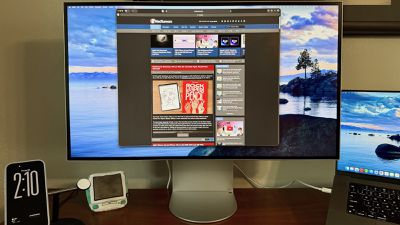
Unlike many larger displays, the UltraFine 6K doesn't compromise on sharpness. The 6,144 x 3,456 resolution delivers a true Retina experience, with crisp text and interface elements sized appropriately for the typical viewing distance. That's one of the biggest advantages the display has over most monitors in this size class that deliver only 4K resolution. While those displays can often yield a similarly sized desktop through scaling, the result sometimes lacks a bit of sharpness while the UltraFine 6K feels completely native due to its higher pixel density.
The UltraFine 6K also pairs well with Apple's latest Macs thanks to Thunderbolt 5 support. Using a MacBook Pro, a single cable handled display output, charging, and connected accessories, and you can even daisy chain multiple displays over a single connection. DisplayPort 2.1, HDMI 2.1, and non-Thunderbolt USB-C ports on the display provide additional display connectivity options, plus a downstream Thunderbolt 5 port support to support daisy chain configurations and a pair of upstream USB-C ports for hub functionality.
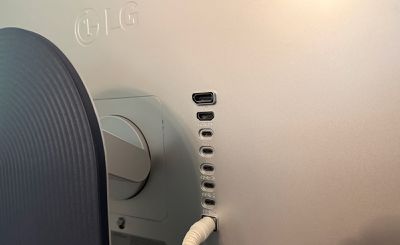
LG includes up to 96 watts of power delivery in the display, which easily keeps a 16-inch MacBook Pro topped up throughout the day and relatively quickly recharges a depleted one upon connecting the display.
Day-to-day reliability was excellent during testing. The monitor consistently woke from sleep without issue, display scaling options appeared properly in macOS, and there were none of the connection quirks that sometimes affect third-party displays. While that might sound like a small detail, seamless operation remains one of the most important qualities for a monitor intended primarily for Mac users.
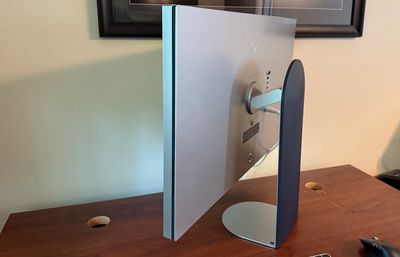
LG has also made significant improvements to the industrial design of its UltraFine lineup. Earlier UltraFine displays were known for their Mac compatibility, but they often looked more utilitarian than premium. The 32U990A adopts a cleaner aesthetic with slim bezels and a more refined rear enclosure that doesn't look out of place next to a Mac Studio or MacBook Pro. A wide foot provides stability, as does a wide vertical stand arm that features an unobtrusive silver color on the front but some dark blue ribbed plastic on the back to provide a bit of visual interest if the display is used in a setting where it the rear is visible.
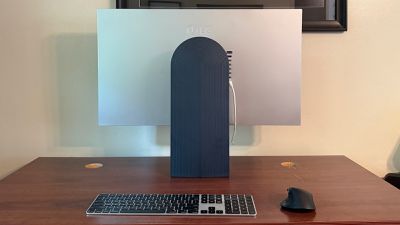
Ports and a joystick button for controlling display settings are hidden away on the rear of the display, and there's no distracting pulsing LED to light up a dark bedroom when the display is sleeping.
The included stand offers height, tilt, swivel, and pivot adjustments, providing considerably more flexibility than Apple's standard display configurations to help you get the display in just the right ergonomic position.
Image quality is excellent overall. Colors appear vibrant and accurate, and the Nano IPS Black panel provides solid contrast. And of course the 6K resolution provides the sharpness and clarity many users are looking for.
The matte finish does a good job minimizing reflections, particularly in brighter environments or near windows. Apple's glossy displays still provide a slightly more vibrant appearance, but the tradeoff may be worthwhile for users who work in rooms with significant ambient light.
LG touts the UltraFine 6K's ability to work with macOS keyboard shortcuts for brightness and volume adjustments, although it's not fully baked into the macOS experience. Unlike my older UltraFine 5K displays that integrated perfectly into the built-in macOS functionality for these shortcuts, the UltraFine 6K requires a separate LG Switch app to enable these keyboard shortcuts and they are separate from the macOS-level adjustments while using the same keys, which makes things less seamless than I'd like them to be. Simply put, things can be finicky when using multiple displays and audio output options.
There are a few other areas where Apple's displays continue to maintain an advantage. The Studio Display XDR delivers substantially brighter HDR highlights and more impressive HDR performance overall, thanks to its advanced backlighting technology. Users working extensively with HDR video content will still benefit from Apple's higher-end display. The UltraFine 6K is also limited to a 60Hz refresh rate. For productivity work, that isn't a major concern, but users who spend much of their day on ProMotion-equipped Macs may notice the difference when scrolling or performing other actions resulting in quick onscreen movements.
Those limitations feel relatively minor, however, when viewed in the context of the entire UltraFine 6K package, especially considering the price difference versus the Studio Display XDR. The UltraFine 6K's primary appeal isn't HDR performance or refresh rate. It's the combination of a large 32-inch panel, Retina resolution, Thunderbolt 5 connectivity, and solid Mac compatibility.
The UltraFine 6K delivers the sharpness and ease of use that Apple users expect, while offering considerably more screen real estate than Apple's current display lineup. The result is a display that feels close to purpose-built for Mac users, and one that stands out as one of the strongest premium monitor options currently available for the Mac. The LG UltraFine 6K 32U990A is normally priced at $1,999.99, but LG is currently offering savings of $700 on the display, bringing it down to $1,299.99.
Note: LG provided MacRumors with the UltraFine 6K display for the purposes of this review. No other compensation was received. MacRumors is an affiliate partner with LG. When you click a link and make a purchase, we may receive a small payment, which helps us keep the site running.















































Top Rated Comments
All the remaining 32” options are either low brightness, require an app to integrate with macOS, or flex and creak if you look at them wrong.
It’s a disappointing situation when the best monitor is a used model off eBay.
I bet it has an entire installer with a TOS and privacy policy and prompts you to sign in to your LG ThinQ account, too.
With the recent cluster of HDR MiniLED and OLED 27" 5K "gaming" displays shown at CES this year, I am hoping we will see the OEM panel vendors bringing the same with 6K panels next year.
“Not OLED” does not automatically mean “modest” or “passable” image quality and not every OLED is superior to non-OLED.