Eve Systems, formerly known as Elgato, has been making its Eve line of HomeKit products since ‌HomeKit‌ was first announced, and it was in fact one of the first companies to come out with ‌HomeKit‌ devices.

Eve recently expanded into lighting, launching the Eve Flare and the Eve Light Strip. I tested the Eve Light Strip earlier this year, and now that its sister product the Eve Flare has come to the United States, I thought I'd take a look at it to see how it measures up to other available ‌HomeKit‌ lighting options.

eveflare

Design

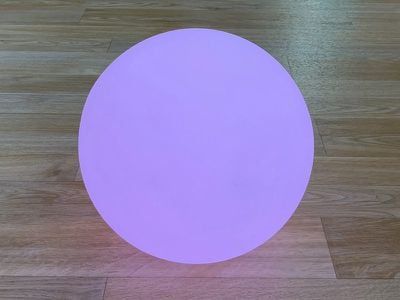
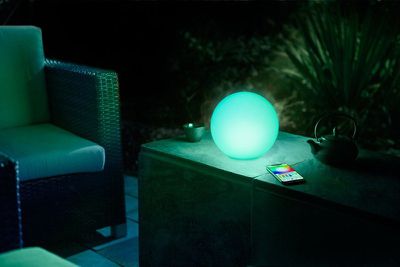
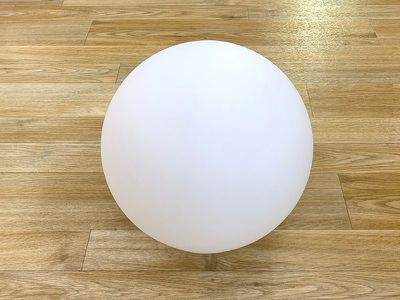
The Eve Flare is a sphere-shaped LED lamp that reminds me a lot of the white FADO lamps from Ikea. I've used Ikea's lamps for years with my Hue bulbs, so I expected the Eve Flare's sphere-shaped form factor to look great with colored and white light alike and I was not disappointed.

eveflareoff
Ikea's FADO lamps are made of glass with a plastic base, but the Eve Flare assembly is all plastic because it's meant to be portable. A plastic design makes it lighter weight and safer to move around than glass. There is a seam that I can feel at the top of the Flare where the two halves come together, but it's not very visible when the light is in use.

eveflarebottom
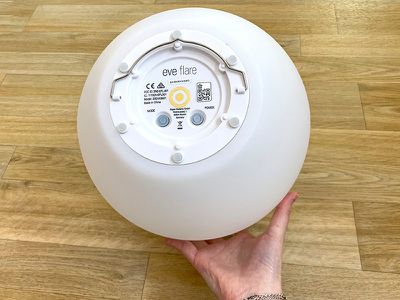
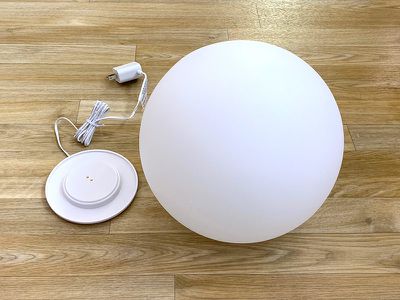
There's one flat side on the base of the Eve Flare that allows it to sit flat on a table and charge on its included charging base. You can use the Eve Flare while it's on the base, but you can also pick it up and take it with you outside, in the bath, next to the pool, in the kitchen, or wherever else you might want portable mood lighting. It's kind of similar to the Hue Go in regard to portability, though the Flare is larger and not as bright.

eveflarehandle
The Eve Flare has impressive battery life. Eve says that it will last for up to six hours, but I assume that's at maximum brightness. I set the brightness to about 40 percent and the Eve Flare lasted well over 24 hours. I took it off the charger at 9:40 a.m. and when I got up the next morning, it was still on. It didn't die until the next day at 6pm. Battery level can be checked in the Eve app.

eveflareandbase
Eve designed the Eve Flare to be IP65 water resistant, which means it's able to hold up to multi-directional low-pressure water jets for at least 15 minutes. This basically means that it can be used in the rain, poolside, near the bathtub, and in other areas where it might get splashed or a bit wet, but you're not going to want to submerge it.

I don't necessarily recommend it, but I took the Eve Flare in the shower to test it a few times, and it had no problem with the moisture and splashes in there.

eveflarewaterresistant
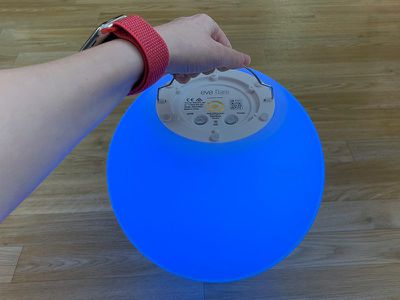
The Eve Flare is on the larger size, which make it a little inconvenient to carry, but at the base, there's a little metal handle you can use for both carrying and hanging the light up on a hook if you want. The handle isn't particularly comfortable to hold because it's metal, but it's sturdy when hung up on something like one of those 3M adhesive hooks.

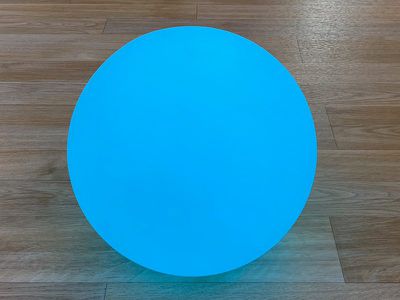
eveflareblue
There are two physical control buttons at the bottom of the Eve Flare. One for cycling through the colors you have set as favorites in the Eve app and a second for turning the power on and off. There are no options for setting up color palettes and automatically shifting between colors, unfortunately.

Setup and Reliability

While Eve's other lighting product, the Eve Light Strip, connects to ‌HomeKit‌ using WiFi, the Eve Flare uses a Bluetooth connection. Connecting it to ‌HomeKit‌ was a matter of opening up the Eve app, making sure the lamp was turned on using the power button at the bottom, and then scanning the code. The connection is quick with no WiFi steps since it's Bluetooth.

I had no issues with the Eve Flare's connection while testing it, but I did notice that when controlling the light with the Eve app, there were occasionally some delays between when I selected a color and when the color changed, likely because of the Bluetooth connection.

eveflarelightpurple
I didn't see the same delays when using the Home app or Siri to change the color when I was close to the Eve Flare, though there were one or two times ‌Siri‌ told me the Eve Flare was unavailable.

When further away from the Eve Flare, like in another room, it is slower to respond over Bluetooth to ‌HomeKit‌ commands and to changes made in the Eve/Home app, but it still works. On the whole, the Eve Flare was reliable and responsive to ‌Siri‌ and app commands, though I'd warn anyone planning a purchase to expect a short delay here and there.

Brightness and Functionality

The Eve Flare isn't a bright lamp and it's not going to be able to replace a traditional table lamp, but it provides nice mood lighting when you don't need a lot of light. It's suitable for a bedside table at night, for example, or as relaxing outdoor/nighttime lighting.

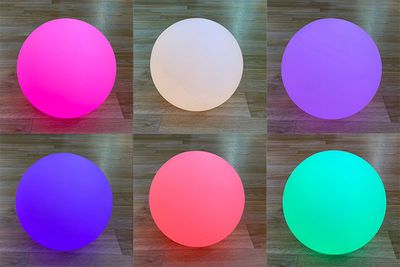
It's designed to be used in conjunction with other lamps rather than as a standalone lamp. It's not, for example, as bright as my Ikea FADO lamp with a Hue bulb inside, but it does offer rich, vibrant colors. It produces accurate colors, including purples and blues, which some of the Hue bulbs still struggle with.

eveflarecolors
The Eve Flare's colors are saturated and it looks so pretty on a table that I can forgive the fact that it's not super bright. It's also worth noting that it's brighter on its charging base than off, something that Eve says is normal.

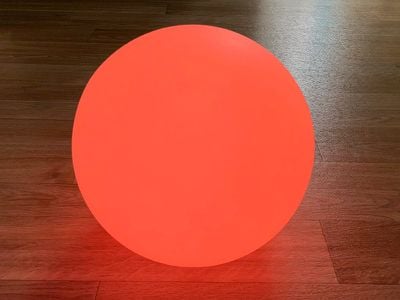
eveflarered
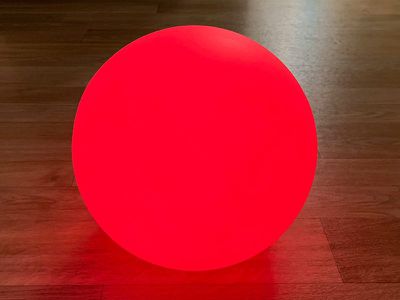
Eve Flare can replicate most colors accurately, and, in fact, it can do some shades better than Hue bulbs can (especially older Hue bulbs), like purple, green, and blue-green shades. Colors look more true to life and vivid in dark rooms, but it can also be used as accent lighting in a well-lit room. I thought it was a bit weak on the deep reds and oranges, but overall, the colors are vibrant and saturation/shade can be adjusted with brightness controls.

Eve App

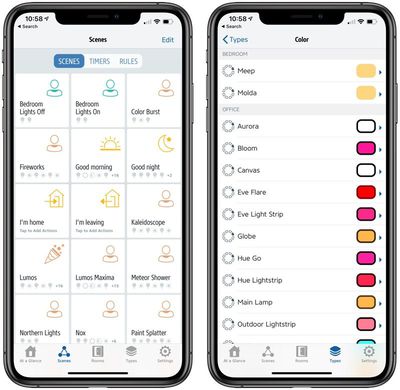
The Eve app is one of the better third-party ‌HomeKit‌ apps that are available, with a clean, intuitive layout that makes it easy to see and control all of your available ‌HomeKit‌ products. Eve's app is actually my go to when I need to do something that I can't easily do in the Home app, like see all scenes at a glance.

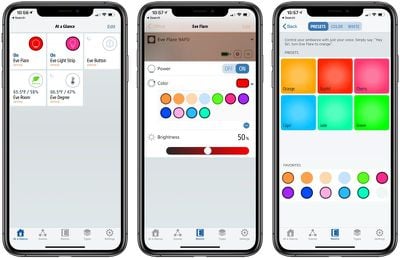
There's a main "At a Glance" screen where you can see any favorited products, and then there are tabs to scenes and timers, ‌HomeKit‌ products by room, and ‌HomeKit‌ products by type, such as temperature, power, color, motion, etc.

eveflarecolors 1
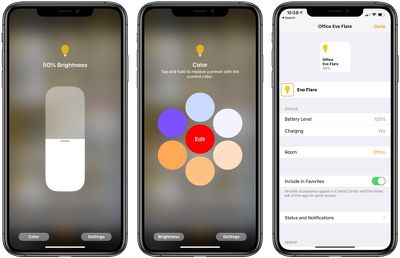
For the Eve Flare, there are in-app controls for turning the accessory on or off, adjusting the brightness, or changing the color. There are some simple pre-set colors that can be adjusted so you can save your favorites, and there's an easy access color wheel for choosing whatever color you like.

eveflarescenesandtypes
In addition to adjusting the Eve Flare's settings, you can also use the Eve app to incorporate the Eve Flare into ‌HomeKit‌ scenes with other ‌HomeKit‌ products or create automations, such as having the light set to come on at a certain time or swap to a specific color at a specific time.

HomeKit Integration

Eve Flare works with ‌HomeKit‌, so you can include it in ‌HomeKit‌ scenes and automations. You can also control it with ‌Siri‌ commands, which is something that I often do with the Eve lights since I can't control them alongside my Hue lights.

eveflareaqua
I use ‌Siri‌ voice commands for turning the Eve Flare on and off, dimming it, making it brighter, and changing its color. You can say things like "turn the Eve Flare magenta," or "turn the Eve Flare aquamarine" to change the colors. There are a whole slew of color options that work with Eve Flare (and similar lights), with some examples available here.

eveflarehomekit

Bottom Line

Eve Flare looks impressive as an accent light in the home, but it's expensive at $99. It can't quite replace a traditional lamp (unless you don't mind rather dim lighting), but for mood lighting, it's fantastic.

You can get a similar look with an Ikea FADO lamp ($25) and a HomeKit-compatible smart bulb that does colors, and some of these bulbs are quite a bit cheaper. You could probably get this setup for somewhere around $50 to $60 using a cheap colored ‌HomeKit‌ bulb, but the Eve Flare is portable, battery powered with a long battery life, and water resistant, all features that make the extra cost worth it.

eveflareorange
If you're looking for a HomeKit-connected accent light, I don't think you'll regret getting the Eve Flare, but do be aware that this is a Bluetooth light and there can be some slight delays in response at times (generally when first opening up the app to change the color after a long period of time).

In the future, I think it'd be great if Eve added more automation, such as an option to have the Flare cycle through different color modes automatically without having to manually change the colors or create complicated ‌HomeKit‌ automations.

How to Buy

Eve Flare can be purchased from Amazon.com or the Eve website for $99.95.

Note: Eve provided MacRumors with an Eve Flare for the purpose of this review. No other compensation was received.

Top Rated Comments

jclo Avatar
88 months ago
Since this $100 mood light (wimpy 90 lumen output isn't good for much else) does not require a bridge, I suppose it is technically cheaper than Philips Hue Go ($80 without the bridge). But Philips Hue Go is much brighter (300 lumens), although obviously still not usable as a primary light for activities like reading.

On the flip side, Eve Flare has much longer battery life (6+ hours vs up to 3 hours), water proof, more elegant charging system, and more diffused.
As mood lighting, I find it more visually impressive than the Hue Go and the battery life is waaaaaaay better. Hue Go is smaller, though, and better fits on a table. Hue Go is definitely a lot brighter. Almost too bright for a mood light depending on where you have it. Mine's never on max brightness.
Score: 1 Votes (Like | Disagree)
jclo Avatar
88 months ago
Takeaway: You can never own too many LUSH products
I'm glad someone got the correct message from this!
[doublepost=1552584905][/doublepost]
Kinda neat. Since all of my lighting is Hue, I have to ask. This or the Hue Go?

And dangit, now I want to buy a bunch of those FADOs and put Hue bulbs in them. Because having an Ikea NOT lamp in each corner of my rooms with a Hue bulb isn't enough.
It's kind of a tossup for me. I really like the look of the Eve Flare and the battery is so much longer, but it's nice having all of the lights in the Hue app and Hue Go is a good bit brighter. If you use any of the Hue integrations like the feature that lets it sync to media, Hue Go all the way. If you don't, the Flare is nice. Flare's also the way to go if you prefer long battery life.
[doublepost=1552585083][/doublepost]
To the writer of this article,

I just purchased the Eve Flare myself yesterday and can manually change the colors on the Flare itself. On the bottom of it there’s a “mode” button. Pressing this button will cycle through the main colors you’ve chosen as your favorites.

Thanks.
Thanks! I overlooked a mention of the control buttons at the bottom. Sorry about that -- I've updated the review. It would definitely be nice to have an automatic feature that would cycle through various colors and color scenes sort of like LIFX or Nanoleaf rather than the manual button. Manual button is handy for quickly swapping colors if you don't want to use Siri or the iPhone app, though.
Score: 1 Votes (Like | Disagree)
nutmac Avatar
88 months ago
Since this $100 mood light (wimpy 90 lumen output isn't good for much else) does not require a bridge, I suppose it is technically cheaper than Philips Hue Go ($80 without the bridge). But Philips Hue Go is much brighter (300 lumens), although obviously still not usable as a primary light for activities like reading.

On the flip side, Eve Flare has much longer battery life (6+ hours vs up to 3 hours), water proof, more elegant charging system, and more diffused.
Score: 1 Votes (Like | Disagree)
jclo Avatar
88 months ago
Just an FYI: the Eve website link takes you directly to your cart and not the main website or Eve Flare product page.
Thanks for the heads up. I've fixed that link.
Score: 1 Votes (Like | Disagree)
InfiniteJoules Avatar
88 months ago
('https://www.macrumors.com/review/homekit-compatible-eve-flare/')


Eve Systems, formerly known as Elgato, has been making its Eve line of HomeKit products since HomeKit was first announced, and it was in fact one of the first companies to come out with HomeKit devices.

Eve recently expanded into lighting, launching the Eve Flare and the Eve Light Strip. I tested the Eve Light Strip ('https://www.macrumors.com/review/eve-light-strip-homekit/') earlier this year, and now that its sister product the Eve Flare ('https://www.evehome.com/en-us/eve-flare') has come to the United States ('https://www.macrumors.com/2019/02/19/eve-systems-flare-homekit/'), I thought I'd take a look at it to see how it measures up to other available HomeKit lighting options.


Design

The Eve Flare is a sphere-shaped LED lamp that reminds me a lot of the white FADO lamps ('https://www.ikea.com/us/en/catalog/products/60416280/?query=FADO&icid=iba us unbxdsuggestion 201811132211556208_1') from Ikea. I've used Ikea's lamps for years with my Hue bulbs, so I expected the Eve Flare's sphere-shaped form factor to look great with colored and white light alike and I was not disappointed.


Ikea's FADO lamps are made of glass with a plastic base, but the Eve Flare assembly is all plastic because it's meant to be portable. A plastic design makes it lighter weight and safer to move around than glass. There is a seam that I can feel at the top of the Flare where the two halves come together, but it's not very visible when the light is in use.


There's one flat side on the base of the Eve Flare that allows it to sit flat on a table and charge on its included charging base. You can use the Eve Flare while it's on the base, but you can also pick it up and take it with you outside, in the bath, next to the pool, in the kitchen, or wherever else you might want portable mood lighting. It's kind of similar to the Hue Go in regard to portability, though the Flare is larger and not as bright.


The Eve Flare has impressive battery life. Eve says that it will last for up to six hours, but I assume that's at maximum brightness. I set the brightness to about 40 percent and the Eve Flare lasted well over 24 hours. I took it off the charger at 9:40 a.m. and when I got up the next morning, it was still on. It didn't die until the next day at 6pm. Battery level can be checked in the Eve app.


Eve designed the Eve Flare to be IP65 water resistant, which means it's able to hold up to multi-directional low-pressure water jets for at least 15 minutes. This basically means that it can be used in the rain, poolside, near the bathtub, and in other areas where it might get splashed or a bit wet, but you're not going to want to submerge it.

I don't necessarily recommend it, but I took the Eve Flare in the shower to test it a few times, and it had no problem with the moisture and splashes in there.
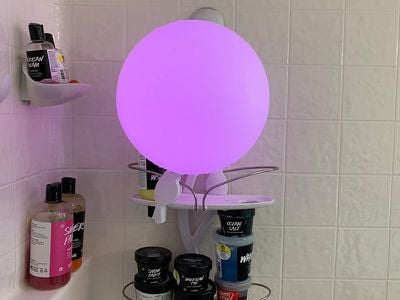


The Eve Flare is on the larger size, which make it a little inconvenient to carry, but at the base, there's a little metal handle you can use for both carrying and hanging the light up on a hook if you want. The handle isn't particularly comfortable to hold because it's metal, but it's sturdy when hung up on something like one of those 3M adhesive hooks.
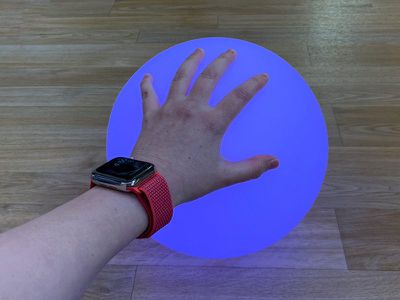


There are no physical controls on the Eve Flare, so you have to use your iPhone or Siri commands to change its colors. I think it would have been nice to have a button to cycle through the available presets, but you can set something like that up with automations.

You could conceivably charge the Eve Flare at night and then use it somewhere else for the entirety of the day where there's no power available.

Setup and Reliability

While Eve's other lighting product, the Eve Light Strip, connects to HomeKit using WiFi, the Eve Flare uses a Bluetooth connection. Connecting it to HomeKit was a matter of opening up the Eve app, making sure the lamp was turned on using the power button at the bottom, and then scanning the code. The connection is quick with no WiFi steps since it's Bluetooth.


Click here to read more... ('https://www.macrumors.com/review/homekit-compatible-eve-flare/')

Article Link: Eve's HomeKit-Enabled 'Eve Flare' Offers Awesome Mood Lighting, Long Battery Life, and Water Resistance ('https://www.macrumors.com/review/homekit-compatible-eve-flare/')
To the writer of this article,

I just purchased the Eve Flare myself yesterday and can manually change the colors on the Flare itself. On the bottom of it there’s a “mode” button. Pressing this button will cycle through the main colors you’ve chosen as your favorites.

Thanks.


Here’s some pictures of mine and what it looks like in the Home app.


Attachment Image

Attachment Image

Attachment Image

Attachment Image

Attachment Image

Attachment Image

Attachment Image

Attachment Image

Attachment Image
Score: 1 Votes (Like | Disagree)
Braderunner Avatar
88 months ago
$100 is a bit much for 1 decorative light. o_O
Score: 1 Votes (Like | Disagree)

Popular Stories

iOS 26

iOS 26.2 Coming Soon With These 8 New Features on Your iPhone

Thursday December 11, 2025 8:49 am PST by
Apple seeded the second iOS 26.2 Release Candidate to developers earlier this week, meaning the update will be released to the general public very soon. Apple confirmed iOS 26.2 would be released in December, but it did not provide a specific date. We expect the update to be released by early next week. iOS 26.2 includes a handful of new features and changes on the iPhone, such as a new...
Google maps feaure

Google Maps Quietly Added This Long-Overdue Feature for Drivers

Wednesday December 10, 2025 2:52 am PST by
Google Maps on iOS quietly gained a new feature recently that automatically recognizes where you've parked your vehicle and saves the location for you. Announced on LinkedIn by Rio Akasaka, Google Maps' senior product manager, the new feature auto-detects your parked location even if you don't use the parking pin function, saves it for up to 48 hours, and then automatically removes it once...
AirPods Pro Firmware Feature

Apple Releases New Firmware for AirPods Pro 2 and AirPods Pro 3

Thursday December 11, 2025 11:28 am PST by
Apple today released new firmware designed for the AirPods Pro 3 and the prior-generation AirPods Pro 2. The AirPods Pro 3 firmware is 8B30, up from 8B25, while the AirPods Pro 2 firmware is 8B28, up from 8B21. There's no word on what's include in the updated firmware, but the AirPods Pro 2 and AirPods Pro 3 are getting expanded support for Live Translation in the European Union in iOS...
Foldable iPhone 2023 Feature 1

Apple to Make More Foldable iPhones Than Expected [Updated]

Tuesday December 9, 2025 9:59 am PST by
Apple has ordered 22 million OLED panels from Samsung Display for the first foldable iPhone, signaling a significantly larger production target than the display industry had previously anticipated, ET News reports. In the now-seemingly deleted report, ET News claimed that Samsung plans to mass-produce 11 million inward-folding OLED displays for Apple next year, as well as 11 million...
iOS 26

15 New Things Your iPhone Can Do in iOS 26.2

Friday December 5, 2025 9:40 am PST by
Apple is about to release iOS 26.2, the second major point update for iPhones since iOS 26 was rolled out in September, and there are at least 15 notable changes and improvements worth checking out. We've rounded them up below. Apple is expected to roll out iOS 26.2 to compatible devices sometime between December 8 and December 16. When the update drops, you can check Apple's servers for the ...
AirTag 2 Mock Feature

Apple AirTag 2: Four New Features Found in iOS 26 Code

Thursday December 11, 2025 10:31 am PST by
The AirTag 2 will include a handful of new features that will improve tracking capabilities, according to a new report from Macworld. The site says that it was able to access an internal build of iOS 26, which includes references to multiple unreleased products. Here's what's supposedly coming: An improved pairing process, though no details were provided. AirTag pairing is already...
iOS 26

iOS 26.4 and iOS 27 Features Revealed in New Leak

Friday December 12, 2025 10:56 am PST by
Macworld's Filipe Espósito today revealed a handful of features that Apple is allegedly planning for iOS 26.4, iOS 27, and even iOS 28. The report said the features are referenced within the code for a leaked internal build of iOS 26 that is not meant to be seen by the public. However, it appears that Espósito and/or his sources managed to gain access to it, providing us with a sneak peek...
iOS 26

Apple Seeds Second iOS 26.2 Release Candidate to Developers and Public Beta Testers

Monday December 8, 2025 10:18 am PST by
Apple today seeded the second release candidate version of iOS 26.2 to developers and public beta testers, with the software coming one week after Apple seeded the first RC. The release candidate represents the final version iOS 26.2 that will be provided to the public if no further bugs are found. Registered developers and public beta testers can download the betas from the Settings app on...
iOS 26

Apple Releases iOS 26.2 With Alarms for Reminders, Lock Screen Changes, Enhanced Safety Alerts and More

Friday December 12, 2025 10:10 am PST by
Apple today released iOS 26.2, the second major update to the iOS 26 operating system that came out in September, iOS 26.2 comes a little over a month after iOS 26.1 launched. ‌iOS 26‌.2 is compatible with the ‌iPhone‌ 11 series and later, as well as the second-generation ‌iPhone‌ SE. The new software can be downloaded on eligible iPhones over-the-air by going to Settings >...
iPhone 14 Pro Dynamic Island

iPhone 18 Pro Leak Adds New Evidence for Under-Display Face ID

Monday December 8, 2025 4:54 am PST by
Apple is actively testing under-screen Face ID for next year's iPhone 18 Pro models using a special "spliced micro-transparent glass" window built into the display, claims a Chinese leaker. According to "Smart Pikachu," a Weibo account that has previously shared accurate supply-chain details on Chinese Android hardware, Apple is testing the special glass as a way to let the TrueDepth...