

CalDigit recently came out with the TS5 Plus, which is designed to work with Apple's Thunderbolt 5 Macs.
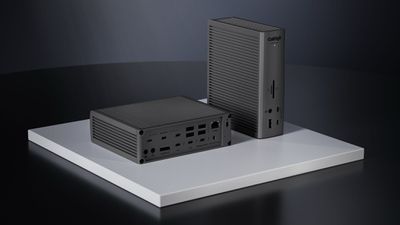
The TS5 Plus looks like CalDigit's prior docks, featuring a simple rectangular shape and an aluminum build with some ridging at the top, bottom, and sides for visual interest and heat dissipation.
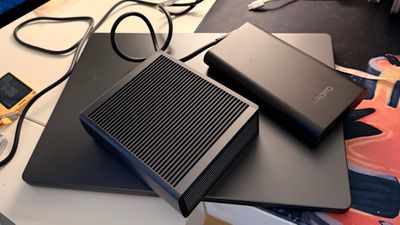
It's a black aluminum color that matches the Space Black of the M4 MacBook Pro models, and it comes with a hefty 330W power brick. In fact, the power brick is longer than the dock itself, but it's flat and tucks away under a desk fairly well. The TS5 Plus is six inches long, five inches wide, and 1.8 inches thick, while the power brick is seven inches long, 3.5 inches wide, and a little under an inch thick.
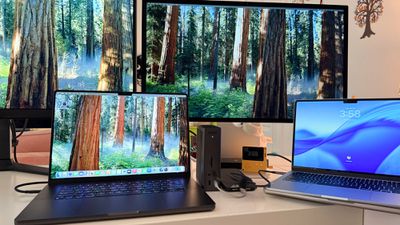
After using Anker's Thunderbolt 5 dock with a built-in power supply, I am disappointed with the large size of the CalDigit power brick. There's a power supply cable that attaches to the power brick, and then the power brick has a cable that plugs into the dock. CalDigit includes a high-quality 3.3ft Thunderbolt 5 cable with a braided design, and a set of rubber feet.
Though I am complaining about the power brick compared to the Anker Prime's more compact design with included power supply, the CalDigit TS5 Plus has six more available ports, faster Ethernet, and more charging power for accessory devices.
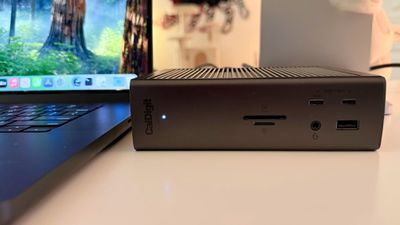
At the front of the dock, there's a 10Gb/s USB-A port that can provide 7.5W to charge AirPods or an Apple Watch, along with two 10Gb/s USB-C ports, one that supplies 7.5W and a second that supplies 36W, which is enough to fast charge an iPhone or iPad, and even enough power for a MacBook Air. The front also has an SD card slot and a microSD card reader, plus there's an audio combo jack and a small LED that lets you know when the dock has power. The card slots support UHS-II transfer speeds at up to 312MB/s.
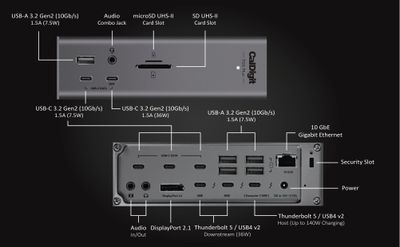
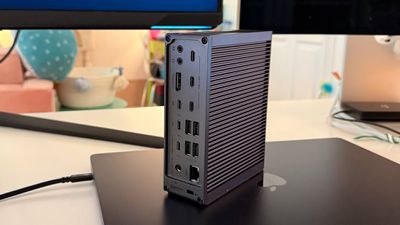
The rest of the ports are on the back, and include the following:
- 3 10Gb/s USB-C data ports that can provide 7.5W
- 4 10Gb/s USB-A ports that can provide 7.5W
- 10GbE Ethernet port
- Audio in
- Audio out
- DisplayPort 2.1
- Two downstream 80Gb/s Thunderbolt 5 ports that supply 36W
- One upstream Thunderbolt 5 port that supplies 140W to the host machine (with the included TB5 cable)
- One security slot
- DC in
There are enough ports to connect a ton of peripherals and multiple displays, but this isn't a dock that has an HDMI port. If you need HDMI, you can get an appropriate DisplayPort to HDMI adapter or just use the Mac's HDMI port.
I like the port arrangement. It's been useful having a 36W USB-C port front and center, and the SD card slot on the front is convenient for transferring photos from my camera. The USB-C ports charge my devices even when I don't have my MacBook connected, so the TS5 Plus also works as a charging station.
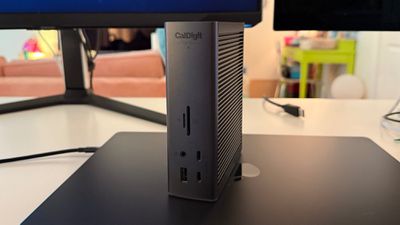
It's useful to have three 36W USB-C ports available on the TS5 Plus because I can charge an iPhone, iPad Pro, Apple Watch, AirPods, and MacBook Air all at the same time while still charging my MacBook Pro and powering multiple displays. I did get the full fast charging for the 16-inch MacBook Pro, and plugging in more devices didn't drop the power levels.
The TS5 Plus has dual USB controllers inside (one for the front and one for the back), and there's no throttling with multiple devices plugged in and transferring data at the same time. I tested with the Thunderbolt 5 SSD and two additional USB-C SSDs, and I didn't see any drop off in transfer speeds.
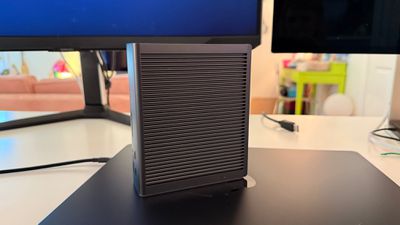
Since there is no fan inside, the TS5 Plus can get warm to the touch. It's not hot enough to burn, but it would warm your hands in the winter, and I wouldn't want to put a chocolate bar on top. The aluminum ridges do dissipate heat, but it won't run as cool as the Anker Prime. On the plus side, operation is silent because it doesn't have a fan.
Thunderbolt 5 supports 80Gb/s speeds with a bandwidth boost of up to 120Gb/s for displays, so it's twice as fast as Thunderbolt 4, which maxes out at 40Gb/s. There's also more bandwidth available for SSDs, which allows for faster data transfers.
Using the TS5 Plus and the Thunderbolt 5 Envoy Ultra from OWC, I was able to get maximum speeds of 4,647MB/s write and 5,154MB/s read. Speeds were just a little slower than the SSD plugged in directly to my MacBook Pro.
Thunderbolt 5 supports up to three displays on PCs, but not on Macs. On the Mac, you're still going to max out at two displays over a single Thunderbolt 5 connection (aka run through a dock) because of GPU limitations. With the TS5 Plus, you can use two 8K displays at 60Hz, two 6K displays at 60Hz, a 5K and a 6K display, two 4K displays at 240Hz, and several other display combinations depending on which Mac you have and what it supports.
With the M4 Pro or M4 Max, you can actually run up to four displays, but you'll either need two Thunderbolt 5 docks for that setup, or you'll need to use the other Thunderbolt and HDMI ports you have available on your machine.
For higher resolutions, the M4 Pro only supports a single 8K display, so that's what you're limited to with the dock. The M4 Max can support two 8K displays at 60Hz, two 6K displays at 60Hz and one 8K display at 60Hz, or four displays at 6K 60Hz. CalDigit says you can run two 8K displays through the TS5 Plus, but you might test bandwidth limits if you have other devices like SSDs connected. You'd probably get better performance plugging one 8K display into the dock and then connecting the other 8K display to a different Thunderbolt 5 port or the Mac's HDMI port
I don't have a dual 6K or 8K dual display setup available, so I wasn't able to push the TS5 Plus to its limits. I normally use my MacBook Pro with just a single 5K Studio Display connected over Thunderbolt, but I added a 4K 144Hz Samsung display for testing with the TS5 Plus. I didn't run into any issues with two displays, even with multiple SSDs and other peripherals connected.
If you have a similar setup with a 5K display and a 4K display, or two 6K displays, you're not going to run into any problems, plus you'll have the bandwidth for upgrading to higher resolution displays as that kind of technology comes down in price. There are some fine-print limitations on displays that any potential buyer should check out. You can't run dual LG UltraFine 5K displays, for example. Dual 5K monitors need to be Thunderbolt 4 or Apple Studio displays, and 6K monitors need to be the Pro Display XDR or Thunderbolt 4 displays.
I primarily tested the TS5 Plus with an M4 Pro MacBook Pro, but it's also compatible with Thunderbolt 4 machines. I also had no issues using it with my M1 Max MacBook Pro, and it worked flawlessly with an M4 MacBook Air as well. You can also connect to iPads that support Thunderbolt, such as the M4 iPad Pro.
For older Macs with base M1, M2, or M3 chips, you can only use one external display with CalDigit's dock. If you have a M1/M2/M3 Max or Pro chip, you can use dual displays with no issue.
Bottom Line
If you have a Thunderbolt 5 Mac and need the fastest data transfer speeds along with the ability to drive high resolution displays, you're not going to go wrong with the TS5 Plus. This is one of the most capable Thunderbolt 5 docks on the market, and its wide selection of ports are going to work for nearly any configuration.
Thunderbolt 5 docks are backwards compatible with Thunderbolt 4 machines, so it might also be worth opting for the TS5 Plus for future-proofing purposes, to get 10GbE, or to get the multi-device charging power that it offers. With three 36W USB-C ports, you can most likely charge all of your devices with the TS5 Plus, eliminating the need for multiple cables running from your desk to a power source.
This is the dock to get if you're looking for the best Thunderbolt 5 performance, and it's the one I'd recommend for use for any professional setup that involves high resolution displays and the need for fast transfer speeds. It is more expensive than some other docks, including the $400 CalDigit TS5 and the $400 Anker Prime, but the extra money may be worth it if you need the flexibility of 20 ports.
How to Buy
The TS5 Plus can be purchased from the CalDigit website or from Amazon for $500.
Note: CalDigit provided MacRumors with a TS5 Plus for the purpose of this review. No other compensation was received.















































Top Rated Comments
This is not accurate. Both controllers are used on the front and back. They have a nice diagram.