

In iOS 13 and iPadOS, Apple has augmented and enhanced textual manipulation features available to iPhone and iPad users to make working with text a whole lot easier.

One of these new features is a native swipe-based keyboard called QuickPath, and anyone who has used a third-party keyboard extension like SwiftKey should be instantly familiar with it.
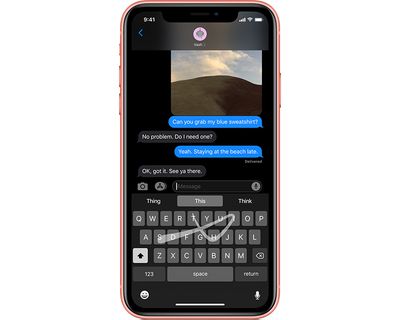
ios13quickpathkeyboard
QuickPath allows you to type a word without removing your finger from the keyboard when entering individual letters. If you were typing "Apple," for example, you'd start with your finger on A and then swipe your finger across the onscreen keyboard from P, to P, to L, and so on.

Once you've spelled out the word (and finished with a full stop if it's the end of a sentence) simply lift your finger off the screen and iOS will automatically add a space, ready for you to type another word or start a new sentence.

Another advantage of QuickPath is that it's intelligent enough to deal with words that have double letters in them. If you swipe across the letters "cal," for example, the word "call" will appear when you remove your finger from the screen.

QuickPath can take a bit of getting used to, but once you've got the hang of it you'll be inputting words in no time. It's particularly handy for composing text with your thumb if you're holding your ‌iPhone‌ in one hand.

You can use QuickPath on ‌iPad‌, too. However, note that it's only available on the floating keyboard that's revealed when you pinch inward on the full-width virtual keyboard in iPadOS.

How to Disable QuickPath

If you don't like using QuickPath, don't worry – you can easily disable it. On ‌iPhone‌, launch the Settings app, select General -> Keyboard, then toggle the switch next to Slide to Type to the clear OFF position.
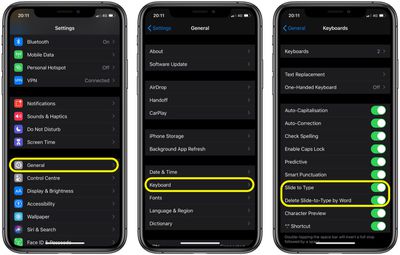
how to use quickpath ios
On ‌iPad‌, the option is in the same settings screen, it's just worded differently: the switch to turn it off is beside Slide on Floating Keyboard to Type. You can also toggle the switch next to Delete Slide-to-Type by Word to enable or disable the action that deletes a QuickPath word when backspace is selected.


Related Forum: iOS 13

Popular Stories

Apple Logo Top Half

Early iOS 26 Software Leak Uncovers Dozens of Upcoming Apple Features

Monday December 15, 2025 3:05 pm PST by
Software from an iPhone prototype running an early build of iOS 26 leaked last week, giving us a glimpse at future Apple devices and iOS features. We recapped device codenames in our prior article, and now we have a list of some of the most notable feature flags that were found in the software code. In some cases, it's obvious what the feature flags are referring to, while some are more...
apple beta 26 lineup

Apple Leak Confirms Work on Foldable iPhone, AirTag 2, and Dozens More Devices

Monday December 15, 2025 2:05 pm PST by
Last week, details about unreleased Apple devices and future iOS features were shared by Macworld. This week, we learned where the information came from, plus we have more findings from the leak. As it turns out, an Apple prototype device running an early build of iOS 26 was sold, and the person who bought it shared the software. The OS has a version number of 23A5234w, and the first...


iPhone Top Left Hole Punch Face ID Feature Purple

iPhone 18 Pro Features Leaked in New Report, Including Under-Screen Face ID

Tuesday December 16, 2025 8:44 am PST by
Next year's iPhone 18 Pro and iPhone 18 Pro Max will be equipped with under-screen Face ID, and the front camera will be moved to the top-left corner of the screen, according to a new report from The Information's Wayne Ma and Qianer Liu. As a result of these changes, the report said the iPhone 18 Pro models will not have a pill-shaped Dynamic Island cutout at the top of the screen....
iOS 26

iOS 26.3 Beta 1 Features: What's New So Far

Monday December 15, 2025 4:23 pm PST by
Apple is testing iOS 26.3, the next version of iOS 26 that will launch around January. Since iOS 26.3's testing is happening over the holidays, it is a smaller update with fewer features than we've seen in prior betas. We've rounded up what's new so far, and we'll add to our list with subsequent betas if we come across any other features. Transfer to Android Apple is making it simpler...
Apple Foldable Thumb

Leak Reveals Foldable iPhone Details

Monday December 15, 2025 9:09 am PST by
The first foldable iPhone will feature a series of design and hardware firsts for Apple, according to details shared by the Weibo leaker known as Digital Chat Station. According to a new post, via machine translation, Apple is developing what the leaker describes as a "wide foldable" device, a term used to refer to a horizontally oriented, book-style foldable with a large internal display....
iOS 26

iOS 26.4 and iOS 27 Features Revealed in New Leak

Friday December 12, 2025 10:56 am PST by
Macworld's Filipe Espósito today revealed a handful of features that Apple is allegedly planning for iOS 26.4, iOS 27, and even iOS 28. The report said the features are referenced within the code for a leaked internal build of iOS 26 that is not meant to be seen by the public. However, it appears that Espósito and/or his sources managed to gain access to it, providing us with a sneak peek...
apple iphone air battery pack

Apple Aims to Boost Popularity of iPhone Air 2 in Two Ways

Tuesday December 16, 2025 11:06 am PST by
We have been covering iPhone 18 Pro, iPhone 17e, and iPhone Fold details from The Information's report about future iPhone models, and next up is the iPhone Air 2. The report says that Apple aims to make the iPhone Air 2 more attractive in two ways. First, Apple is apparently considering adding a second rear camera to the device, which would resolve a key limitation. The current iPhone...
apple music chatgpt

ChatGPT's Apple Music Integration Is Now Live

Wednesday December 17, 2025 3:50 pm PST by
There's now a dedicated Apple Music app for ChatGPT, which allows ChatGPT to make music recommendations and build playlists. Apple Music can be added to ChatGPT through the Settings section in the Mac app, website, or iOS app. Apple Music is listed under the apps option, and connecting to it requires signing in with your Apple Account for authorization purposes. ChatGPT can be used to...
maxresdefault

Apple Developing iMac Pro With M5 Max Chip

Tuesday December 16, 2025 7:30 am PST by
Apple is developing a high-end iMac featuring the M5 Max chip, according to information from leaked internal software. Subscribe to the MacRumors YouTube channel for more videos. The finding comes from leaked kernel debug kit files used by Apple engineers. These kernel debug kit files enumerate unreleased Apple hardware by internal identifiers, such as codenames and platform names, and they...










































