Disable 'Click Wallpaper to Reveal Desktop' in macOS - MacRumors
Skip to Content

Disable 'Click Wallpaper to Reveal Desktop' in macOS

by

By default, ‌macOS Sonoma‌ hides all your active windows when you click on your desktop wallpaper. This is handy if you tend to have a bunch of files on the desktop that you need access to. But if you find this behavior maddening, there is a way to turn it off.
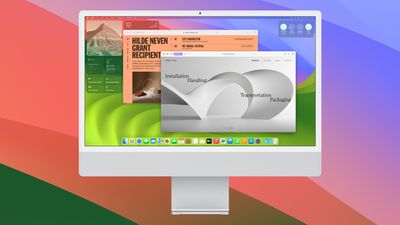
macos sonoma 4
Apple's latest macOS Sonoma operating system for Mac has a new option called "Click wallpaper to reveal desktop." Enabled by default, the option can be especially useful if you tend to have several open windows and want to access files or folders on your desktop without having to minimize or move windows out of the way.

When the feature is enabled and you click on the desktop wallpaper, all open windows are temporarily swept aside, giving you direct access to the desktop. Once you're done, you can click again to return the windows to their original position.

If you're unfamiliar with this behavior in macOS, it can be surprising when it first happens, but it can be especially irritating if you find you keep activating it unintentionally. Fortunately, there's a way to prevent it from happening, but it requires that you first disable Stage Manager in the menu bar's Control Center panel. Once you've done that, follow these steps.

  1. Click the Apple () symbol in your Mac's menu bar.
  2. Choose System Settings....
  3. Click Desktop & Dock in the side column.
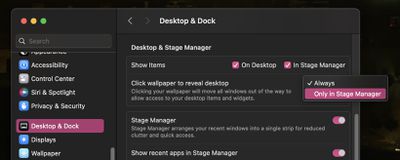
  4. In the "Desktop & ‌Stage Manager‌" section, look for the option Click wallpaper to reveal desktop, then click Always and choose Only in ‌Stage Manager in the dropdown menu‌ instead.

click wallpaper reveal desktop

That's all there is to it. As long as you have ‌Stage Manager‌ disabled, clicking the desktop will no longer have any impact on your active windows.

Related Forum: macOS Sonoma

Popular Stories

iPhone 18 Pro Deep Red Feature

iPhone 18 Pro Launching in Two Months With These 12 New Features

Friday July 17, 2026 10:39 am PDT by
It is now mid-July, and that means the iPhone 18 Pro and iPhone 18 Pro Max are now just two months away. The devices are expected to look similar to the iPhone 17 Pro and iPhone 17 Pro Max, but there will still be many year-over-year changes, with rumored features including a smaller Dynamic Island, 5G via satellite, and more. Apple is expected to unveil the iPhone 18 Pro, iPhone 18 Pro Max, ...
Apple 2026 Back to School Graphic

Apple's 2026 Back to School Offer Just Went Live in Select Countries

Wednesday July 15, 2026 11:48 am PDT by
Apple's annual Back to School promotion is now live in select countries in Asia, including China, India, Malaysia, the Philippines, Singapore, Taiwan, Thailand, and Vietnam. The offer provides college students and educational staff with a free item with the purchase of an eligible Mac or iPad model. The exact offer varies by country, with options including a pack of four AirTags, AirPods 4,...
iphone 17 cyber

Apple Closes Unlocked iPhone Loophole for T-Mobile and Verizon Financing

Wednesday July 15, 2026 3:20 pm PDT by
Carrier-financed iPhones purchased from Apple will soon be locked to the carrier, ending a workaround customers used to purchase an unlocked iPhone on a payment plan. Until the rule change, buying an iPhone from Apple and opting for financing through Verizon or T-Mobile meant you would get an iPhone not locked to either carrier's network. That's no longer the case, and now iPhones financed...