Apple Watch Series 8 and Apple Watch Ultra models can log your temperature data while you're sleeping to give you an "insight into your overall well-being," according to Apple. This article explains what it does and how to use it.
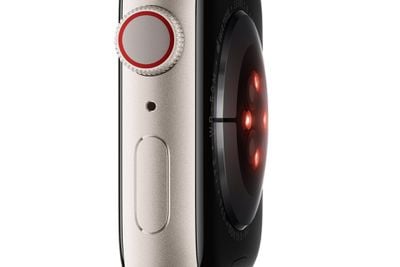
Apple Watch Series 8 and Apple Watch Ultra have two temperature sensors. One is on the back near your skin, and the other is just under the display. Apple designed it this way to improve accuracy by reducing bias from the outside environment.
If you wear your Apple Watch while you're asleep, these sensors can take measurements every five seconds of your wrist temperature, which can naturally fluctuate each night. Advanced algorithms then use this data to provide an aggregate for each night.
These measurements can then be compared against your established baseline temperature and used to give you an insight into your health if you are ill, and if you use Cycle Tracking, they can provide retrospective ovulation estimates and improve period predictions.
What You'll Need
For your Apple Watch to track your wrist temperature at night, you have to be at least 14 years of age. You'll also need to have the following:
- An Apple Watch Series 8 or Apple Watch Ultra
- Sleep mode setup with Track Sleep with Apple Watch enabled.
- Sleep focus enabled for at least four hours per night for around five nights.
How to View Your Wrist Temperature Data
- On your iPhone, open the Health app.
- Tap Browse, then tap Body Measurements.
- Tap Wrist Temperature.
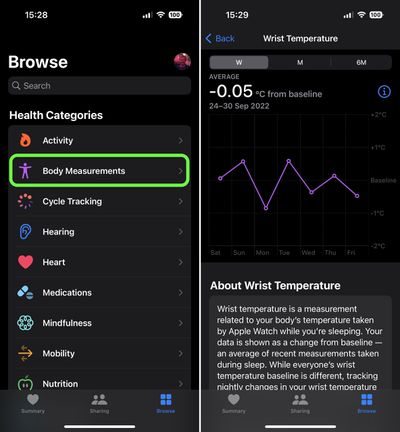
If you see "Needs More Data" at the top of the chart, your baseline temperature is yet to have been established and you'll need to wear your Apple Watch for more nights. The number of nights required will be displayed below the chart.
How to Disable Wrist Temperature Tracking
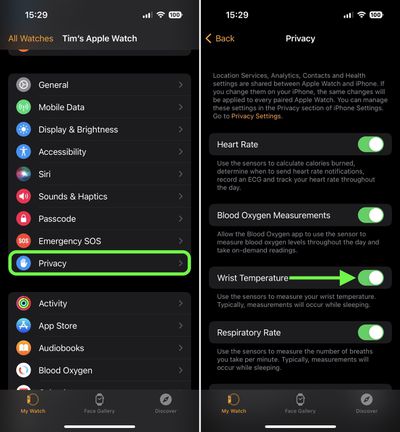
- On your iPhone, launch the Watch app.
- Tap Privacy.
- Toggle off the switch next to Wrist Temperature.
Apple cautions that the temperature sensing feature isn't a medical device and isn't intended for any medical purpose. Also bear in mind that the temperature data taken by your Apple Watch can also be impacted by certain physiological, lifestyle and environmental factors.