

In iOS 17 and later, Apple includes an accessibility setting that makes the haptic feedback feature activate faster than in previous versions of its mobile operating system. If you fondly hearken back for the days of 3D Touch, you might just prefer it.
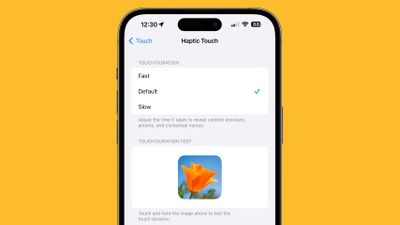
haptic touch ios 17 fast
As many iPhone users might remember, ‌3D Touch‌ was an interactive haptic feature that Apple introduced in 2015 with the ‌iPhone‌ 6s. When the iPhone XR was released in 2018, Apple kiboshed 3D Touch‌ to the dismay of some users, and instead implemented the simplified ‌Haptic Touch, which offers less functionality‌.

‌3D Touch‌ supported multiple levels of pressure for different interactions depending on how hard you pressed, with Apple implementing "Peek and Pop" gestures. In contrast, ‌Haptic Touch‌ supports just a single level of pressure for the long press gesture.

‌Haptic Touch‌ has always worked slower than ‌3D Touch‌ because of the two levels of pressure that ‌3D Touch‌ allowed for. The first ‌3D Touch‌ pressure level activated quickly when pressing on the display, so those who became used to ‌3D Touch‌ may have found the ‌Haptic Touch‌ replacement to be too sluggish.

The good news is that setting ‌Haptic Touch‌ to the Fast option makes a noticeable difference in how quick haptic menus pop up under the finger when an icon or on-screen element is long pressed. The speed brings ‌Haptic Touch‌ interactions closer to 3D Touch interactions. Here's how to enable it on iPhones running iOS 17 and newer.

  1. Open the Settings app and tap Accessibility.
  2. Under "Physical and Motor," tap Touch.
  3. Tap Haptic Touch.
  4. Select from Fast, Default, and Slow. Note that when you select a speed, you can test it using the flower image on the same screen.
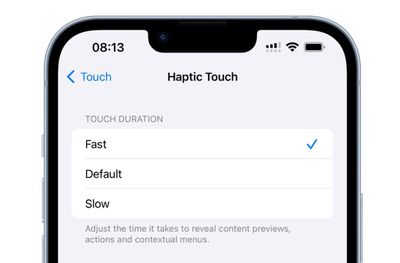
haptic touch faster ios 17

It's still not entirely clear why Apple got rid of ‌3D Touch. Some have argued that it suffered from a lack of discoverability, similar to the Apple Watch's Force Touch functionality, which suffered the same fate. Others have speculated that Apple eliminated it in order to bring gesture parity to the ‌iPhone‌ and the iPad. Either way, the change allowed Apple to remove the capacitive layer that used to be integrated into every ‌‌iPhone‌‌ display.

Top Rated Comments

9 months ago
This is my favorite tip. It may only save milliseconds, but it makes it feel so much more responsive.
Score: 5 Votes (Like | Disagree)
9 months ago
Great tip! However, I really don’t use it much. Getting rid of 3D Touch was such a bummer, I still miss it today.

Score: 4 Votes (Like | Disagree)
9 months ago
Didn't know of this. Thank you.

I feel like when iOS 26 comes out, there will be a lot of users changing things in the Accessibility settings to make their iPhone/iPad less hard to actually use.
Score: 3 Votes (Like | Disagree)
TechWhisperer Avatar
9 months ago
Still ain’t fast enough.
Score: 2 Votes (Like | Disagree)
9 months ago
Have set it to 'Fast' for my iPhones ever since 3D touch was removed years ago.
Score: 2 Votes (Like | Disagree)
OlliFlamme Avatar
9 months ago
[LIST=1]
* Open the Settings app, pull down and search "Haptic Touch"
* Tap the top result
* Select from Fast, Default, and Slow.
Score: 2 Votes (Like | Disagree)

Popular Stories

M3 iPad Air

Apple's Next Two Products Are Coming Soon

Thursday February 12, 2026 11:17 am PST by
Apple plans to release an iPhone 17e and an iPad Air with an M4 chip "in the coming weeks," according to the latest word from Bloomberg's Mark Gurman. "Apple retail employees say that inventory of the iPhone 16e has basically dried out and the iPad Air is seeing shortages as well," said Gurman. "I've been expecting new versions of both (iPhone 17e and M4 iPad Air) in the coming weeks."...
Apple Sales Coach App

Apple Launching New 'Sales Coach' App

Friday February 13, 2026 2:01 pm PST by
Apple plans to launch a rebranded "Sales Coach" app on the iPhone and iPad later this month, according to a source familiar with the matter. "Sales Coach" will arrive as an update to Apple's existing "SEED" app, and it will continue to provide sales tips and training resources to Apple Store and Apple Authorized Reseller employees around the world. For example, there are articles and videos...
Coffee Burgundy and Purple iPhone 18 Pro Mock

Five iPhone 18 Pro Features Revealed in New Report

Friday February 13, 2026 8:43 am PST by
While the iPhone 18 Pro and iPhone 18 Pro Max are still seven months away, an analyst has revealed five new features the devices will allegedly have. Rumored color options for the iPhone 18 Pro models In a research note with investment firm GF Securities on Thursday, analyst Jeff Pu outlined the following upgrades for the iPhone 18 Pro models: Smaller Dynamic Island: It has been rumored...
iOS 26 Home Feature

Three New Apple Home Products Rumored for 2026

Friday February 13, 2026 4:18 pm PST by
Apple has a long list of new products rumored for 2026, including a series of home products that will see the company establishing more of a presence in the smart home space. Robots are on the horizon for 2027, but the 2026 releases will be a little tamer. HomePod mini We're expecting a new HomePod mini 2 to launch at any time. Apple isn't going to update the device's design, but we could...
m5 macbook pro deal

Why You Shouldn't Buy the Next MacBook Pro

Tuesday February 10, 2026 4:27 pm PST by
Apple is planning to launch new MacBook Pro models as soon as early March, but if you can, this is one generation you should skip because there's something much better in the works. We're waiting on 14-inch and 16-inch MacBook Pro models with M5 Pro and M5 Max chips, with few changes other than the processor upgrade. There won't be any tweaks to the design or the display, but later this...









































