Get Upcoming Calendar Events on Your iPhone Lock Screen - MacRumors
Skip to Content

Get Upcoming Calendar Events on Your iPhone Lock Screen

by

On iPhones running iOS 16 or later, you can display upcoming calendar events directly on the Lock Screen. Keep reading to learn how it's done.
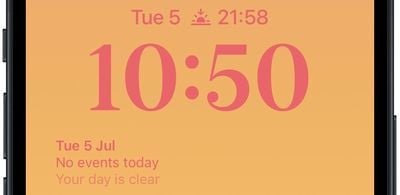
calendar widget
Thanks to watch face complications, many Apple Watch owners are used to being able to glance at their wrist to check their next upcoming calendar event. With the advent of iOS 16 and Lock Screen widgets, you can view the same calendar event information right on your iPhone without even having to unlock the device.

The calendar Lock Screen widget comes in two flavors, allowing you to track the time of the next upcoming event or use a larger widget to show both the event name and its time.

2lock screen widgets
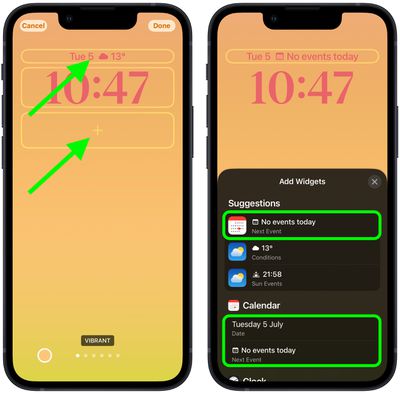
To get started adding widgets, unlock your ‌‌iPhone‌‌ with Face ID or Touch ID, long press on the Lock Screen to enter the Lock Screen gallery, then tap the Customize button. The following steps guide you through the rest of the process.

Add Calendar Event Widget to Lock Screen

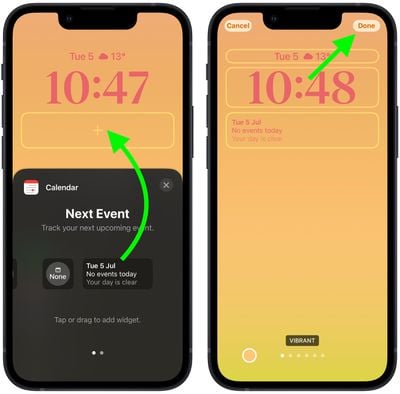
  1. Tap the frame either above or below the time to bring up the widgets selector.
  2. Tap the suggested calendar events widget at the top of the widgets selector to add it to the selected frame.
    Lock Screen

  3. You can also tap Calendar in the column list of apps to choose from a couple of widget variants. Swipe to the one you want, then tap it or drag it to the frame to place it.
  4. When you're finished arranging your widgets, tap Done in the top-right corner of the screen.
  5. Tap the current Lock Screen in the wallpaper gallery to activate it.
    Lock Screen

iOS developers often create widgets for third-party apps using Apple's WidgetKit API, so look out for them whenever you install a new app.

Popular Stories

imac video apple feature

Apple Released Yet Another New Product Today

Friday March 20, 2026 2:39 pm PDT by
Apple has unveiled a whopping nine new products so far this March, including an iPhone 17e, iPad Air models with the M4 chip, MacBook Air models with the M5 chip, MacBook Pro models with M5 Pro and M5 Max chips, the all-new MacBook Neo, an updated Studio Display, a higher-end Studio Display XDR, AirPods Max 2, and now the Nike Powerbeats Pro 2. iPhone 17e features the same overall design as...
ios 26 4 pastel

iOS 26.4: Top 10 New Features Coming to Your iPhone

Friday March 20, 2026 2:44 pm PDT by
iOS 26.4 isn't the major update with new Siri features that we hoped for, but there are some useful quality of life improvements, and a little bit of fun with an AI playlist generator and new emoji characters. Playlist Playground - Apple Music has a Playlist Playground option that lets you generate playlists from text-based descriptions. You can include moods, feelings, activities, or...
iPhone 18 Pro Deep Red Feature

iPhone 18 Pro Launching Later This Year With These 12 New Features

Wednesday March 18, 2026 7:39 am PDT by
While the iPhone 18 Pro and iPhone 18 Pro Max are not expected to launch for another six months or so, there are already plenty of rumors about the devices. It was initially reported that the iPhone 18 Pro models would have fully under-screen Face ID, with only a front camera visible in the top-left corner of the screen. However, the latest rumors indicate that only one Face ID component...