iOS 14.5: How to Share Apple Music Lyrics and Song Clips - MacRumors
Skip to Content

iOS 14.5: How to Share Apple Music Lyrics and Song Clips

by

With the release of iOS 14.5, Apple added a new Apple Music feature that lets subscribers of the streaming service share lyrics as text as well as audio clips containing the sung lyrics. Read on to learn how it works.
iMessage
‌Apple Music‌ features real-time lyrics for many songs that you can sing along to while the track plays or use to skip to specific parts of a song. In iOS 14.5 and later installed on your iPhone or iPad, you can now share song lyrics with a friend or with a wider circle of people over social media, including Instagram Stories.

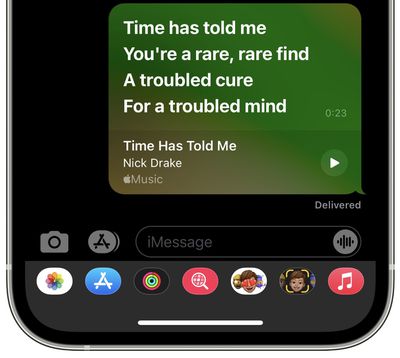
In some cases, the feature also lets you share song clips. For example, if you opt to share over iMessage, an ‌‌Apple Music‌‌ card will appear in the conversation that allows the recipient to play that specific part of the song in Messages via a play button. The following steps guide you through the process of sharing lyrics in ‌Apple Music‌.

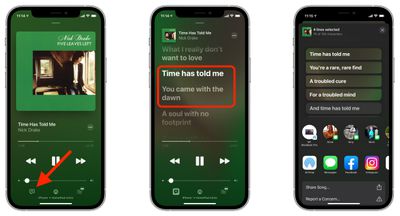
  1. In the ‌Apple Music‌ app, select a song to play and expand the currently playing menu to the whole screen.
  2. Tap the lyrics button in the bottom-left corner of the screen. If it's greyed out, ‌Apple Music‌ doesn't have lyrics for the currently playing song and you won't be able to share.
  3. With the real-time lyrics showing on screen, press and hold on any of the words.
  4. The actions menu will appear, where you can tap on the individual lines of lyrics that you want to share. To de-select a highlighted lyric, simply tap it again. Note Apple applies a character limit, which means on average that you can share between four and six lines depending on the song.

  5. Choose a sharing method from the two rows of options, such as iMessage or Instagram. You can also choose to share a clip of the song using the Share Song... action.
    Apple Music

For more helpful articles detailing all the new features in iOS 14.5, be sure to check our dedicated guide.


Related Forum: iOS 14

Top Rated Comments

66 months ago
(Re the last sentence of step 3 above.)
After choosing Lyrics, if you click 'Share Song', in my experience that will share the entire song, not a clip.
Score: 1 Votes (Like | Disagree)
66 months ago
If only Apple offered a way to correct or flag the many lyrics they have that are just laughably terribly incorrect.
Score: 1 Votes (Like | Disagree)
66 months ago
Good choice of song.
Score: 1 Votes (Like | Disagree)
TheYayAreaLiving 🎗️ Avatar
66 months ago
Handful feature. Loving iOS 14.5 so far.
Score: 1 Votes (Like | Disagree)

Popular Stories

apple music

Apple Music Is Down for Some Users

Monday April 20, 2026 12:18 pm PDT by
If Apple Music isn't working for you, you're not alone. According to Apple's System Status page, there's currently an Apple Music outage. Apple says that users may be experiencing intermittent issues with the service. The outage started at 2:38 p.m. Eastern Time, and it is ongoing. We'll update this article when the outage has been...
Dynamic Island iPhone 18 Pro Feature

11 Reasons to Wait for the iPhone 18 Pro

Monday May 11, 2026 9:01 am PDT by
We're only four months out from the launch of Apple's premium next-generation smartphone lineup, and while we're not expecting a sea change in terms of functionality, there are still several enhancements rumored to be coming to the iPhone 18 Pro and iPhone 18 Pro Max. One thing worth noting is that Apple is reportedly planning a major change to its iPhone release cycle this year, adopting a...
iOS 26

iOS 26.5 Features: Everything New in iOS 26.5

Monday May 11, 2026 5:09 pm PDT by
Apple released iOS 26.5 after a few months of beta testing, and while it doesn't have the Siri features we were hoping for since those are being held until iOS 27, there are a handful of useful changes worth knowing about. Subscribe to the MacRumors YouTube channel for more videos. End-to-End Encryption for RCS Support for end-to-end encryption (E2EE) for RCS messages between iPhone and...