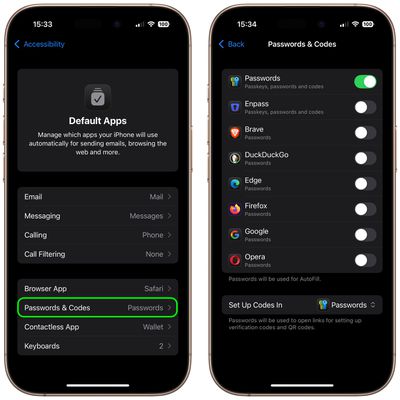
In iOS 18.2, Apple introduced a way for users to select their preferred default apps for iPhone. Apple initially promised that the feature would be coming to the European Union, but it is actually available worldwide.
Change Default Browser App 2025 Feature

The Freedom to Choose – Why It Matters

The freedom to choose default apps on iPhone represents a marked shift in Apple's traditionally closed ecosystem, giving you more control over how you interact with your device. Rather than being locked into Safari for web browsing or Apple Mail for email, you can now set third-party alternatives like Chrome, Firefox, Gmail, or Outlook as your go-to apps.

This means when you tap a link or email address, your iPhone will automatically open your preferred app instead of Apple's built-in options. The change effectively eliminates the extra steps of manually copying and pasting content between apps or navigating through share sheets to get to the apps you actually want to use.

In iOS 18.2, there are Default App settings for Email, Messaging, Calling, Call Filtering, Browser App, Passwords and Codes, and Keyboards. For users in the European Union, there is also an additional App Installation option to choose an alternative app marketplace instead of the App Store.

On iPhones in select countries and regions, another option called Contactless Apps appears that lets you choose another app apart from the Wallet app to make contactless transactions using your device's NFC technology. Contactless Apps is available in the European Economic Area (European Union, Iceland, Liechtenstein, Norway), Australia, Brazil, Canada, Japan, New Zealand, Switzerland, the United Kingdom, and the United States.

How to Set Default Apps on iPhone and iPad

  1. Open Settings on your iPhone or iPad (running iOS 18.2/iPadOS 18.2 or later).
  2. Scroll to the bottom and select Apps.
  3. Tap Default Apps at the top of your list of apps.
    settings

  4. Tap a feature to change your default setting to a different app.
  5. Follow any additional onscreen steps if necessary to set up your default app.
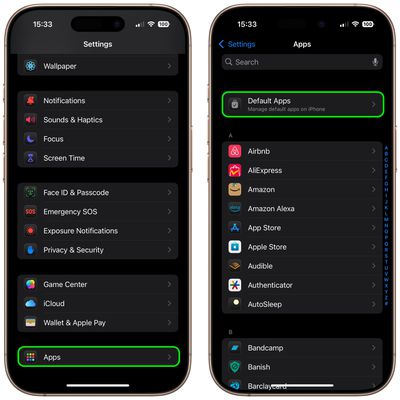
    settings

In some cases, only one app at a time can be the default app for a feature. In other cases, you can prioritize the apps your device uses. If you can't see an option to set a particular app as the default for a feature, it's best to contact the app developer.


Top Rated Comments

Jason2000 Avatar
14 months ago
Wish we had the option to set defaults for maps and music.
Score: 24 Votes (Like | Disagree)
WarmWinterHat Avatar
14 months ago

I don't care, I buy Apple based on the fact that I like the Apple phone and it's ecosystem.

If I didn't like it I would buy an Android phone.

Additionally I don't appreciate governments forcing companies to make changes to their product. If people are not happy they buy a different product.
I buy Apple for the hardware, and ignore ecosystems. That way I've never tied to anything in particular.

This is available in the US. The US government didn't force Apple to do anything, or even ask.
Score: 17 Votes (Like | Disagree)
PhilJustRidingAlong Avatar
14 months ago
I don't care, I buy Apple based on the fact that I like the Apple phone and it's ecosystem.

If I didn't like it I would buy an Android phone.

Additionally I don't appreciate governments forcing companies to make changes to their product. If people are not happy they buy a different product.
Score: 16 Votes (Like | Disagree)
bviktor Avatar
14 months ago
Too bad there's no default setting for maps. And even though the web link is a GMaps link, iOS will open it in Apple Maps no matter what I do.
Score: 14 Votes (Like | Disagree)
Frankied22 Avatar
14 months ago
Article image shows replacing the default music app...which can't be done. Nice one Macrumors!
Score: 12 Votes (Like | Disagree)
mystery hill Avatar
14 months ago

Wonder how much more viruses will spread in the iOS ecosystem and how Apple is increasing antivirus and antimalware protections. I get the need for options
Why would setting an existing app as the default result in viruses being spread?
Score: 12 Votes (Like | Disagree)

Popular Stories

Aston Martin CarPlay Ultra Screen

Apple's CarPlay Ultra to Expand to These Vehicle Brands Later This Year

Sunday February 1, 2026 10:08 am PST by
Last year, Apple launched CarPlay Ultra, the long-awaited next-generation version of its CarPlay software system for vehicles. Nearly nine months later, CarPlay Ultra is still limited to Aston Martin's latest luxury vehicles, but that should change fairly soon. In May 2025, Apple said many other vehicle brands planned to offer CarPlay Ultra, including Hyundai, Kia, and Genesis. In his Powe...
Apple Logo Black

Apple's Next Launch is 'Imminent'

Sunday February 1, 2026 12:31 pm PST by
The calendar has turned to February, and a new report indicates that Apple's next product launch is "imminent," in the form of new MacBook Pro models. "All signs point to an imminent launch of next-generation MacBook Pros that retain the current form factor but deliver faster chips," Bloomberg's Mark Gurman said on Sunday. "I'm told the new models — code-named J714 and J716 — are slated...
Apple MacBook Pro M4 hero

New MacBook Pros Reportedly Launching Alongside macOS 26.3

Sunday February 1, 2026 5:42 am PST by
Apple is planning to launch new MacBook Pro models with M5 Pro and M5 Max chips alongside macOS 26.3, according to Bloomberg's Mark Gurman. "Apple's faster MacBook Pros are planned for the macOS 26.3 release cycle," wrote Gurman, in his Power On newsletter today. "I'm told the new models — code-named J714 and J716 — are slated for the macOS 26.3 software cycle, which runs from...
iOS 26

iOS 26.3 and iOS 26.4 Will Add These New Features to Your iPhone

Tuesday February 3, 2026 7:47 am PST by
We are still waiting for the iOS 26.3 Release Candidate to come out, so the first iOS 26.4 beta is likely still at least a week or two away. Following beta testing, iOS 26.4 will likely be released to the general public in March or April. Below, we have recapped known or rumored iOS 26.3 and iOS 26.4 features so far. iOS 26.3 iPhone to Android Transfer Tool iOS 26.3 makes it easier...
14 inch MacBook Pro Keyboard

Apple Changes How You Order a Mac

Saturday January 31, 2026 10:51 am PST by
Apple recently updated its online store with a new ordering process for Macs, including the MacBook Air, MacBook Pro, iMac, Mac mini, Mac Studio, and Mac Pro. There used to be a handful of standard configurations available for each Mac, but now you must configure a Mac entirely from scratch on a feature-by-feature basis. In other words, ordering a new Mac now works much like ordering an...