Set Alarm-Style iPhone Reminders in iOS 26.2 - MacRumors
Skip to Content

Set Alarm-Style iPhone Reminders in iOS 26.2

by

In iOS 26.2, released in December 2025, Apple has added a new optional feature that provides the Reminders app with a more urgent notification system. When you need to ensure you don't miss an important task, you can now set an alarm that works just like your morning wake-up call, with a snooze button and slide-to-stop slider.
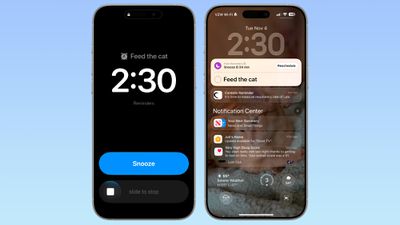
ios 26 2 alarm reminders
The feature distinguishes Reminder alarms from standard Clock alarms by applying a distinctive blue color to the snooze button, allowing you to easily tell which type of alarm is going off. You can also choose to see a Complete button instead of a Snooze button on the alarm screen that marks the reminder as completed.

Enable Alarms for Reminders

Before you can use alarms with reminders, you need to grant the Reminders app permission to access iPhone alarms.

  1. Open the Settings app on your iPhone.
  2. Swipe to the bottom and tap Apps ➝ Reminders.
  3. In the "Allow Reminders to Access" section, toggle on the switch next to Alarms.

settings

Create a Reminder With an Alarm

Once you've enabled alarm access, creating an urgent reminder is straightforward.

  1. Open the Reminders app.
  2. Create a new reminder or tap an existing one.
  3. Tap the info button (ⓘ) next to the reminder.
  4. Turn on Time and select when you want to be alerted.

  5. Turn on the Urgent switch to enable an alarm.

When the designated time arrives, your iPhone will sound an alarm. You'll see a snooze option and a slide-to-stop control on your screen. If you choose to stop or snooze the alarm, a notification appears with options to complete the reminder or reschedule it. Note that tapping to complete the reminder opens the Reminders app, where you'll need to tap again to mark it as done. Alarms will activate even when a Focus is on or your device is muted.

Show a 'Complete' Button on Reminder Alarms

You can streamline your alarm-reminder by replacing the snooze option with a Complete button that immediately marks the reminder as done.

  1. Open the Settings app on your iPhone.
  2. Swipe to the bottom and tap Apps ➝ Reminders.
  3. In the "Urgent Reminders" section, toggle on the switch next to Complete for Alarm.

reminders alarm complete

With this setting enabled, you can instantly complete reminders without opening the app, which is handy for quick tasks you finish on the spot.


Top Rated Comments

JaydenA Avatar
27 weeks ago
Shouldn't need a reminder. Most cats would never forget to remind their hooman of the need for noms.
Score: 6 Votes (Like | Disagree)
27 weeks ago
Finally! I’ve missed too many reminders because Reminders is just not as “alarm-y” as I’d like.
Score: 4 Votes (Like | Disagree)
adrianlondon Avatar
16 weeks ago

Anybody know how you tell Siri to mark a reminder as “urgent” to include this high-powered alarm?

[edit: oops, see this has already been asked. I wish I could say I was surprised at this lack of basic support from Siri...]
Prompted by this, I did another test (iOS 26.3 latest beta).

Siri ignored the word "urgent" completely, despite hearing it (I have transcript for my Siri requests turned on*). So, no "urgent" text in the reminder name, and the urgent toggle left off.

* I like to check how stupid Siri is every now and again for personal entertainment.

Score: 2 Votes (Like | Disagree)
aries81 Avatar
27 weeks ago

Finally! I’ve missed too many reminders because Reminders is just not as “alarm-y” as I’d like.

This!

A welcome addition indeed.
Score: 2 Votes (Like | Disagree)
la3541 Avatar
27 weeks ago
Is there a way to create an urgent reminder with an alarm via Siri?
Score: 1 Votes (Like | Disagree)
27 weeks ago
Very happy to see this. Have missed some reminders in the past. This should definitely ensure that nothing will be missed.
Score: 1 Votes (Like | Disagree)

Popular Stories

Four iPhone 18 Pro Colors Mock Feature

iPhone 18 Pro Launching Later This Year With These 10 New Features

Tuesday May 26, 2026 6:32 am PDT by
While the iPhone 18 Pro and iPhone 18 Pro Max are not launching until September, there are already plenty of rumors about the devices. It was initially reported that the iPhone 18 Pro models would have fully under-screen Face ID, with only a front camera visible in the top-left corner of the screen. However, the latest rumors indicate that only one Face ID component will be moved under the...
apple wallet drivers license feature iPhone 15 pro

Apple Just Expanded iPhone Driver's License Feature to Arkansas

Wednesday May 27, 2026 9:41 am PDT by
In select U.S. states, residents can add their driver's license or state ID to the Apple Wallet app on the iPhone and Apple Watch, and then use it to display proof of identity or age at select airports and businesses, and in select apps. Starting today, the feature is available in Arkansas, which is the 14th state to offer it. However, it may take some time to roll out to all users. To...
Apple Watch Blood Glucose Monitoring Feature 2

Apple Watch for Diabetes: The Latest on Apple's Plans for Non-Invasive Blood Sugar Monitoring

Tuesday May 26, 2026 9:30 am PDT by
For many years now, it has been rumored that the Apple Watch will eventually gain non-invasive blood sugar monitoring capabilities, which would enable millions of people with diabetes to track their blood glucose levels without needing to prick their skin with a needle or wear a dedicated continuous glucose monitor. According to Bloomberg's Mark Gurman, Apple recently shifted oversight of...