Search Your Apple Account Purchase History on iPhone - MacRumors
Skip to Content

Search Your Apple Account Purchase History on iPhone

by

In an age of digital ubiquity, knowing how to easily keep track of your online transactions is crucial, especially as an Apple user who frequently downloads apps, music, movies, and more from various Apple services.
apple account%402x
Your Apple Account purchase history is a comprehensive log of all the content you've bought using your account, not just on your iPhone, but across all your Apple devices. Knowing how to access this information on your device can give you valuable insights into your digital spending habits, help you manage your subscriptions, or even assist in troubleshooting or disputing unauthorized purchases.

So whether you're trying to keep a budget, ensure that your family's purchases are appropriate, or simply curious about when you bought that app or movie, here's how to view your Apple Account purchase history on an iPhone or iPad logged into your account.

View Purchase History in Settings

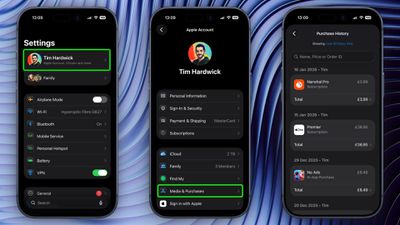
  1. Open the Settings app and tap your Apple Account banner at the top.
  2. Tap Media & Purchases.
  3. Tap View Account in the popup and authenticate with Face ID or Touch ID.
  4. Scroll down and tap Purchase History.

settings

You are now viewing the purchase history for this Apple Account across all the devices tied to the account. If you are looking for a specific purchase, you can use the search field at the top to enter a name, price, or order ID.
view apple account purchase history1
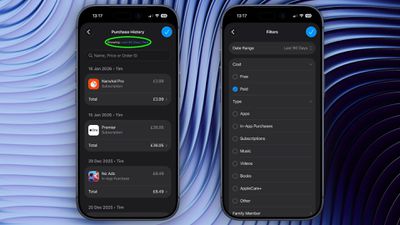
If you tap the blue text next to "Showing:" you can also filter the history by date range, price, and purchase type.

View Purchase History in App Store

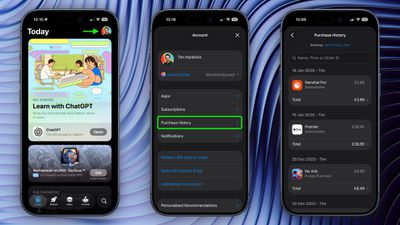
In iOS 17.4 and iPadOS 17.4 or later, you can access the same purchase history a little bit faster via the App Store app on iPhone and iPad.
app store
Simply tap your account profile in the top-right corner, then tap Purchase History and authenticate with Face ID or Touch ID when prompted.


Top Rated Comments

Crowbot Avatar
23 weeks ago
I would love to see this extended to hardware purchases too. Some of this info is available on the Apple ID site but I'd like to see a comprehensive list on the phone.
Score: 2 Votes (Like | Disagree)
maflynn Avatar
23 weeks ago
Thanks for this information, Sometimes trying to do your due diligence on purchases and subscriptions, it can be daunting to find
Score: 2 Votes (Like | Disagree)
23 weeks ago
Good article. Have used it in the past. Useful. However I feel that the search feature could be improved.

Score: 1 Votes (Like | Disagree)
23 weeks ago
Sadly I cannot find a way to search every year all at once. I could only search a single year at a time for a specific app. Maybe I'm missing something.

Score: 1 Votes (Like | Disagree)

Popular Stories

Apple TV Thumb 3

Everything Coming in the 2026 Apple TV 4K

Wednesday July 8, 2026 4:51 pm PDT by
The Apple TV 4K hasn't been updated since 2022, and it's due for a refresh. An update is planned for 2026, but Apple is likely going to wait to launch it after Siri AI launches in iOS 27. Design Apple TV design updates don't happen often, and that's not changing. The next Apple TV is going to have the same squircle shape as the current model, and it'll continue to be made from a black...
iphone 16 teal

'Siri AI' Lawsuit Update: Apple to Pay Owners of These iPhone Models

Thursday July 9, 2026 7:08 am PDT by
In May, Apple agreed to pay $250 million to settle a U.S. class action lawsuit over Siri AI's delayed launch, and eligible iPhone users could receive up to a $95 payout. This week, the California court overseeing the case held a hearing regarding preliminary approval of the settlement, but the judge has not yet issued a ruling. It will likely be at least a few more months before eligible...
apple wallet drivers license feature iPhone 15 pro

Apple Says iPhone Driver's Licenses Will Expand to These 6 U.S. States

Thursday July 9, 2026 7:29 am PDT by
In select U.S. states, residents can add their driver's license or state ID to the Apple Wallet app on the iPhone and Apple Watch, and then use it to display proof of identity or age at select airports and businesses, and in select apps. To set up the feature, open the Wallet app on the iPhone and tap on the plus sign in the top-right corner. Next, tap on Driver's License and ID Cards,...