When Apple unveiled its new MacBook Pro models with a notch to house the camera in the thinner display bezel, many users saw it as a potential problem for third-party apps that place additional content across the menu bar, such as menus that extend from the left or menu items that extend from the right.
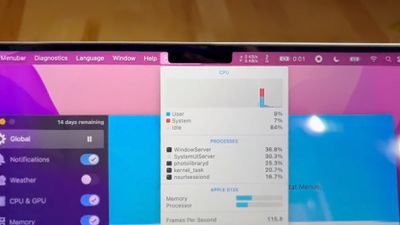
notch behavior feature
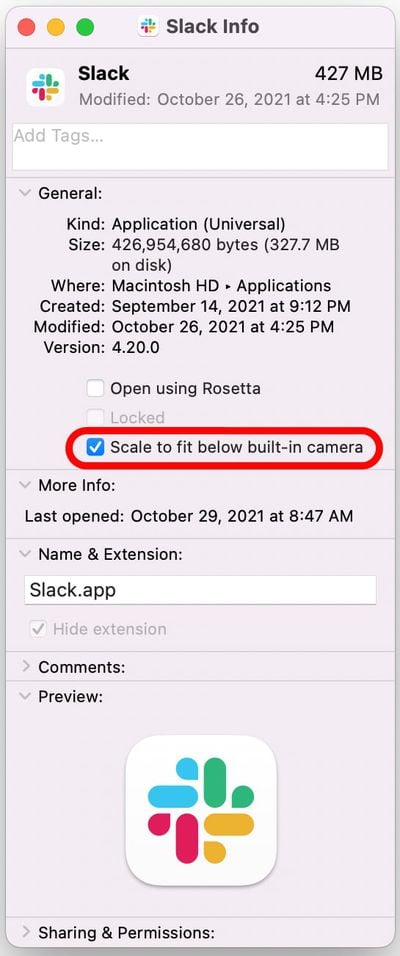
However, it turns out Apple was wise to the potential issue of having menus or menu items in the menu bar inadvertently being hidden behind the notch. In macOS Monterey, it includes a compatibility setting called "Scale to fit below built-in camera," which adjusts an app's settings so that it either uses the whole display or uses only the area below the camera housing.

"Scale to fit" ensures the menu bar and app windows appear below the built-in camera on your Mac and are always visible. Moreover, if the app has menu bar items or windows that would appear behind the camera housing, all open apps or apps that share the same space appear below the camera until you quit the app using the scaled setting.

Here's how to turn it on for an individual Mac app.

  1. Close the app that you want to adjust for the notch.
  2. Launch Finder and select the Applications folder.
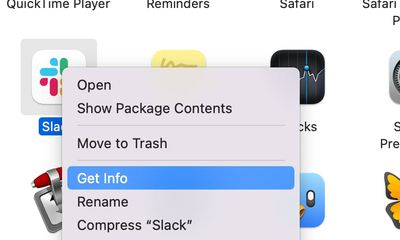
  3. Right-click (Ctrl-click) the icon for the app in question and choose Get Info.
    mac app notch get info

  4. Check the box next to Scale to fit below built-in camera.mac app scale below camera

Now restart the app, and as it launches you should see the screen automatically scale to fit its entire menu bar below the notch area, ensuring all of the app's menu bar items stay visible.

Related Roundup: MacBook Pro
Buyer's Guide: MacBook Pro (Caution)
Related Forums: MacBook Pro, macOS Monterey

Popular Stories

Apple Announces Special Event in New York Feature

Apple Announces Special Event in New York, London, and Shanghai on March 4

Monday February 16, 2026 6:05 am PST by
Apple today announced a "special Apple Experience" in New York, London, and Shanghai, taking place on March 4, 2026 at 9:00am ET. Apple invited select members of the media to the event in three major cities around the world. It is simply described as a "special Apple Experience," and there is no further information about what it may entail. The invitation features a 3D Apple logo design...
Apple Announces Special Event in New York Feature 1

Apple Event on March 4: Here's What to Expect

Tuesday February 17, 2026 8:08 am PST by
Apple on Monday invited selected journalists and content creators to a "special Apple Experience" on Wednesday, March 4 in New York, London, and Shanghai. At an Apple Experience, attendees are typically given the opportunity to try out Apple's latest hardware or software. Following the launch of Apple Creator Studio last month, for example, some content creators attended an Apple Experience...
Apple Announces Special Event in New York Feature 1

Rumor: Apple to Announce Multiple New Products in First Week of March

Tuesday February 17, 2026 6:35 pm PST by
Apple on Monday invited selected journalists and content creators to a "special Apple Experience" on Wednesday, March 4 in New York, London, and Shanghai. And now, rumors are surfacing about Apple's broader plans for that week. Daring Fireball's John Gruber today guessed that Apple will announce new products on a day-by-day basis from Monday, March 2 through Wednesday, March 4:What strikes...
iphone 17 pro dark blue 1

Gurman: iPhone 18 Pro Could Be Underwhelming

Monday February 16, 2026 4:24 am PST by
Apple's upcoming iPhone 18 Pro and iPhone 18 Pro Max models "won't be a big update," according to Bloomberg's Mark Gurman. In the latest edition of his "Power On" newsletter, Gurman said that the iPhone 18 Pro models will "represent minor tweaks from last year's iPhone 17 Pro and 17 Pro Max." He compared the upgrade to Apple's past practice of appending the letter "S" to its more minor...
CarPlay Liquid Glass Dark

iOS 26.4's New CarPlay Video Feature Shown in Action

Wednesday February 18, 2026 9:29 am PST by
Back at WWDC 2025, Apple revealed that it was planning to allow CarPlay users to watch video via AirPlay in their vehicles while they are not driving, and the first beta of iOS 26.4 suggests the feature may be nearing availability. There are several new references to CarPlay video streaming functionality within the iOS 26.4 beta's source code. The feature is not yet visible to users, but...