In macOS Mojave and later, the Finder includes Quick Actions that make it easier to perform quick edits to files without having to open the apps associated with them.
finder
In the default set that Apple includes with every macOS install, there's a very handy Quick Action that allows you to remove the background from a selected image or photo.

The feature lifts the subject out of the picture and turns it into a PNG file, which makes the background transparent. The Quick Action works best on images with a clearly defined subject in the foreground, like a person or object, set against a fairly uniform background.

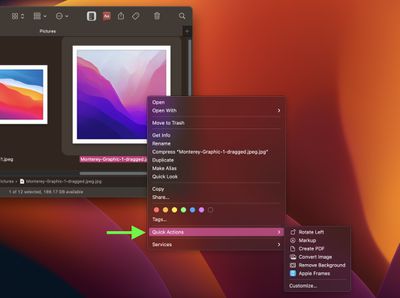
To use the Remove Background feature in macOS, simply right-click an image file in Finder, hover your cursor over the Quick Actions submenu, then click Remove Background.

Wait for the image to be processed (you may see a progress bar appear if the image is particularly complex), and you should soon see a transparent PNG version of the file appear in the same location as the original image, titled "[original filename] Background Removed.png."

background removed
Aside from the default Quick Actions that Apple includes in macOS, Apple encourages third-party developers to add support for Quick Actions in their apps. You can also create your own custom ones using the Automator app.


Popular Stories

airpods pro 3 purple

New, Higher End AirPods Pro Coming This Year

Tuesday January 20, 2026 9:05 am PST by
Apple is planning to debut a high-end secondary version of AirPods Pro 3 this year, sitting in the lineup alongside the current model, reports suggest. Back in September 2025, supply chain analyst Ming-Chi Kuo reported that Apple is planning to introduce a successor to the AirPods Pro 3 in 2026. This would be somewhat unusual since Apple normally waits around three years to make major...

smaller dynamic island iphone 18 pro Filip Vabrous%CC%8Cek

iPhone 18 Pro Leak: Smaller Dynamic Island, No Top-Left Camera Cutout

Tuesday January 20, 2026 2:34 am PST by
Over the last few months, rumors around the iPhone 18 Pro's front-panel design have been conflicted, with some supply-chain leaks pointing to under-display Face ID, reports suggesting a top-left hole-punch camera, and debate over whether the familiar Dynamic Island will shrink, shift, or disappear entirely. Today, Weibo-based leaker Instant Digital shared new details that appear to clarify the ...
Apple Logo Spotlight

Apple Expected to Unveil Five All-New Products This Year

Wednesday January 21, 2026 10:54 am PST by
In addition to updating many of its existing products, Apple is expected to unveil five all-new products this year, including a smart home hub, a Face ID doorbell, a MacBook with an A18 Pro chip, a foldable iPhone, and augmented reality glasses. Below, we have recapped rumored features for each product. Smart Home Hub Apple home hub (concept) Apple's long-rumored smart home hub should...
Liquid Glass App Store Feature

App Store and Apple TV Experiencing Outage

Tuesday January 20, 2026 4:36 pm PST by
Apple's App Store, iTunes Store, and Apple TV service are experiencing an outage at the current time, according to Apple's System Status page. Apple says that some users may be experiencing issues with the App Store and iTunes Store. Apple also says some users may be seeing intermittent issues with Apple TV. The Apple TV Channels feature is down too, and users may be unable to access some...
airtag prime day 2

Apple Developing AirTag-Sized AI Pin With Dual Cameras

Wednesday January 21, 2026 12:31 pm PST by
Apple is working on a small, wearable AI pin equipped with multiple cameras, a speaker, and microphones, reports The Information. If it actually launches, the AI pin will likely run the new Siri chatbot that Apple plans to unveil in iOS 27. The pin is said to be similar in size to an AirTag, with a thin, flat, circular disc shape. It has an aluminum and glass shell, and two cameras at the...