As part of its updated parental controls, Netflix now includes an option that lets account holders PIN protect individual profiles to help prevent kids from using them.
netflixpin
Even if you're not a parent or guardian, so long as you're the account holder you can still use the PIN feature to prevent other people in the same household from watching stuff on your Netflix profile and messing up your recommendations.

The easiest way to set up a PIN for your profile is on the Netflix website. The steps below show you how it's done.

  1. Launch a browser and go to www.netflix.com.
  2. Sign into Netflix using your account credentials, then select your profile.
    Netflix

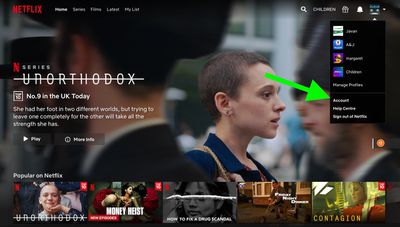
  3. On the main Netflix screen, select your profile avatar and choose the Account option in the menu.
    netflix

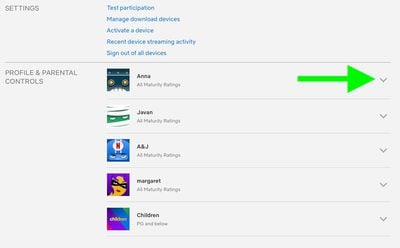
  4. Under the Profile & Parental Controls section, use the chevron against your profile to reveal further options.
    netflix

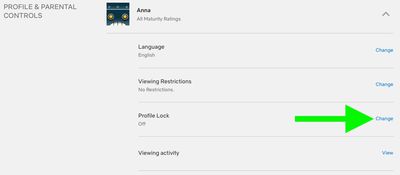
  5. Click Change next to the Profile Lock option.
    netflix

  6. Enter your account password if prompted.
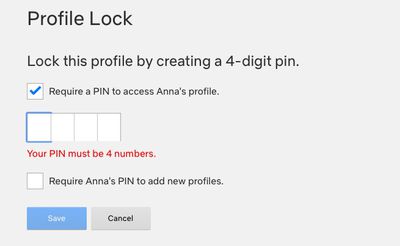
  7. Click the checkbox next to Require a PIN to access [yourname] profile, then enter the four-digit pin that you want to use.
    netflix

  8. Click the second checkbox to require the same pin to add new profiles.
  9. Click Save.

When your PIN is set, Netflix will ask for it whenever your profile is selected at the welcome screen. This will happen on all devices, including smart TVs. Note that you won't be asked for a PIN if your profile is the only one that exists on the account.

In addition to PIN protection for profiles, Netflix has added filters for children's accounts that are based on country ratings, as well as options to remove individual series or films by title, and a feature for reviewing each profile's setting using the Profile and Parental Controls hub in the settings menu.


Tag: Netflix

Top Rated Comments

mw360 Avatar
74 months ago

You might as well let your kids see the F bombs and get them prepared to live in a cruel world. I never understood why parents continue to pretend their kids don't know how to swear even long after they admit Santa doesn't exist.
Thanks. I've filed this in the same place all the other anonymous parenting advice goes.
Score: 4 Votes (Like | Disagree)
ryanwarsaw Avatar
74 months ago

Thanks. I've filed this in the same place all the other anonymous parenting advice goes.
May your children grow up to be as gentle and mild mannered as you are.
Score: 3 Votes (Like | Disagree)
ryanwarsaw Avatar
74 months ago

I don't know why these companies move like their development team is one person working part time. This feature is handy I guess if you're embarrassed about your viewing history, but useless for parenting. The kids profile is way too restrictive for kids of 5+, so ours will pester a parent to use theirs, but since the adult profile now features f-bombs and whatever else in the autoplaying trailers, the parent has to navigate to the show carefully. Thankfully, the developer called in a couple of months back to allow us to disable the autoplaying trailers, but now you can't play the trailers at all, which is a pain when the kids are in bed, and you're trying to browse.
You might as well let your kids see the F bombs and get them prepared to live in a cruel world. I never understood why parents continue to pretend their kids don't know how to swear even long after they admit Santa doesn't exist.
Score: 3 Votes (Like | Disagree)
gsmornot Avatar
74 months ago

How do you remove a PIN in case you forget it?
Use your account password and uncheck the option or type a new one.It does not replace the account password, just adds the PIN option to stop others in the house. Meh
Score: 2 Votes (Like | Disagree)
Sethal Avatar
74 months ago
Disney+ needs this feature!
Score: 2 Votes (Like | Disagree)
4487549 Avatar
74 months ago
The real story here is that we can finally turn off autoplay previews (setting found in the profile section):

Attachment Image
Score: 1 Votes (Like | Disagree)

Popular Stories

iOS 26

iOS 26.4 and iOS 27 Features Revealed in New Leak

Friday December 12, 2025 10:56 am PST by
Macworld's Filipe Espósito today revealed a handful of features that Apple is allegedly planning for iOS 26.4, iOS 27, and even iOS 28. The report said the features are referenced within the code for a leaked internal build of iOS 26 that is not meant to be seen by the public. However, it appears that Espósito and/or his sources managed to gain access to it, providing us with a sneak peek...
Apple Logo Top Half

Early iOS 26 Software Leak Uncovers Dozens of Upcoming Apple Features

Monday December 15, 2025 3:05 pm PST by
Software from an iPhone prototype running an early build of iOS 26 leaked last week, giving us a glimpse at future Apple devices and iOS features. We recapped device codenames in our prior article, and now we have a list of some of the most notable feature flags that were found in the software code. In some cases, it's obvious what the feature flags are referring to, while some are more...
apple beta 26 lineup

Apple Leak Confirms Work on Foldable iPhone, AirTag 2, and Dozens More Devices

Monday December 15, 2025 2:05 pm PST by
Last week, details about unreleased Apple devices and future iOS features were shared by Macworld. This week, we learned where the information came from, plus we have more findings from the leak. As it turns out, an Apple prototype device running an early build of iOS 26 was sold, and the person who bought it shared the software. The OS has a version number of 23A5234w, and the first...
iOS 26

iOS 26.3 Beta 1 Features: What's New So Far

Monday December 15, 2025 4:23 pm PST by
Apple is testing iOS 26.3, the next version of iOS 26 that will launch around January. Since iOS 26.3's testing is happening over the holidays, it is a smaller update with fewer features than we've seen in prior betas. We've rounded up what's new so far, and we'll add to our list with subsequent betas if we come across any other features. Transfer to Android Apple is making it simpler...
Apple Foldable Thumb

Leak Reveals Foldable iPhone Details

Monday December 15, 2025 9:09 am PST by
The first foldable iPhone will feature a series of design and hardware firsts for Apple, according to details shared by the Weibo leaker known as Digital Chat Station. According to a new post, via machine translation, Apple is developing what the leaker describes as a "wide foldable" device, a term used to refer to a horizontally oriented, book-style foldable with a large internal display....
iOS 26

Apple Releases iOS 26.2 With Alarms for Reminders, Lock Screen Changes, Enhanced Safety Alerts and More

Friday December 12, 2025 10:10 am PST by
Apple today released iOS 26.2, the second major update to the iOS 26 operating system that came out in September, iOS 26.2 comes a little over a month after iOS 26.1 launched. ‌iOS 26‌.2 is compatible with the ‌iPhone‌ 11 series and later, as well as the second-generation ‌iPhone‌ SE. The new software can be downloaded on eligible iPhones over-the-air by going to Settings >...
airpods max 2024 colors

AirPods Max 2 Likely to Offer These 10 New Features

Monday December 15, 2025 7:41 am PST by
Apple released the AirPods Max on December 15, 2020, meaning the over-ear headphones launched five years ago today. While the AirPods Max were updated with a USB-C port and new color options last year, followed by support for lossless audio and ultra-low latency audio this year, the headphones lack some of the features that have been introduced for newer generations of the regular AirPods and the ...
iOS 26

iOS 26.2 Coming Soon With These 8 New Features on Your iPhone

Thursday December 11, 2025 8:49 am PST by
Apple seeded the second iOS 26.2 Release Candidate to developers earlier this week, meaning the update will be released to the general public very soon. Apple confirmed iOS 26.2 would be released in December, but it did not provide a specific date. We expect the update to be released by early next week. iOS 26.2 includes a handful of new features and changes on the iPhone, such as a new...