

How to Pair a Bluetooth Keyboard and Mouse in macOS Recovery - MacRumors
Skip to Content

How to Pair a Bluetooth Keyboard and Mouse in macOS Recovery

by

All modern Macs with Apple silicon feature a built-in recovery system called macOS Recovery that includes various utilities that can be accessed before your Mac boots up the operating system.
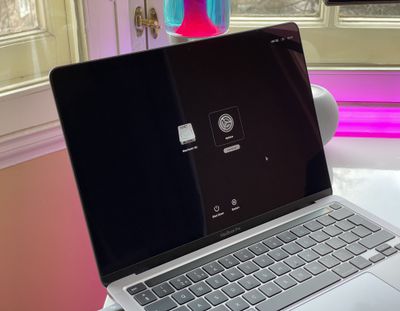
m1 mac startup options
With macOS Recovery, you can perform several troubleshooting related actions on your Mac if it isn't functioning as it should, but booting into Recovery mode may prevent you from automatically using input devices that connect over Bluetooth.

Fortunately, macOS Recovery allows you to pair Bluetooth devices so you can interact more easily with the various utilities. You just need to run through the process manually to get things going again. Here's how.

  1. Shut down your Mac if it's already on by clicking the Apple symbol in the menu bar and selecting Shut Down.
  2. When your Mac has shut down completely, press and hold the power button until "Loading startup options" appears on the screen.
  3. When the system volume and the Options button appear, press the power button three times. NOTE: Each press of the power button needs to be made within one second of the previous press, but don't press the button too fast otherwise it won't register.
  4. Use Bluetooth Setup Assistant to pair your Bluetooth accessories to your Mac. (You won't see the assistant if you already have an input device connected.)
  5. Select an administrator account, then click Next.
  6. Enter the password for the administrator account, then click Continue.

m1 share disk startup

Your mouse and keyboard should now be working. After a short time, the Recovery app will appear in the menu bar, and you'll be able to select options and launch apps from the window or the menu bar.


Popular Stories

Four iPhone 18 Pro Colors Mock Feature

iPhone 18 Pro Launching in September With These 10 New Features

Monday April 20, 2026 7:13 am PDT by
While the iPhone 18 Pro and iPhone 18 Pro Max are not launching until September, there are already plenty of rumors about the devices. It was initially reported that the iPhone 18 Pro models would have fully under-screen Face ID, with only a front camera visible in the top-left corner of the screen. However, the latest rumors indicate that only one Face ID component will be moved under the...

Tim Cook Rainbow

Apple CEO Tim Cook Stepping Down, John Ternus Taking Over

Monday April 20, 2026 1:33 pm PDT by
Apple CEO Tim Cook is stepping down as Apple's chief executive officer, and hardware engineering chief John Ternus is set to take over, Apple announced today. Cook will continue on as Apple CEO through the summer, with Ternus set to join Apple's Board of Directors and take over as CEO on September 1, 2026. Cook is going to transition to executive chairman, and he will "assist with certain...
iphone 17 ceramic shield

Leaker: Apple Downgrading iPhone 18 to Cut Costs

Monday April 20, 2026 9:12 am PDT by
Apple is downgrading the planned specifications of the standard iPhone 18 to cut costs, a leaker claims. In a new post on Weibo, the user known as "Fixed Focus Digital" said that the iPhone 18 features "certain manufacturing downgrades" that bring it more into line with the low-cost iPhone 18e model. The decision is said to be "a cost-cutting measure." Apple has apparently chosen to...









































